

New to the LBG20x?
What you are building
The LBG20x is a relay for outdoors. It listens for small Bluetooth sensors around it, keeps what they say, finds its own position, and forwards what matters over Wi-Fi, a mobile network or satellite to a platform you choose. Nothing you do here writes any of your data to Adsum.The hardware
The LBG20x is made and sold by Fanstel. This guide was verified on an LBG20BC02C, the model with Wi-Fi; the LBG20BC runs the same image.

The two halves. The Bluetooth half hears your sensors and decides what is worth keeping. The wide-area half owns the modem, the position and the schedule. They talk to each other over two wires, and each can only report what it knows itself.
Adsum IoT Coder, in one paragraph
Adsum IoT Coder is a VS Code extension. For this run it uses your computer’s Bluetooth to pair with the relay, claim it, update both halves and commission it, with its agent asking one question at a time and your approval before each write. The NTN-GW Commissioner does the commissioning from a browser instead, for an installer with a phone.What you need
The whole run at a glance
- Open the Hardware page in Adsum IoT Coder.
- Pair, claim and update the relay over Bluetooth.
- Commission it, with its own GNSS position.
- Set the deployment class, if you commission from a browser.
- Admit your sensor.
- Send readings to your platform: one radio cycle.
- Send a command back: one radio cycle.
Step 1: Open the Hardware page
Install Adsum IoT Coder in VS Code, sign in, and open the Hardware page. Under Gateways in range it lists the relays it hears over Bluetooth.Step 2: Pair, claim and update
about 5 minutes The relay advertises for five minutes after power-on and after each disconnect, then stops. To open the window again, hold DFU1 for 3 to 8 seconds. A new device pairs only after this hold. The Hardware page then takes the relay through four steps:- Pair. Your operating system asks for the passkey the page shows.
- Claim it for this computer. The relay’s service now takes images only with this computer’s key.
- Check its firmware. When a newer demo release is out, Update installs it over Bluetooth, both halves, in about four minutes, and the relay keeps its settings.
- Commission it: step 3.
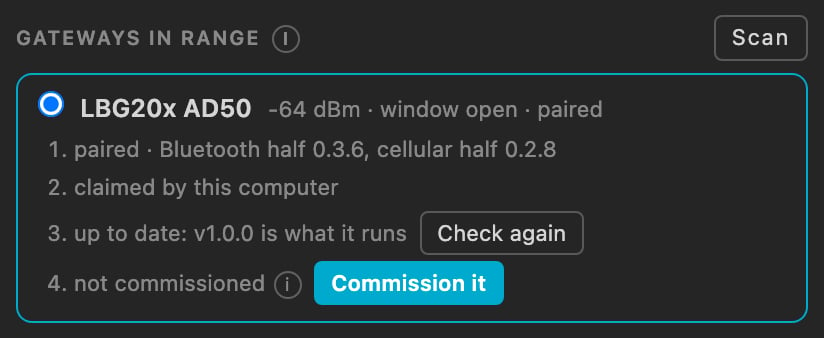
An LBG20x in range on the Hardware page: paired, claimed by this computer, its firmware current, not commissioned yet.
Step 2b: a relay on an older release, once
A relay that left the factory with a release older than its Bluetooth service takes our pair over the debug probes once; from then on every update is over Bluetooth. Put one probe on each half’s header, BLE-SWD1 and LTE-SWD1, and let Adsum IoT Coder read the silicon behind each probe before anything is written: a probe’s name says nothing about which half it reaches. The wide-area half takes three commands in one session, with nothing in between, because erasing it clears the word that keeps its debug port open:Step 3: Commission it, with its own position
about 10 minutes Commission it opens a session. The agent reads what the relay already holds and asks one question at a time for what it cannot read, then writes each setting, reads it back from the relay, starts the relay and checks that it is working.- Where it is. The relay takes its own GNSS fix: a two-minute window, with the cellular radio paused. With no fix, it offers five more minutes once: first when it heard three satellites or more, or with “the antenna does not see the sky” when it heard fewer. A phone’s position, or one typed in, is always offered beside it.
- Its name and key. The key is shown once, and the session adds it to
adsum-fleet-register.csvin your workspace: keep that file, it is the only place the key exists. - The Wi-Fi, on the LBG20BC02C, then the mobile network and its class: mobile only, mobile with satellite backup, or satellite only.
- The platform: its host, port and the device’s token.
adsum-site.json, so the next relay needs only its fix, the Wi-Fi passphrase and its token. It never holds a password, a token or a key.
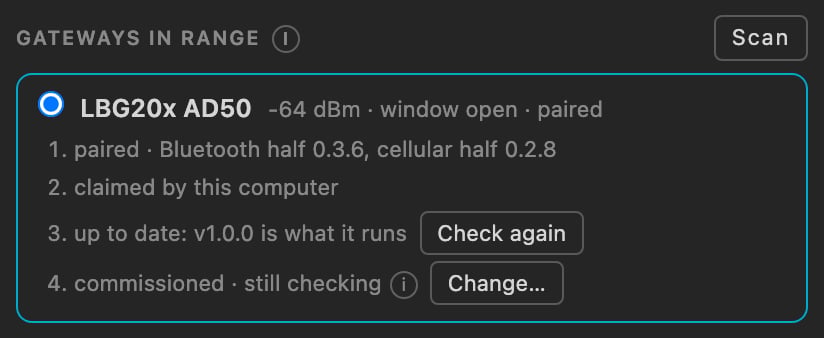
Commissioned, in the relay's own words: still checking its first send. The (i) holds the position, how it sends and where, and the commissioning window.
From a browser
The NTN-GW Commissioner does the same in Chrome over Web Bluetooth, on a phone or a laptop, and asks for the relay’s own fix in its second step. A relay claimed by a computer is still commissioned from the browser, and takes its firmware from that computer.Step 4: Set the deployment class
From Adsum IoT Coder this is part of step 3. From the browser, the class has its own panel, and the order matters: to narrow, untick satellite in the network policy and clear it from the ladder, write the policy, then the class; to widen, the class first. The BLG20x guide, step 4 shows each panel.Step 5: Admit your sensor
about 5 minutes A commissioned relay with no access list ingests nothing. That is deliberate: on a metered link, admitting whatever happens to be nearby is a bill somebody else writes for you. Admit your sensor with the expected list, one entry per line,ADDRESS, profile, label, short id:
Step 6: Send readings to your platform
about 10 minutes, plus one radio cycle On your ThingsBoard tenant, a device profile with CoAP transport and a Protobuf payload, a device on that profile, and its access token. The token goes into step 3.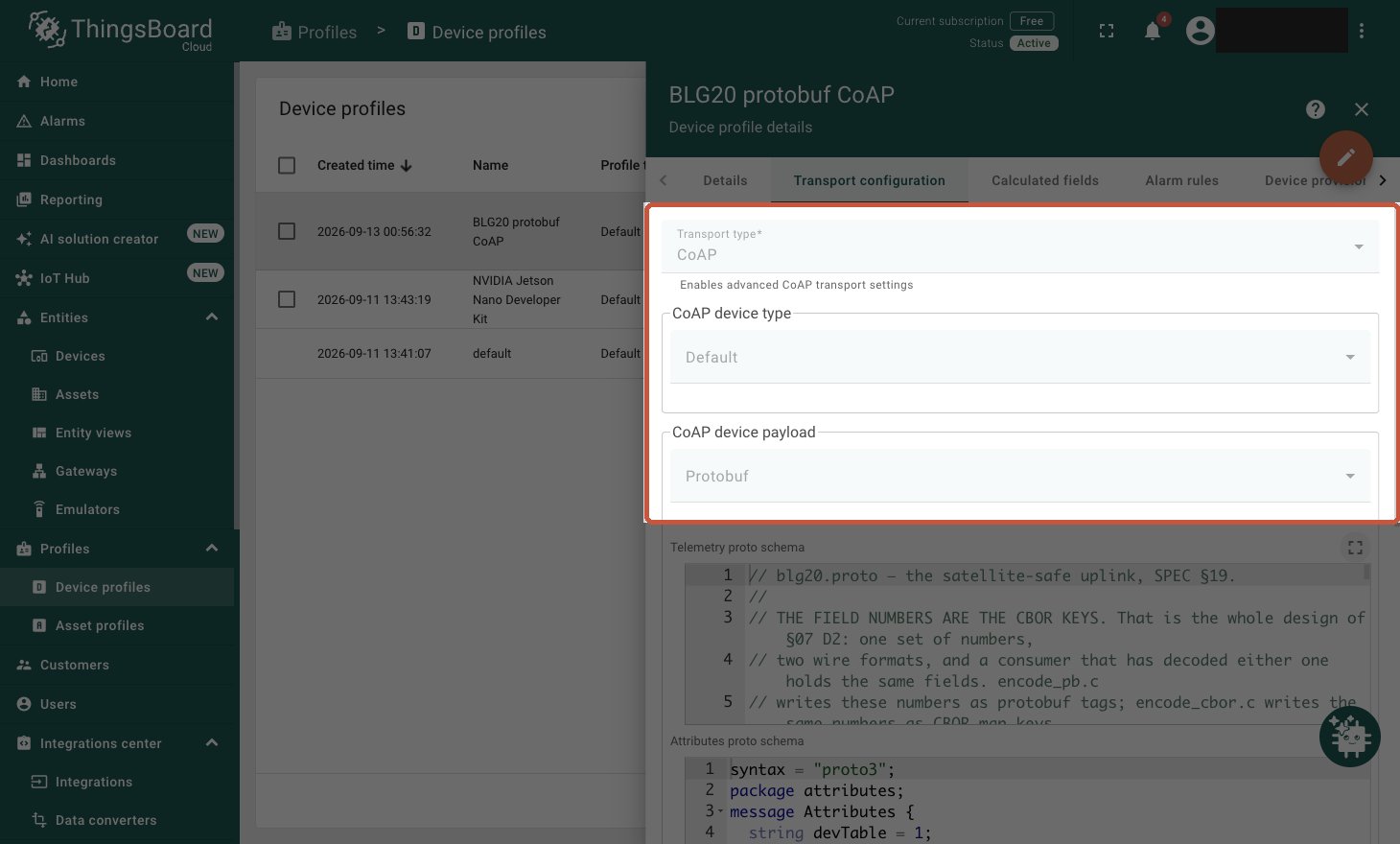
Transport CoAP, payload Protobuf. These two fields are the whole step: get either wrong and the readings silently never arrive.
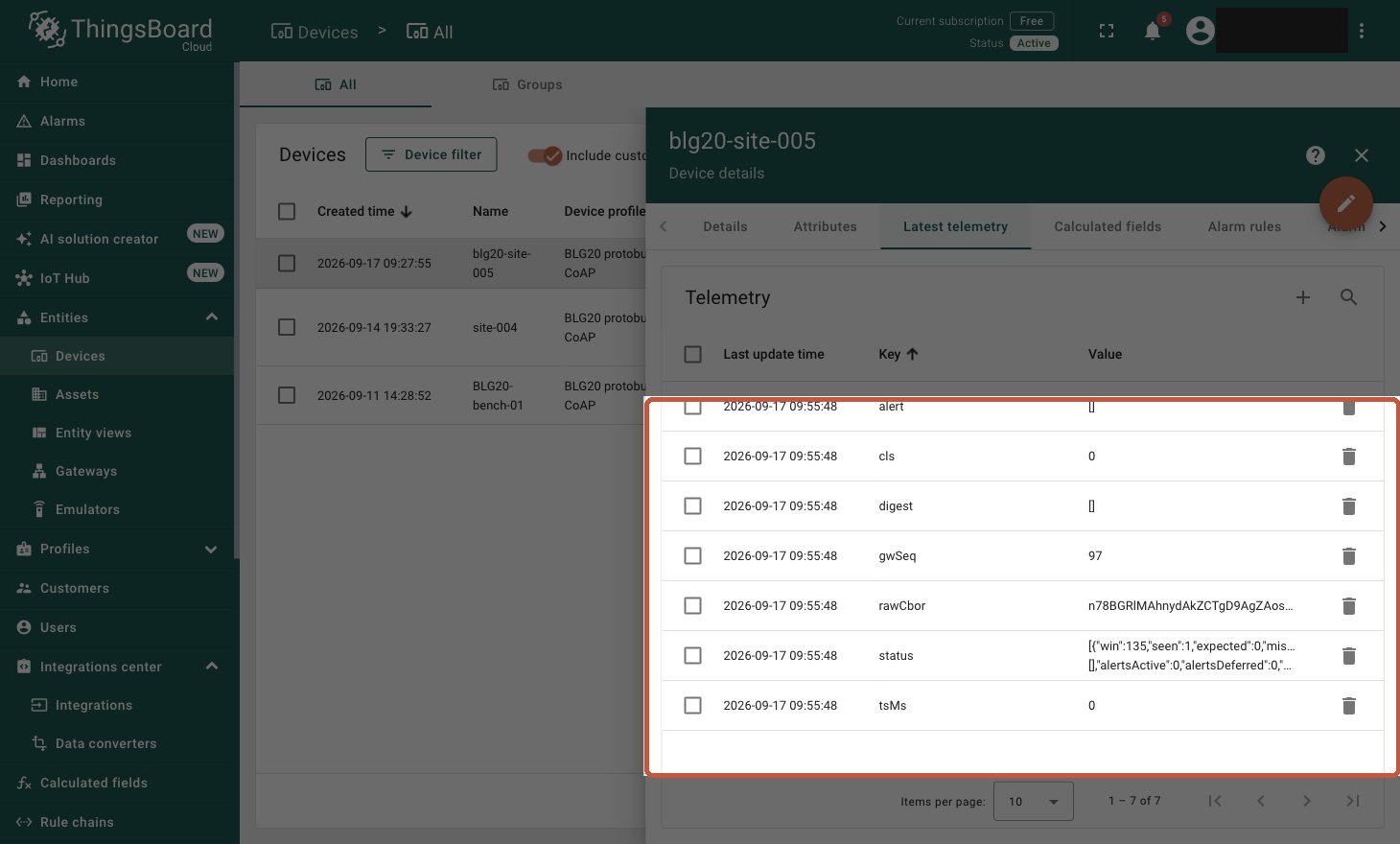
The first record. Several intact keys, each carrying the device's own timestamp: that is what proves the profile is right.
2.01: the platform took the reading.Step 7: Send a command back
one radio cycle On your tenant, add a shared attribute to the device: keycmd, type string, value clear_latch. The relay reads its shared attributes on its next radio cycle: up to about fifteen minutes, usually a few. The pass is the Bluetooth half logging that it received the command. Delete the attribute afterwards: the relay acts on it at every cycle while it stays set.