Fixes for first-run and hardware issues: J-Link and nRF Connect SDK not detected, ESP-IDF and serial ports, provider errors, long sessions, the Register card.
Confirm the SEGGER J-Link drivers are installed and the board enumerates in nrfjprog --ids. Re-plug the board and reload the VS Code window.
Flash command fails
Make sure no other tool (nRF Connect for Desktop, OpenOCD) holds the J-Link interface. Only one process can flash at a time.
"nRF Connect SDK not detected" on the home
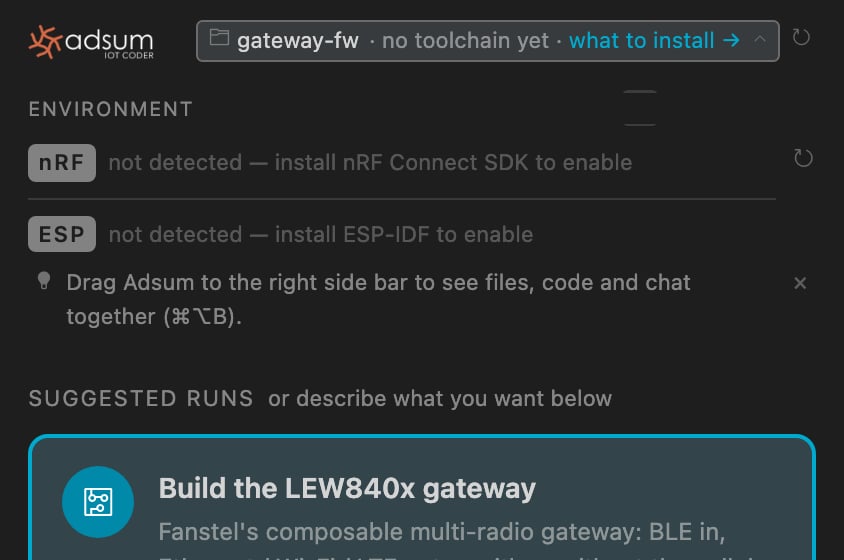
The header row names the state it actually found: not a display glitch, the toolchain check itself cannot see an SDK.
The full view names each platform's state and what to install.
Install the nRF Connect Extension Pack and, through its Toolchain Manager, an SDK and toolchain. Reload the window, or force a re-read with ↻ on the row. Still missing: the SDK lives under a path the nRF extension does not know about; point it there in the extension’s own settings, then reload.
Confirm ESP-IDF is installed and IDF_PATH is set in the environment VS Code launched from. The Espressif IDF extension sets this up; reload the window after installing it.
ESP serial port not found
Most ESP dev boards need a USB-to-UART driver, CP210x or CH340 depending on the board. Install it, re-plug the board, reload the window.
"No serial data received"
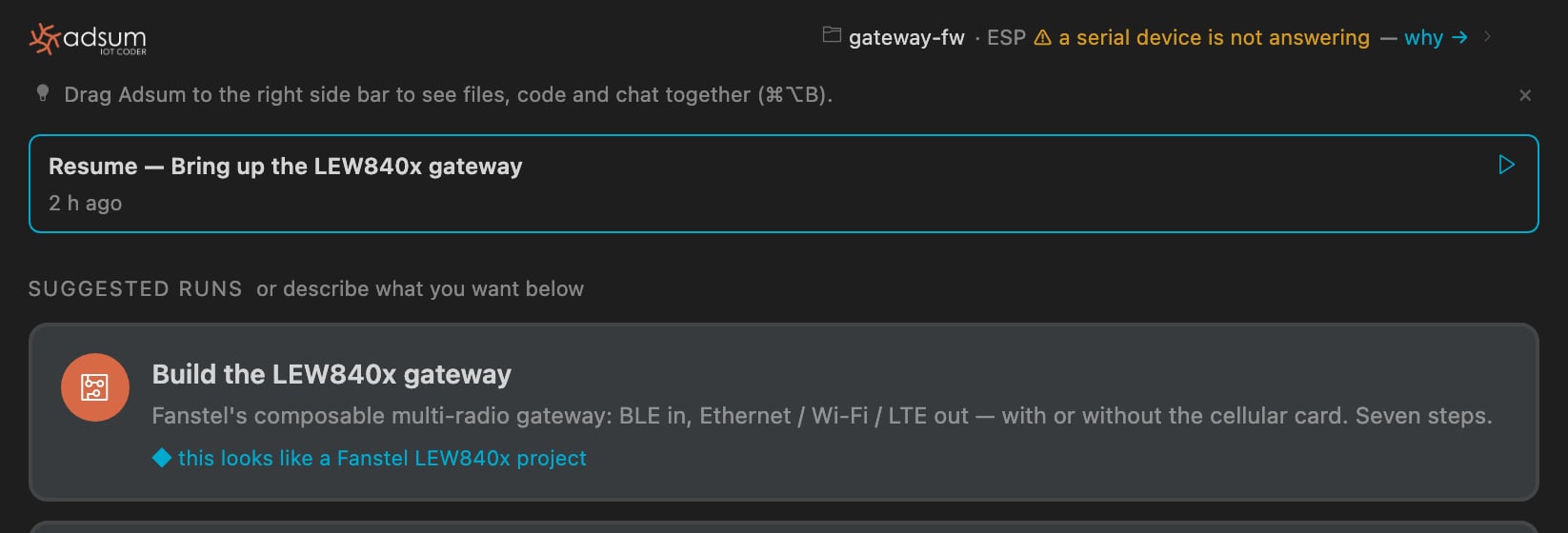
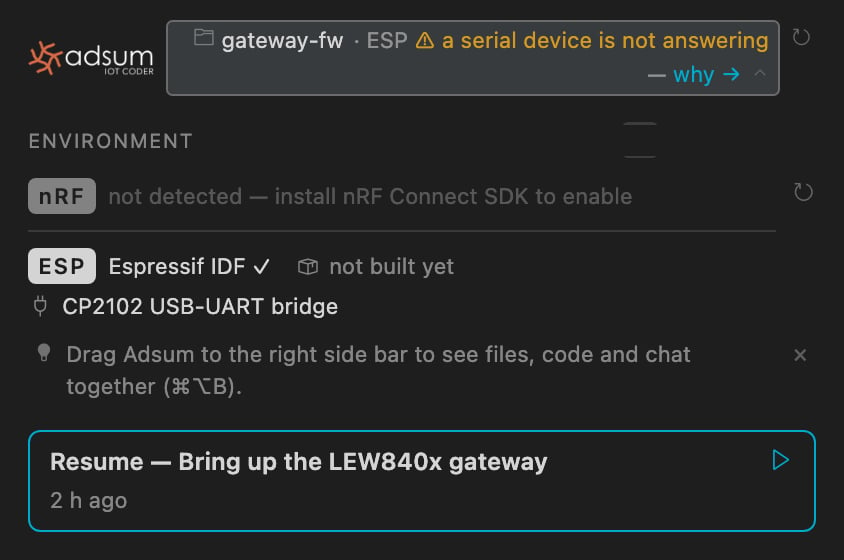
The port exists, the USB-UART bridge answers, but the chip behind it says nothing when esptool asks. The row names what it can see, the bridge, and never guesses the board behind a stock CP2102.
The exception in the row, and the detail behind why: the bridge named, the chip unconfirmed.
Check
If it is wrong
Is the port free?
A monitor is holding it. Close it and retry.
Is the board in download mode?
Hold BOOT while connecting, or move the mode switch.
Is it a Fanstel LEW840x?
The selector card must sit on ESP32, or the nRF is holding GPIO2 low. This board has no BOOT button.
ESP flash fails
Confirm the correct serial port and chip target are selected and the board is in download mode, then retry.
Verify your API key in the extension settings and that the endpoint URL matches your provider (for example https://openrouter.ai/api/v1 for OpenRouter).
Model refuses tool calls or returns plain text
The configured model must support native tool-calling. See Models for recommendations.
Long session hits a context or prompt-length error
The agent manages the context window itself and announces a compaction before it runs, keeping the goal, the board, the bug, and the open file. Still seeing it, update the extension; a fresh chat is cheap to start, since project memory briefs it.
First checkpoint is slow on a large repository
The first snapshot of a big repo takes a moment; later checkpoints are incremental and fast.
Cellular, satellite NB-NTN, nRF54 edge-AI basics and the LEW840x gateway firmware need a free account; everything above that group works without one. Click Register, sign in with GitHub or email in the browser, and come back to the same window: the card you clicked is open.
Still stuck?
Open a discussion. Include your platform, SDK version, and what the terminal printed.
{"docsConfig":{"theme":"mint","$schema":"https://mintlify.com/docs.json","name":"Adsum IoT Coder","description":"An open-source VS Code AI coding agent for Nordic nRF and Espressif ESP32 firmware, with hardware-verified expert knowledge, gateway firmware, and one-click EU CRA readiness.","colors":{"primary":"#D76947","light":"#E89478","dark":"#C2562F"},"logo":{"light":"https://mintcdn.com/adsumnetworks/5oq22Vr6_IxYgZXr/logo/adsum-networks-light.svg?fit=max\u0026auto=format\u0026n=5oq22Vr6_IxYgZXr\u0026q=85\u0026s=11327ef8767d0cc889ffaf6eee2decf4","dark":"https://mintcdn.com/adsumnetworks/5oq22Vr6_IxYgZXr/logo/adsum-networks-dark.svg?fit=max\u0026auto=format\u0026n=5oq22Vr6_IxYgZXr\u0026q=85\u0026s=dc117186e265933c45a637860ce915f9","href":"https://www.adsumnetworks.com"},"favicon":"https://mintcdn.com/adsumnetworks/gfAMtGNaT6MiJTU7/logo/icon.png?fit=max\u0026auto=format\u0026n=gfAMtGNaT6MiJTU7\u0026q=85\u0026s=22093a3de723db8e8d7401c5541419d7","appearance":{"default":"system"},"background":{"decoration":"grid"},"navbar":{"links":[{"icon":"satellite-dish","href":"https://www.adsumnetworks.com/","label":"NTN Relay"},{"icon":"github","href":"https://github.com/adsumnetworks/Adsum-IoT-Coder","label":"GitHub"},{"icon":"youtube","href":"https://www.youtube.com/@adsumnetworks","label":"YouTube"}],"primary":{"type":"button","label":"Install","href":"https://marketplace.visualstudio.com/items?itemName=AdsumNetwork.nrf-ai-debugger"}},"footer":{"socials":{"github":"https://github.com/adsumnetworks/Adsum-IoT-Coder","youtube":"https://www.youtube.com/@adsumnetworks","linkedin":"https://www.linkedin.com/company/adsum-networks"}},"search":{"prompt":"Search the Adsum IoT Coder docs..."},"seo":{"metatags":{"og:image":"https://docs.adsumnetworks.com/images/og-image.png","og:image:width":"1200","og:image:height":"630","og:site_name":"Adsum IoT Coder","og:type":"website","twitter:card":"summary_large_image","twitter:image":"https://docs.adsumnetworks.com/images/og-image.png"},"organization":{"id":"https://docs.adsumnetworks.com/#organization","name":"Adsum Networks","url":"https://www.adsumnetworks.com","logo":"https://docs.adsumnetworks.com/logo/icon.png","sameAs":["https://www.linkedin.com/company/adsum-networks/","https://github.com/adsumnetworks/Adsum-IoT-Coder","https://www.youtube.com/@adsumnetworks"]},"indexing":"navigable"},"fonts":{"heading":{"family":"Archivo","weight":700},"body":{"family":"IBM Plex Sans","weight":400}},"styling":{"latex":false},"banner":{"content":"New: the Adsum NTN Relay, BLG20x and LBG20x. Your Bluetooth devices over satellite, licensed per relay, the demo free. [Prices and datasheets](https://www.adsumnetworks.com/)","dismissible":true},"navigation":{"pages":[]}},"deployment":{"deploymentMetadataValue":{"subdomain":"adsumnetworks","hasAudioNarration":false,"actualSubdomain":"adsumnetworks","customDomains":["docs.adsumnetworks.com"],"gitSource":{"type":"github","owner":"adsumnetworks","repo":"adsumcoder-docs","deployBranch":"main","contentDirectory":"","isPrivate":true,"mountPath":"","label":""},"chroma":{"collectionId":"2af7b464-d8e8-4c77-bb51-1b409b1ae34d","liveDeploymentHistoryId":"6acdf6b4a71bd07e07fff0be","schemaVersion":"v3","latestBuiltDeploymentHistoryId":"6acdf6b4a71bd07e07fff0be"},"entitlements":{"AI_CHAT":{"status":"DISABLED"}},"buildId":"6acdf6b4a71bd07e07fff0be","clientVersion":"0.0.4021","searchFilterCounts":[{"language":"default","tag":"Documentation","count":37},{"language":"default","tag":"Build on partner open hardware","count":13},{"language":"default","tag":"What it does","count":6},{"language":"default","tag":"Get started","count":5},{"language":"default","tag":"Reference","count":5},{"language":"default","tag":"How it works","count":3},{"language":"default","tag":"BWG840x · BLE to Wi-Fi","count":3},{"language":"default","tag":"Supported hardware","count":3},{"language":"default","tag":"BLG20x · NTN Relay, indoors","count":3},{"language":"default","tag":"LBG20x · NTN Relay, outdoors","count":3}]},"assistantConfig":{"enableAskAiButton":false,"enableStarterQuestions":false,"enableContextualStarterQuestions":false,"enableAskAiSearchBar":true},"basePath":"","hasChatPermissions":false,"hasWebMcpPermissions":false,"toggles":[{"name":"kill-isr","enabled":true,"variant":{"name":"disabled","enabled":false,"feature_enabled":true},"impressionData":false},{"name":"agent-mintlify-slack","enabled":true,"variant":{"name":"disabled","enabled":false,"feature_enabled":true},"impressionData":false},{"name":"agent-integrations-settings","enabled":true,"variant":{"name":"disabled","enabled":false,"feature_enabled":true},"impressionData":false},{"name":"automations-pr-grouping","enabled":true,"variant":{"name":"disabled","enabled":false,"feature_enabled":true},"impressionData":false},{"name":"custom-prefix","enabled":true,"variant":{"name":"disabled","enabled":false,"feature_enabled":true},"impressionData":false},{"name":"analytics-v7","enabled":true,"variant":{"name":"disabled","enabled":false,"feature_enabled":true},"impressionData":false},{"name":"user-flows-analytics","enabled":true,"variant":{"name":"disabled","enabled":false,"feature_enabled":true},"impressionData":false},{"name":"no-publish-flow","enabled":true,"variant":{"name":"disabled","enabled":false,"feature_enabled":true},"impressionData":false},{"name":"workos-onboarding","enabled":true,"variant":{"name":"disabled","enabled":false,"feature_enabled":true},"impressionData":false},{"name":"llms-txt-v2","enabled":true,"variant":{"name":"disabled","enabled":false,"feature_enabled":true},"impressionData":false},{"name":"pause-universal-search-reconcile","enabled":true,"variant":{"name":"disabled","enabled":false,"feature_enabled":true},"impressionData":false},{"name":"snapshot-serving-live","enabled":true,"variant":{"name":"disabled","enabled":false,"feature_enabled":true},"impressionData":false},{"name":"stripTemperatureMiddleware","enabled":true,"variant":{"name":"disabled","enabled":false,"feature_enabled":true},"impressionData":false},{"name":"per-site-search-delta","enabled":true,"variant":{"name":"disabled","enabled":false,"feature_enabled":true},"impressionData":false},{"name":"support-platform-pylon-zendesk","enabled":true,"variant":{"name":"disabled","enabled":false,"feature_enabled":true},"impressionData":false},{"name":"snapshot-serving","enabled":true,"variant":{"name":"disabled","enabled":false,"feature_enabled":true},"impressionData":false},{"name":"instant-rollback","enabled":true,"variant":{"name":"disabled","enabled":false,"feature_enabled":true},"impressionData":false},{"name":"granular-notifications-server","enabled":true,"variant":{"name":"disabled","enabled":false,"feature_enabled":true},"impressionData":false},{"name":"granular-notifications","enabled":true,"variant":{"name":"disabled","enabled":false,"feature_enabled":true},"impressionData":false},{"name":"editor-private-page-search","enabled":true,"variant":{"name":"disabled","enabled":false,"feature_enabled":true},"impressionData":false},{"name":"automations-fable","enabled":true,"variant":{"name":"disabled","enabled":false,"feature_enabled":true},"impressionData":false},{"name":"fixed-ai-action-pricing","enabled":true,"variant":{"name":"disabled","enabled":false,"feature_enabled":true},"impressionData":false},{"name":"automation-resolve-merge-conflict","enabled":true,"variant":{"name":"disabled","enabled":false,"feature_enabled":true},"impressionData":false},{"name":"scoped-publishing","enabled":true,"variant":{"name":"disabled","enabled":false,"feature_enabled":true},"impressionData":false},{"name":"mintql","enabled":true,"variant":{"name":"disabled","enabled":false,"feature_enabled":true},"impressionData":false},{"name":"page-level-analytics","enabled":true,"variant":{"name":"disabled","enabled":false,"feature_enabled":true},"impressionData":false},{"name":"editor-version-history-v2","enabled":true,"variant":{"name":"disabled","enabled":false,"feature_enabled":true},"impressionData":false},{"name":"billing-page-v2","enabled":true,"variant":{"name":"disabled","enabled":false,"feature_enabled":true},"impressionData":false},{"name":"workspace-projects","enabled":true,"variant":{"name":"disabled","enabled":false,"feature_enabled":true},"impressionData":false},{"name":"assistant-v5","enabled":true,"variant":{"name":"disabled","enabled":false,"feature_enabled":true},"impressionData":false},{"name":"byok-sep-25","enabled":true,"variant":{"name":"disabled","enabled":false,"feature_enabled":true},"impressionData":false},{"name":"fork-pr-previews","enabled":true,"variant":{"name":"disabled","enabled":false,"feature_enabled":true},"impressionData":false},{"name":"revalidation-jwt","enabled":true,"variant":{"name":"disabled","enabled":false,"feature_enabled":true},"impressionData":false},{"name":"vite-origin","enabled":true,"variant":{"name":"disabled","enabled":false,"feature_enabled":true},"impressionData":false},{"name":"billing-updated-9-15","enabled":true,"variant":{"name":"disabled","enabled":false,"feature_enabled":true},"impressionData":false},{"name":"workos-sso-scim","enabled":true,"variant":{"name":"disabled","enabled":false,"feature_enabled":true},"impressionData":false},{"name":"hobby-abuse-scan","enabled":true,"variant":{"name":"disabled","enabled":false,"feature_enabled":true},"impressionData":false},{"name":"dashboard-inbox","enabled":true,"variant":{"name":"disabled","enabled":false,"feature_enabled":true},"impressionData":false},{"name":"workos-signup","enabled":true,"variant":{"name":"disabled","enabled":false,"feature_enabled":true},"impressionData":false},{"name":"workos-enabled","enabled":true,"variant":{"name":"disabled","enabled":false,"feature_enabled":true},"impressionData":false}],"googleFontsInlined":true},"customCss":[{"filePath":"styles.css","content":"/* cyrillic-ext */\n@font-face {\n font-family: 'IBM Plex Mono';\n font-style: normal;\n font-weight: 400;\n font-display: swap;\n src: url(/_mintlify/assets/fonts/google/s/ibmplexmono/v20/-F63fjptAgt5VM-kVkqdyU8n1iIq129k.woff2) format('woff2');\n unicode-range: U+0460-052F, U+1C80-1C8A, U+20B4, U+2DE0-2DFF, U+A640-A69F, U+FE2E-FE2F;\n}\n/* cyrillic */\n@font-face {\n font-family: 'IBM Plex Mono';\n font-style: normal;\n font-weight: 400;\n font-display: swap;\n src: url(/_mintlify/assets/fonts/google/s/ibmplexmono/v20/-F63fjptAgt5VM-kVkqdyU8n1isq129k.woff2) format('woff2');\n unicode-range: U+0301, U+0400-045F, U+0490-0491, U+04B0-04B1, U+2116;\n}\n/* vietnamese */\n@font-face {\n font-family: 'IBM Plex Mono';\n font-style: normal;\n font-weight: 400;\n font-display: swap;\n src: url(/_mintlify/assets/fonts/google/s/ibmplexmono/v20/-F63fjptAgt5VM-kVkqdyU8n1iAq129k.woff2) format('woff2');\n unicode-range: U+0102-0103, U+0110-0111, U+0128-0129, U+0168-0169, U+01A0-01A1, U+01AF-01B0, U+0300-0301, U+0303-0304, U+0308-0309, U+0323, U+0329, U+1EA0-1EF9, U+20AB;\n}\n/* latin-ext */\n@font-face {\n font-family: 'IBM Plex Mono';\n font-style: normal;\n font-weight: 400;\n font-display: swap;\n src: url(/_mintlify/assets/fonts/google/s/ibmplexmono/v20/-F63fjptAgt5VM-kVkqdyU8n1iEq129k.woff2) format('woff2');\n unicode-range: U+0100-02BA, U+02BD-02C5, U+02C7-02CC, U+02CE-02D7, U+02DD-02FF, U+0304, U+0308, U+0329, U+1D00-1DBF, U+1E00-1E9F, U+1EF2-1EFF, U+2020, U+20A0-20AB, U+20AD-20C4, U+2113, U+2C60-2C7F, U+A720-A7FF;\n}\n/* latin */\n@font-face {\n font-family: 'IBM Plex Mono';\n font-style: normal;\n font-weight: 400;\n font-display: swap;\n src: url(/_mintlify/assets/fonts/google/s/ibmplexmono/v20/-F63fjptAgt5VM-kVkqdyU8n1i8q1w.woff2) format('woff2');\n unicode-range: U+0000-00FF, U+0131, U+0152-0153, U+02BB-02BC, U+02C6, U+02DA, U+02DC, U+0304, U+0308, U+0329, U+2000-206F, U+20AC, U+2122, U+2191, U+2193, U+2212, U+2215, U+FEFF, U+FFFD;\n}\n/* cyrillic-ext */\n@font-face {\n font-family: 'IBM Plex Mono';\n font-style: normal;\n font-weight: 500;\n font-display: swap;\n src: url(/_mintlify/assets/fonts/google/s/ibmplexmono/v20/-F6qfjptAgt5VM-kVkqdyU8n3twJwl1FgtIU.woff2) format('woff2');\n unicode-range: U+0460-052F, U+1C80-1C8A, U+20B4, U+2DE0-2DFF, U+A640-A69F, U+FE2E-FE2F;\n}\n/* cyrillic */\n@font-face {\n font-family: 'IBM Plex Mono';\n font-style: normal;\n font-weight: 500;\n font-display: swap;\n src: url(/_mintlify/assets/fonts/google/s/ibmplexmono/v20/-F6qfjptAgt5VM-kVkqdyU8n3twJwlRFgtIU.woff2) format('woff2');\n unicode-range: U+0301, U+0400-045F, U+0490-0491, U+04B0-04B1, U+2116;\n}\n/* vietnamese */\n@font-face {\n font-family: 'IBM Plex Mono';\n font-style: normal;\n font-weight: 500;\n font-display: swap;\n src: url(/_mintlify/assets/fonts/google/s/ibmplexmono/v20/-F6qfjptAgt5VM-kVkqdyU8n3twJwl9FgtIU.woff2) format('woff2');\n unicode-range: U+0102-0103, U+0110-0111, U+0128-0129, U+0168-0169, U+01A0-01A1, U+01AF-01B0, U+0300-0301, U+0303-0304, U+0308-0309, U+0323, U+0329, U+1EA0-1EF9, U+20AB;\n}\n/* latin-ext */\n@font-face {\n font-family: 'IBM Plex Mono';\n font-style: normal;\n font-weight: 500;\n font-display: swap;\n src: url(/_mintlify/assets/fonts/google/s/ibmplexmono/v20/-F6qfjptAgt5VM-kVkqdyU8n3twJwl5FgtIU.woff2) format('woff2');\n unicode-range: U+0100-02BA, U+02BD-02C5, U+02C7-02CC, U+02CE-02D7, U+02DD-02FF, U+0304, U+0308, U+0329, U+1D00-1DBF, U+1E00-1E9F, U+1EF2-1EFF, U+2020, U+20A0-20AB, U+20AD-20C4, U+2113, U+2C60-2C7F, U+A720-A7FF;\n}\n/* latin */\n@font-face {\n font-family: 'IBM Plex Mono';\n font-style: normal;\n font-weight: 500;\n font-display: swap;\n src: url(/_mintlify/assets/fonts/google/s/ibmplexmono/v20/-F6qfjptAgt5VM-kVkqdyU8n3twJwlBFgg.woff2) format('woff2');\n unicode-range: U+0000-00FF, U+0131, U+0152-0153, U+02BB-02BC, U+02C6, U+02DA, U+02DC, U+0304, U+0308, U+0329, U+2000-206F, U+20AC, U+2122, U+2191, U+2193, U+2212, U+2215, U+FEFF, U+FFFD;\n}\n/* cyrillic-ext */\n@font-face {\n font-family: 'IBM Plex Mono';\n font-style: normal;\n font-weight: 600;\n font-display: swap;\n src: url(/_mintlify/assets/fonts/google/s/ibmplexmono/v20/-F6qfjptAgt5VM-kVkqdyU8n3vAOwl1FgtIU.woff2) format('woff2');\n unicode-range: U+0460-052F, U+1C80-1C8A, U+20B4, U+2DE0-2DFF, U+A640-A69F, U+FE2E-FE2F;\n}\n/* cyrillic */\n@font-face {\n font-family: 'IBM Plex Mono';\n font-style: normal;\n font-weight: 600;\n font-display: swap;\n src: url(/_mintlify/assets/fonts/google/s/ibmplexmono/v20/-F6qfjptAgt5VM-kVkqdyU8n3vAOwlRFgtIU.woff2) format('woff2');\n unicode-range: U+0301, U+0400-045F, U+0490-0491, U+04B0-04B1, U+2116;\n}\n/* vietnamese */\n@font-face {\n font-family: 'IBM Plex Mono';\n font-style: normal;\n font-weight: 600;\n font-display: swap;\n src: url(/_mintlify/assets/fonts/google/s/ibmplexmono/v20/-F6qfjptAgt5VM-kVkqdyU8n3vAOwl9FgtIU.woff2) format('woff2');\n unicode-range: U+0102-0103, U+0110-0111, U+0128-0129, U+0168-0169, U+01A0-01A1, U+01AF-01B0, U+0300-0301, U+0303-0304, U+0308-0309, U+0323, U+0329, U+1EA0-1EF9, U+20AB;\n}\n/* latin-ext */\n@font-face {\n font-family: 'IBM Plex Mono';\n font-style: normal;\n font-weight: 600;\n font-display: swap;\n src: url(/_mintlify/assets/fonts/google/s/ibmplexmono/v20/-F6qfjptAgt5VM-kVkqdyU8n3vAOwl5FgtIU.woff2) format('woff2');\n unicode-range: U+0100-02BA, U+02BD-02C5, U+02C7-02CC, U+02CE-02D7, U+02DD-02FF, U+0304, U+0308, U+0329, U+1D00-1DBF, U+1E00-1E9F, U+1EF2-1EFF, U+2020, U+20A0-20AB, U+20AD-20C4, U+2113, U+2C60-2C7F, U+A720-A7FF;\n}\n/* latin */\n@font-face {\n font-family: 'IBM Plex Mono';\n font-style: normal;\n font-weight: 600;\n font-display: swap;\n src: url(/_mintlify/assets/fonts/google/s/ibmplexmono/v20/-F6qfjptAgt5VM-kVkqdyU8n3vAOwlBFgg.woff2) format('woff2');\n unicode-range: U+0000-00FF, U+0131, U+0152-0153, U+02BB-02BC, U+02C6, U+02DA, U+02DC, U+0304, U+0308, U+0329, U+2000-206F, U+20AC, U+2122, U+2191, U+2193, U+2212, U+2215, U+FEFF, U+FFFD;\n}\n/* cyrillic-ext */\n@font-face {\n font-family: 'Source Serif 4';\n font-style: normal;\n font-weight: 400;\n font-display: swap;\n src: url(/_mintlify/assets/fonts/google/s/sourceserif4/v15/vEFI2_tTDB4M7-auWDN0ahZJW1gW8tenXg.woff2) format('woff2');\n unicode-range: U+0460-052F, U+1C80-1C8A, U+20B4, U+2DE0-2DFF, U+A640-A69F, U+FE2E-FE2F;\n}\n/* cyrillic */\n@font-face {\n font-family: 'Source Serif 4';\n font-style: normal;\n font-weight: 400;\n font-display: swap;\n src: url(/_mintlify/assets/fonts/google/s/sourceserif4/v15/vEFI2_tTDB4M7-auWDN0ahZJW1gf8tenXg.woff2) format('woff2');\n unicode-range: U+0301, U+0400-045F, U+0490-0491, U+04B0-04B1, U+2116;\n}\n/* greek */\n@font-face {\n font-family: 'Source Serif 4';\n font-style: normal;\n font-weight: 400;\n font-display: swap;\n src: url(/_mintlify/assets/fonts/google/s/sourceserif4/v15/vEFI2_tTDB4M7-auWDN0ahZJW1gY8tenXg.woff2) format('woff2');\n unicode-range: U+0370-0377, U+037A-037F, U+0384-038A, U+038C, U+038E-03A1, U+03A3-03FF;\n}\n/* vietnamese */\n@font-face {\n font-family: 'Source Serif 4';\n font-style: normal;\n font-weight: 400;\n font-display: swap;\n src: url(/_mintlify/assets/fonts/google/s/sourceserif4/v15/vEFI2_tTDB4M7-auWDN0ahZJW1gU8tenXg.woff2) format('woff2');\n unicode-range: U+0102-0103, U+0110-0111, U+0128-0129, U+0168-0169, U+01A0-01A1, U+01AF-01B0, U+0300-0301, U+0303-0304, U+0308-0309, U+0323, U+0329, U+1EA0-1EF9, U+20AB;\n}\n/* latin-ext */\n@font-face {\n font-family: 'Source Serif 4';\n font-style: normal;\n font-weight: 400;\n font-display: swap;\n src: url(/_mintlify/assets/fonts/google/s/sourceserif4/v15/vEFI2_tTDB4M7-auWDN0ahZJW1gV8tenXg.woff2) format('woff2');\n unicode-range: U+0100-02BA, U+02BD-02C5, U+02C7-02CC, U+02CE-02D7, U+02DD-02FF, U+0304, U+0308, U+0329, U+1D00-1DBF, U+1E00-1E9F, U+1EF2-1EFF, U+2020, U+20A0-20AB, U+20AD-20C4, U+2113, U+2C60-2C7F, U+A720-A7FF;\n}\n/* latin */\n@font-face {\n font-family: 'Source Serif 4';\n font-style: normal;\n font-weight: 400;\n font-display: swap;\n src: url(/_mintlify/assets/fonts/google/s/sourceserif4/v15/vEFI2_tTDB4M7-auWDN0ahZJW1gb8tc.woff2) format('woff2');\n unicode-range: U+0000-00FF, U+0131, U+0152-0153, U+02BB-02BC, U+02C6, U+02DA, U+02DC, U+0304, U+0308, U+0329, U+2000-206F, U+20AC, U+2122, U+2191, U+2193, U+2212, U+2215, U+FEFF, U+FFFD;\n}\n/* cyrillic-ext */\n@font-face {\n font-family: 'Source Serif 4';\n font-style: normal;\n font-weight: 500;\n font-display: swap;\n src: url(/_mintlify/assets/fonts/google/s/sourceserif4/v15/vEFI2_tTDB4M7-auWDN0ahZJW1gW8tenXg.woff2) format('woff2');\n unicode-range: U+0460-052F, U+1C80-1C8A, U+20B4, U+2DE0-2DFF, U+A640-A69F, U+FE2E-FE2F;\n}\n/* cyrillic */\n@font-face {\n font-family: 'Source Serif 4';\n font-style: normal;\n font-weight: 500;\n font-display: swap;\n src: url(/_mintlify/assets/fonts/google/s/sourceserif4/v15/vEFI2_tTDB4M7-auWDN0ahZJW1gf8tenXg.woff2) format('woff2');\n unicode-range: U+0301, U+0400-045F, U+0490-0491, U+04B0-04B1, U+2116;\n}\n/* greek */\n@font-face {\n font-family: 'Source Serif 4';\n font-style: normal;\n font-weight: 500;\n font-display: swap;\n src: url(/_mintlify/assets/fonts/google/s/sourceserif4/v15/vEFI2_tTDB4M7-auWDN0ahZJW1gY8tenXg.woff2) format('woff2');\n unicode-range: U+0370-0377, U+037A-037F, U+0384-038A, U+038C, U+038E-03A1, U+03A3-03FF;\n}\n/* vietnamese */\n@font-face {\n font-family: 'Source Serif 4';\n font-style: normal;\n font-weight: 500;\n font-display: swap;\n src: url(/_mintlify/assets/fonts/google/s/sourceserif4/v15/vEFI2_tTDB4M7-auWDN0ahZJW1gU8tenXg.woff2) format('woff2');\n unicode-range: U+0102-0103, U+0110-0111, U+0128-0129, U+0168-0169, U+01A0-01A1, U+01AF-01B0, U+0300-0301, U+0303-0304, U+0308-0309, U+0323, U+0329, U+1EA0-1EF9, U+20AB;\n}\n/* latin-ext */\n@font-face {\n font-family: 'Source Serif 4';\n font-style: normal;\n font-weight: 500;\n font-display: swap;\n src: url(/_mintlify/assets/fonts/google/s/sourceserif4/v15/vEFI2_tTDB4M7-auWDN0ahZJW1gV8tenXg.woff2) format('woff2');\n unicode-range: U+0100-02BA, U+02BD-02C5, U+02C7-02CC, U+02CE-02D7, U+02DD-02FF, U+0304, U+0308, U+0329, U+1D00-1DBF, U+1E00-1E9F, U+1EF2-1EFF, U+2020, U+20A0-20AB, U+20AD-20C4, U+2113, U+2C60-2C7F, U+A720-A7FF;\n}\n/* latin */\n@font-face {\n font-family: 'Source Serif 4';\n font-style: normal;\n font-weight: 500;\n font-display: swap;\n src: url(/_mintlify/assets/fonts/google/s/sourceserif4/v15/vEFI2_tTDB4M7-auWDN0ahZJW1gb8tc.woff2) format('woff2');\n unicode-range: U+0000-00FF, U+0131, U+0152-0153, U+02BB-02BC, U+02C6, U+02DA, U+02DC, U+0304, U+0308, U+0329, U+2000-206F, U+20AC, U+2122, U+2191, U+2193, U+2212, U+2215, U+FEFF, U+FFFD;\n}\n/* cyrillic-ext */\n@font-face {\n font-family: 'Source Serif 4';\n font-style: normal;\n font-weight: 600;\n font-display: swap;\n src: url(/_mintlify/assets/fonts/google/s/sourceserif4/v15/vEFI2_tTDB4M7-auWDN0ahZJW1gW8tenXg.woff2) format('woff2');\n unicode-range: U+0460-052F, U+1C80-1C8A, U+20B4, U+2DE0-2DFF, U+A640-A69F, U+FE2E-FE2F;\n}\n/* cyrillic */\n@font-face {\n font-family: 'Source Serif 4';\n font-style: normal;\n font-weight: 600;\n font-display: swap;\n src: url(/_mintlify/assets/fonts/google/s/sourceserif4/v15/vEFI2_tTDB4M7-auWDN0ahZJW1gf8tenXg.woff2) format('woff2');\n unicode-range: U+0301, U+0400-045F, U+0490-0491, U+04B0-04B1, U+2116;\n}\n/* greek */\n@font-face {\n font-family: 'Source Serif 4';\n font-style: normal;\n font-weight: 600;\n font-display: swap;\n src: url(/_mintlify/assets/fonts/google/s/sourceserif4/v15/vEFI2_tTDB4M7-auWDN0ahZJW1gY8tenXg.woff2) format('woff2');\n unicode-range: U+0370-0377, U+037A-037F, U+0384-038A, U+038C, U+038E-03A1, U+03A3-03FF;\n}\n/* vietnamese */\n@font-face {\n font-family: 'Source Serif 4';\n font-style: normal;\n font-weight: 600;\n font-display: swap;\n src: url(/_mintlify/assets/fonts/google/s/sourceserif4/v15/vEFI2_tTDB4M7-auWDN0ahZJW1gU8tenXg.woff2) format('woff2');\n unicode-range: U+0102-0103, U+0110-0111, U+0128-0129, U+0168-0169, U+01A0-01A1, U+01AF-01B0, U+0300-0301, U+0303-0304, U+0308-0309, U+0323, U+0329, U+1EA0-1EF9, U+20AB;\n}\n/* latin-ext */\n@font-face {\n font-family: 'Source Serif 4';\n font-style: normal;\n font-weight: 600;\n font-display: swap;\n src: url(/_mintlify/assets/fonts/google/s/sourceserif4/v15/vEFI2_tTDB4M7-auWDN0ahZJW1gV8tenXg.woff2) format('woff2');\n unicode-range: U+0100-02BA, U+02BD-02C5, U+02C7-02CC, U+02CE-02D7, U+02DD-02FF, U+0304, U+0308, U+0329, U+1D00-1DBF, U+1E00-1E9F, U+1EF2-1EFF, U+2020, U+20A0-20AB, U+20AD-20C4, U+2113, U+2C60-2C7F, U+A720-A7FF;\n}\n/* latin */\n@font-face {\n font-family: 'Source Serif 4';\n font-style: normal;\n font-weight: 600;\n font-display: swap;\n src: url(/_mintlify/assets/fonts/google/s/sourceserif4/v15/vEFI2_tTDB4M7-auWDN0ahZJW1gb8tc.woff2) format('woff2');\n unicode-range: U+0000-00FF, U+0131, U+0152-0153, U+02BB-02BC, U+02C6, U+02DA, U+02DC, U+0304, U+0308, U+0329, U+2000-206F, U+20AC, U+2122, U+2191, U+2193, U+2212, U+2215, U+FEFF, U+FFFD;\n}\nheader img,nav img{height:70px!important;max-height:70px!important;width:auto!important}body:has(.adsum-hide-page-title) h1{position:absolute!important;width:1px!important;height:1px!important;padding:0!important;margin:-1px!important;overflow:hidden!important;clip:rect(0,0,0,0)!important;white-space:nowrap!important;border:0!important}body:has(.adsum-hide-page-title) #header>div.prose{display:none!important}.callout[class*=bg-blue-50]{border-color:#00a9ce!important;background-color:rgba(0,169,206,.08)!important}.callout[class*=bg-blue-50] [class*=text-blue]{color:#0089a8!important}.dark .callout[class*=bg-blue-50]{border-color:#00a9ce!important;background-color:rgba(0,169,206,.16)!important}.dark .callout[class*=bg-blue-50] [class*=text-blue]{color:#6fd2e6!important}.adsum-gal{scroll-padding-inline:0;scroll-behavior:smooth;padding-bottom:4px;scrollbar-width:thin;scrollbar-color:#cfd7de transparent}.adsum-gal>div{flex:0 0 93%!important;width:auto!important}@media (min-width:1024px){.adsum-gal>div{flex-basis:94%!important}}@media (max-width:640px){.adsum-gal>div{flex-basis:90%!important}}.adsum-gal::-webkit-scrollbar{height:6px}.adsum-gal::-webkit-scrollbar-track{background:0 0}.adsum-gal::-webkit-scrollbar-thumb{background:#cfd7de;border-radius:3px}.dark .adsum-gal{scrollbar-color:#3a4551 transparent}.dark .adsum-gal::-webkit-scrollbar-thumb{background:#3a4551}.adsum-gal img,.adsum-gal+p img{cursor:zoom-in}.adsum-gal a[href^=\"#\"]{display:inline-flex;align-items:center;padding:3px 10px;border:1px solid #e3e8ed;border-radius:6px;color:#007e9c;font-weight:500;transition:border-color .15s,color .15s,background-color .15s}.adsum-gal a[href^=\"#\"]:hover{border-color:#00a9ce;background-color:rgba(0,169,206,.07)}.dark .adsum-gal a[href^=\"#\"]{border-color:#2b3742;color:#6fd2e6}.dark .adsum-gal a[href^=\"#\"]:hover{border-color:#00a9ce;background-color:rgba(0,169,206,.14)}.adsum-gal .font-mono{font-weight:600;letter-spacing:.14em}.adsum-gal video{display:block;width:100%;border-radius:.75rem}@media (prefers-reduced-motion:reduce){.adsum-gal{scroll-behavior:auto}.adsum-gal a[href^=\"#\"]{transition:none}}.adsum-fig{--af-rule:#e6e9ee;--af-ink:#16202b;--af-mut:#667382;--af-faint:#667382;--af-accent:#C2562F;--af-soft:#fafbfc;margin:1.75rem 0;font-feature-settings:\"tnum\" 1}.dark .adsum-byline,.dark .adsum-fig,.dark .adsum-lanes,.dark .adsum-mast,.dark .adsum-order,.dark .adsum-readout,.dark .adsum-roles,.dark .adsum-track{--af-rule:#262f3a;--af-ink:#e9eef4;--af-mut:#94a1ae;--af-faint:#7d8a97;--af-accent:#E89478;--af-soft:#141a21}.adsum-fig *{line-height:1.45}.adsum-ladder{border-top:1px solid var(--af-rule)}.adsum-tier{display:grid;grid-template-columns:8.25rem 1fr;gap:0 1.1rem;padding:.95rem 0;border-bottom:1px solid var(--af-rule);align-items:start}.adsum-when{font-weight:650!important;text-transform:uppercase;color:var(--af-accent)!important;padding-top:.18rem;white-space:nowrap}.adsum-what{min-width:0}.adsum-what b{display:block;font-size:.975rem!important;font-weight:600!important;color:var(--af-ink)!important;margin-bottom:.18rem}.adsum-what span{display:block;font-size:.855rem!important;color:var(--af-mut)!important}@media (max-width:540px){.adsum-tier{grid-template-columns:1fr;gap:.3rem}.adsum-when{padding-top:0}}.adsum-pipe{position:relative;padding-left:1.4rem}.adsum-pipe::before{content:\"\";position:absolute;left:.3rem;top:.55rem;bottom:3.1rem;width:1px;background:var(--af-rule)}.adsum-return,.adsum-step{position:relative;padding:0 0 1.05rem}.adsum-step::before{content:\"\";position:absolute;left:-1.4rem;top:.42rem;width:.44rem;height:.44rem;border-radius:50%;background:var(--af-faint);box-shadow:0 0 0 3px var(--af-soft)}.adsum-step b{display:block;font-size:.95rem!important}.adsum-step span{display:block;margin-top:.1rem}.adsum-step.is-key::before{background:var(--af-accent);width:.56rem;height:.56rem;left:-1.46rem;top:.38rem}.adsum-hop-b .adsum-hop-s.is-live,.adsum-step.is-key b{color:var(--af-accent)!important}.adsum-return{margin-top:.25rem;padding:.7rem .9rem;border:1px dashed var(--af-rule);border-radius:.45rem;background:var(--af-soft);font-size:.855rem!important;color:var(--af-mut)!important}.adsum-return::before{content:\"\\2191\";position:absolute;left:-1.52rem;top:.62rem;font-size:.82rem;color:var(--af-accent);line-height:1}.adsum-lane b,.adsum-return b,.adsum-step b{color:var(--af-ink)!important;font-weight:600!important}.adsum-lanes{border-top:1px solid var(--af-rule)}.adsum-lane,.adsum-mast>div{border-bottom:1px solid var(--af-rule)}.adsum-lane{display:grid;grid-template-columns:8.25rem 1fr;gap:0 1.1rem;padding:.7rem 0;align-items:baseline}.adsum-lane b{font-weight:650!important}.adsum-lane span,.adsum-step span{font-size:.855rem!important;color:var(--af-mut)!important}.adsum-verdict{margin-top:.85rem;padding-left:.9rem;border-left:2px solid var(--af-accent);font-size:.9rem!important;color:var(--af-ink)!important}.adsum-verdict b{color:var(--af-accent)!important;font-weight:600!important}@media (max-width:540px){.adsum-lane{grid-template-columns:1fr;gap:.2rem}}.adsum-cap{margin-top:.8rem;font-size:.8rem!important;color:var(--af-faint)!important}.adsum-byline,.adsum-lanes,.adsum-mast,.adsum-order,.adsum-readout,.adsum-roles,.adsum-track{--af-rule:#e6e9ee;--af-ink:#16202b;--af-mut:#667382;--af-faint:#667382;--af-accent:#C2562F;--af-soft:#fafbfc;font-feature-settings:\"tnum\" 1}.adsum-mono{font-family:ui-monospace,SFMono-Regular,\"SF Mono\",Menlo,Consolas,monospace}.adsum-mast{display:grid;grid-template-columns:repeat(2,minmax(0,1fr));border-top:1px solid var(--af-rule);border-left:1px solid var(--af-rule);margin:1.5rem 0}.adsum-mast>div{border-right:1px solid var(--af-rule);padding:.78rem .9rem .85rem;min-width:0}.adsum-mast-k{display:block;font-size:.645rem!important;font-weight:650!important;letter-spacing:.1em;text-transform:uppercase;color:var(--af-faint)!important;margin-bottom:.45rem;line-height:1.3!important}.adsum-mast-v{display:block;font-family:ui-monospace,SFMono-Regular,\"SF Mono\",Menlo,Consolas,monospace;font-size:1.12rem!important;font-weight:600!important;color:var(--af-ink)!important;line-height:1.15!important;letter-spacing:-.01em}.adsum-mast-n{display:block;font-size:.72rem!important;color:var(--af-mut)!important;margin-top:.34rem;line-height:1.35!important}.adsum-byline{display:flex;flex-wrap:wrap;gap:.3rem 1.1rem;margin:1.1rem 0 0;font-family:ui-monospace,SFMono-Regular,\"SF Mono\",Menlo,Consolas,monospace;font-size:.715rem!important;color:var(--af-faint)!important;line-height:1.5!important}.adsum-byline b{color:var(--af-mut)!important;font-weight:500!important}.adsum-roles{border-top:1px solid var(--af-rule);margin:1.5rem 0}.adsum-role{padding:.85rem 0 .9rem;border-bottom:1px solid var(--af-rule)}.adsum-role b{display:block;font-size:.675rem!important;font-weight:650!important;letter-spacing:.095em;text-transform:uppercase;color:var(--af-accent)!important;margin-bottom:.3rem}.adsum-hop-b>span,.adsum-role span,.adsum-trk-t span{display:block;font-size:.875rem!important;color:var(--af-mut)!important}.adsum-order{border-top:1px solid var(--af-rule);margin:1.5rem 0}.adsum-hop{display:grid;grid-template-columns:1.5rem minmax(0,1fr);gap:0 .85rem;padding:.78rem 0 .82rem;border-bottom:1px solid var(--af-rule);align-items:start}.adsum-hop-b .adsum-hop-s,.adsum-hop-n{font-family:ui-monospace,SFMono-Regular,\"SF Mono\",Menlo,Consolas,monospace;font-weight:600!important}.adsum-hop-n{font-size:.8rem!important;color:var(--af-accent)!important;padding-top:.1rem}.adsum-hop-b{min-width:0}.adsum-hop-b b,.adsum-trk-t b{font-size:.95rem!important;font-weight:600!important;color:var(--af-ink)!important}.adsum-hop-b .adsum-hop-s{display:inline!important;margin-top:0!important;font-size:.625rem!important;letter-spacing:.09em;text-transform:uppercase;margin-left:.55rem;white-space:nowrap}.adsum-hop-b>span,.adsum-trk-t span{font-size:.845rem!important;margin-top:.18rem}.adsum-hop-b .adsum-hop-s,.adsum-hop.is-absent .adsum-hop-b b,.adsum-hop.is-absent .adsum-hop-n,.adsum-trk.is-skipped .adsum-trk-n,.adsum-trk.is-skipped .adsum-trk-t b{color:var(--af-faint)!important}.adsum-track{border-top:1px solid var(--af-rule);margin:1.5rem 0}.adsum-trk{display:grid;grid-template-columns:1.5rem minmax(0,1fr) auto;gap:0 .85rem;padding:.72rem 0 .76rem;border-bottom:1px solid var(--af-rule);align-items:baseline}.adsum-trk-n{font-family:ui-monospace,SFMono-Regular,\"SF Mono\",Menlo,Consolas,monospace;font-size:.8rem!important;font-weight:600!important;color:var(--af-accent)!important}.adsum-trk-t{min-width:0}.adsum-trk-t b{display:block;font-size:.925rem!important}.adsum-trk-t span{font-size:.835rem!important;margin-top:.14rem}.adsum-trk-h{font-family:ui-monospace,SFMono-Regular,\"SF Mono\",Menlo,Consolas,monospace;font-size:.615rem!important;font-weight:650!important;letter-spacing:.09em;text-transform:uppercase;color:var(--af-accent)!important;white-space:nowrap;padding-top:.16rem}.adsum-readout{border:1px solid var(--af-rule);border-left:2px solid var(--af-accent);margin:1.5rem 0}.adsum-readout-h,.adsum-readout-row{border-bottom:1px solid var(--af-rule)}.adsum-readout-h{display:block;padding:.58rem .95rem;background:var(--af-soft);font-size:.655rem!important;font-weight:650!important;letter-spacing:.095em;text-transform:uppercase;color:var(--af-mut)!important}.adsum-readout-row{display:grid;grid-template-columns:minmax(0,10.5rem) minmax(0,1fr);gap:0 1rem;margin:0 .95rem}.adsum-readout-row:last-child{border-bottom:0}.adsum-readout-k{font-size:.845rem!important;color:var(--af-mut)!important;padding:.52rem 0}.adsum-lanes.is-ports .adsum-lane b,.adsum-readout-v{font-family:ui-monospace,SFMono-Regular,\"SF Mono\",Menlo,Consolas,monospace}.adsum-readout-v{font-size:.8rem!important;color:var(--af-ink)!important;padding:.52rem 0}.adsum-lanes.is-ports .adsum-lane{grid-template-columns:4.6rem minmax(0,1fr)}.adsum-lanes.is-ports .adsum-lane b{font-size:.78rem!important}@media (max-width:540px){.adsum-mast{grid-template-columns:minmax(0,1fr)}.adsum-readout-row{grid-template-columns:1fr;gap:0}.adsum-readout-k{padding-bottom:0}.adsum-readout-v{padding-top:.12rem}.adsum-trk{grid-template-columns:1.5rem minmax(0,1fr)}.adsum-trk-h{grid-column:2;padding-top:.25rem}.adsum-lanes.is-ports .adsum-lane{grid-template-columns:1fr;gap:.2rem}}:root{--ad-serif:\"Source Serif 4\", Georgia, \"Times New Roman\", serif;--ad-mono:\"IBM Plex Mono\", ui-monospace, SFMono-Regular, Menlo, Consolas, monospace;--ad-sans:\"Archivo\", -apple-system, BlinkMacSystemFont, \"Segoe UI\", sans-serif}#content h2,#content-area h1#page-title{font-weight:700!important;text-wrap:balance}#content-area h1#page-title{letter-spacing:-.028em!important;line-height:1.08!important;max-width:22ch}#content h2{letter-spacing:-.02em!important;line-height:1.15!important;margin-top:3rem!important}#content h3{font-weight:650!important;letter-spacing:-.012em!important;margin-top:2.2rem!important}#header .eyebrow{font-family:var(--ad-mono)!important;font-size:.68rem!important;font-weight:600!important;letter-spacing:.14em!important;text-transform:uppercase!important}#header .prose p{font-family:var(--ad-serif)!important;font-size:1.2rem!important;line-height:1.5!important;max-width:60ch;text-wrap:pretty}#content>blockquote p,#content>blockquote span[data-as=p],#content>ol>li,#content>p,#content>span[data-as=p],#content>ul>li{font-family:var(--ad-serif)!important;font-size:1.075rem!important;line-height:1.62!important;text-wrap:pretty}#content>p,#content>span[data-as=p]{max-width:66ch}#content>ol>li strong,#content>p strong,#content>span[data-as=p] strong,#content>ul>li strong{font-weight:600}#content code:not(pre code){font-family:var(--ad-mono)!important;font-size:.86em!important}#content table{font-family:var(--ad-sans);font-size:.9rem}#content thead th{font-family:var(--ad-mono)!important;font-size:.64rem!important;font-weight:600!important;letter-spacing:.11em;text-transform:uppercase;color:#667382!important;padding-top:.55rem!important;padding-bottom:.55rem!important}.dark #content .adsum-fine,.dark #content thead th,.dark #content>p.adsum-fine{color:#94a1ae!important}#content tbody td{padding-top:.62rem!important;padding-bottom:.62rem!important;vertical-align:top}#content tbody td:first-child,#content tbody td:first-child strong{font-weight:600}#content table code{font-size:.8rem!important}#content [class*=caption],#content figcaption{font-family:var(--ad-sans);font-size:.82rem;line-height:1.45}#content .callout,#content a[class*=card],#content div[class*=card]{border-radius:6px!important}#content .steps [class*=step] h3,#content .steps h3{font-weight:600!important}#content table code,.adsum-byline,.adsum-hop-b .adsum-hop-s,.adsum-hop-n,.adsum-lane b,.adsum-lanes.is-ports .adsum-lane b,.adsum-mast-k,.adsum-mast-v,.adsum-mono,.adsum-readout-h,.adsum-readout-v,.adsum-trk-h,.adsum-trk-n,.adsum-when{font-family:var(--ad-mono)!important}.adsum-when{letter-spacing:.1em;font-size:.68rem!important}.adsum-lane b{font-size:.74rem!important;letter-spacing:.06em;text-transform:uppercase}.adsum-cap,.adsum-hop-b b,.adsum-hop-b>span,.adsum-lane span,.adsum-mast-n,.adsum-readout-k,.adsum-return,.adsum-role b,.adsum-role span,.adsum-step b,.adsum-step span,.adsum-trk-t b,.adsum-trk-t span,.adsum-verdict,.adsum-what b,.adsum-what span{font-family:var(--ad-sans)!important}#content thead tr:not(:has(th:not(:empty))){display:none}#content .adsum-fine,#content>p.adsum-fine{font-family:var(--ad-sans)!important;font-size:.82rem!important;line-height:1.5!important;color:#667382!important;max-width:66ch}#banner{background-color:#007e9c!important}.adsum-cta{display:flex;flex-wrap:wrap;gap:.75rem;margin:1.35rem 0 1.9rem}.adsum-cta a{display:inline-flex;align-items:center;padding:.62rem 1.05rem;border-radius:.75rem;font-size:.95rem;font-weight:600;line-height:1.2;text-decoration:none!important;border-bottom:none!important;transition:background-color .15s ease,border-color .15s ease}.adsum-cta a.adsum-cta-primary{background:#007e9c;color:#fff!important;border:1px solid #007e9c!important}.adsum-cta a.adsum-cta-primary:hover{background:#006b85;border-color:#006b85!important}.adsum-cta a.adsum-cta-ghost{color:#007e9c!important;border:1px solid #007e9c!important}.adsum-cta a.adsum-cta-ghost:hover{background:rgba(0,126,156,.08)}.dark .adsum-cta a.adsum-cta-ghost{color:#6fd2e6!important;border-color:#2f8ea3!important}.dark .adsum-cta a.adsum-cta-ghost:hover{background:rgba(111,210,230,.08)}.adsum-cta a:focus-visible{outline:2px solid #6fd2e6;outline-offset:2px}@media (prefers-reduced-motion:reduce){.adsum-cta a{transition:none}}.adsum-hero{margin:1.5rem 0 2rem;border:1px solid #22323d;border-radius:14px;overflow:hidden;background:#0d161b;outline:0}.adsum-hero:focus-visible{box-shadow:0 0 0 2px #6fd2e6}.adsum-hero-screen{aspect-ratio:16/9;background:#0d161b}.adsum-hero-screen img{display:block;width:100%;height:100%;margin:0!important;border-radius:0!important}.adsum-hero-ctl{display:flex;align-items:center;gap:.4rem;padding:.55rem .7rem;background:#101b22;border-top:1px solid #22323d}.adsum-hero-btn{flex:none;width:2rem;height:2rem;border-radius:.55rem;border:1px solid #2a3b46;background:0 0;color:#c3d0d8;font-size:1rem;line-height:1;cursor:pointer;display:inline-flex;align-items:center;justify-content:center}.adsum-hero-btn:hover{background:#1a2a33;color:#fff}.adsum-hero-btn.is-play{background:#007e9c;border-color:#007e9c;color:#fff;font-size:.7rem;letter-spacing:.05em}.adsum-hero-btn.is-play:hover{background:#006b85}.adsum-hero-btn:focus-visible,.adsum-hero-dot:focus-visible{outline:2px solid #6fd2e6;outline-offset:2px}.adsum-hero-dots{display:flex;gap:.3rem;flex:1;margin-left:.45rem;min-width:0;align-items:center}.adsum-hero-dot{flex:1;min-width:0;height:1.6rem;padding:0;border:0;background:0 0;cursor:pointer;position:relative}.adsum-hero-dot::after{content:\"\";position:absolute;left:0;right:0;top:50%;height:4px;margin-top:-2px;border-radius:2px;background:#22323d}.adsum-hero-dot:hover::after{background:#4b6472}.adsum-hero-dot.is-on::after{background:#e8714f}.adsum-hero-now{flex:none;margin:0 .5rem 0 .6rem;font-size:.78rem;color:#c3d0d8;white-space:nowrap}.adsum-hero-now b{color:#e8714f;font-weight:600;margin-right:.3rem;font-variant-numeric:tabular-nums}.adsum-hero:fullscreen{display:flex;flex-direction:column;justify-content:center;border:0;border-radius:0;background:#0d161b}.adsum-hero:fullscreen .adsum-hero-screen{aspect-ratio:auto;flex:1;min-height:0;display:flex;align-items:center;justify-content:center}.adsum-hero:fullscreen .adsum-hero-screen img{width:auto;height:auto;max-width:100%;max-height:100%}@media (max-width:640px){.adsum-hero-now{display:none}}#content a.link{color:#00798f;border-bottom-color:rgba(0,121,143,.45)}#content a.link:hover{color:#00677a;border-bottom-color:#00677a}html.dark #content a.link{color:#3db8cc;border-bottom-color:rgba(61,184,204,.45)}html.dark #content a.link:hover{color:#62c8d8;border-bottom-color:#62c8d8}#navbar span.bg-primary-dark{background-color:#00798f!important}.adsum-gw{display:grid;gap:20px;margin:24px 0 0}.adsum-gw-feature{grid-template-columns:repeat(2,minmax(0,1fr))}.adsum-gw-more{grid-template-columns:repeat(3,minmax(0,1fr));margin-top:20px}@media (max-width:900px){.adsum-gw-more{grid-template-columns:repeat(2,minmax(0,1fr))}}@media (max-width:640px){.adsum-gw-feature,.adsum-gw-more{grid-template-columns:minmax(0,1fr)}}a.adsum-gw-card{display:flex;flex-direction:column;overflow:hidden;border:1px solid rgba(15,26,32,.12)!important;border-radius:12px;background:#fff;text-decoration:none!important;color:inherit;transition:border-color .15s,box-shadow .15s}a.adsum-gw-card:focus-visible,a.adsum-gw-card:hover{border-color:#00798f!important;box-shadow:0 6px 22px rgba(15,26,32,.1)}a.adsum-gw-card img{display:block;width:100%;height:auto;margin:0!important;border:0;border-radius:0;background:#f6f8f9}.adsum-gw-text{display:flex;flex-direction:column;gap:3px;padding:14px 16px 16px;border-top:1px solid rgba(15,26,32,.08)}.adsum-gw-text b{font-family:Archivo,\"IBM Plex Sans\",sans-serif;font-weight:800;font-size:19px;letter-spacing:-.01em;color:#13181c}.adsum-gw-text>span:last-child{font-size:14px;line-height:1.5;color:#4b5661}.adsum-gw-tag{font:600 10.5px/1.2 \"IBM Plex Mono\",ui-monospace,monospace;letter-spacing:.12em;text-transform:uppercase;color:#c75b37}.adsum-gw-more .adsum-gw-text b{font-size:16px}.adsum-gw-note{margin:10px 0 0!important;font:400 12px/1.4 \"IBM Plex Mono\",ui-monospace,monospace;color:#69757f}html.dark a.adsum-gw-card{background:#111c22;border-color:rgba(233,238,241,.14)!important}html.dark a.adsum-gw-card:focus-visible,html.dark a.adsum-gw-card:hover{border-color:#3db8cc!important}html.dark .adsum-gw-text{border-top-color:rgba(233,238,241,.1)}html.dark .adsum-gw-text b{color:#e9eef1}html.dark .adsum-gw-text>span:last-child{color:#b4c0c7}html.dark .adsum-gw-tag{color:#e3825f}html.dark .adsum-gw-note{color:#8d9ca5}@media (max-width:640px){.adsum-gw-more a.adsum-gw-card{flex-direction:row;align-items:center}.adsum-gw-more a.adsum-gw-card img{width:120px;height:90px;object-fit:contain;flex:none}.adsum-gw-more .adsum-gw-text{border-top:0;border-left:1px solid rgba(15,26,32,.08);align-self:stretch;justify-content:center}html.dark .adsum-gw-more .adsum-gw-text{border-left-color:rgba(233,238,241,.1)}.adsum-gw-more{gap:12px}}"}],"page":{"pagePath":"troubleshooting","slug":"/troubleshooting","pageMetadata":{"title":"Troubleshooting nRF and ESP32 setup","sidebarTitle":"Troubleshooting","description":"Fixes for first-run and hardware issues: J-Link and nRF Connect SDK not detected, ESP-IDF and serial ports, provider errors, long sessions, the Register card.","href":"/troubleshooting"},"description":{"compiledSource":"\"use strict\";\nconst {jsx: _jsx} = arguments[0];\nconst {useMDXComponents: _provideComponents} = arguments[0];\nfunction _createMdxContent(props) {\n const _components = {\n p: \"p\",\n ..._provideComponents(),\n ...props.components\n };\n return _jsx(_components.p, {\n children: \"Fixes for first-run and hardware issues: J-Link and nRF Connect SDK not detected, ESP-IDF and serial ports, provider errors, long sessions, the Register card.\"\n });\n}\nfunction MDXContent(props = {}) {\n const {wrapper: MDXLayout} = {\n ..._provideComponents(),\n ...props.components\n };\n return MDXLayout ? _jsx(MDXLayout, {\n ...props,\n children: _jsx(_createMdxContent, {\n ...props\n })\n }) : _createMdxContent(props);\n}\nreturn {\n default: MDXContent\n};\n","frontmatter":{},"scope":{}},"pageType":"default","mdx":{"mdxSource":{"compiledSource":"\"use strict\";const{Fragment:_Fragment,jsx:_jsx,jsxs:_jsxs}=arguments[0];const{useMDXComponents:_provideComponents}=arguments[0];function _createMdxContent(props){const _components={a:`a`,code:`code`,p:`p`,strong:`strong`,tbody:`tbody`,td:`td`,th:`th`,thead:`thead`,tr:`tr`,..._provideComponents(),...props.components},{Accordion,AccordionGroup,Card,Frame,Heading,OptimizedImage,Table}=_components;if(!Accordion)_missingMdxReference(`Accordion`,true);if(!AccordionGroup)_missingMdxReference(`AccordionGroup`,true);if(!Card)_missingMdxReference(`Card`,true);if(!Frame)_missingMdxReference(`Frame`,true);if(!Heading)_missingMdxReference(`Heading`,true);if(!OptimizedImage)_missingMdxReference(`OptimizedImage`,true);if(!Table)_missingMdxReference(`Table`,true);return _jsxs(_Fragment,{children:[_jsx(Heading,{level:`2`,id:`setup-and-terminal`,children:`Setup and terminal`}),`\n`,_jsxs(AccordionGroup,{children:[_jsx(Accordion,{title:`Shell integration warning on first run`,id:`shell-integration-warning-on-first-run`,children:_jsx(_components.p,{children:`Restart VS Code and open a new terminal session.`})}),_jsx(Accordion,{title:`Linux notifications (ENOENT on task completion)`,id:`linux-notifications-enoent-on-task-completion`,children:_jsxs(_components.p,{children:[`Install the notification helper: `,_jsx(_components.code,{children:`sudo apt install libnotify-bin`})]})})]}),`\n`,_jsx(Heading,{level:`2`,id:`nordic-nrf`,children:`Nordic nRF`}),`\n`,_jsxs(AccordionGroup,{children:[_jsx(Accordion,{title:`J-Link not detected / board not auto-detected`,id:`j-link-not-detected-board-not-auto-detected`,children:_jsxs(_components.p,{children:[`Confirm the `,_jsx(_components.a,{href:`https://www.segger.com/downloads/jlink/`,children:`SEGGER J-Link drivers`}),` are installed and the board enumerates in `,_jsx(_components.code,{children:`nrfjprog --ids`}),`. Re-plug the board and reload the VS Code window.`]})}),_jsx(Accordion,{title:`Flash command fails`,id:`flash-command-fails`,children:_jsx(_components.p,{children:`Make sure no other tool (nRF Connect for Desktop, OpenOCD) holds the J-Link interface. Only one process can flash at a time.`})}),_jsxs(Accordion,{title:`\"nRF Connect SDK not detected\" on the home`,id:`nrf-connect-sdk-not-detected-on-the-home`,children:[_jsx(_components.p,{children:`The header row names the state it actually found: not a display glitch, the toolchain check itself cannot see an SDK.`}),_jsx(Frame,{caption:`The full view names each platform's state and what to install.`,children:_jsx(OptimizedImage,{src:`https://mintcdn.com/adsumnetworks/HDDxurtCPR9DVfJr/images/states/13-nothing-detected-full-view.png?fit=max\u0026auto=format\u0026n=HDDxurtCPR9DVfJr\u0026q=85\u0026s=7110fb601e4aeb3a435376679ace4753`,alt:`Adsum IoT Coder environment full view: nRF not detected, install nRF Connect SDK to enable; ESP not detected, install ESP-IDF to enable`,\"data-og-width\":`844`,width:`844`,\"data-og-height\":`560`,height:`560`,\"data-path\":`images/states/13-nothing-detected-full-view.png`,\"data-optimize\":`true`,\"data-opv\":`3`,srcset:`https://mintcdn.com/adsumnetworks/HDDxurtCPR9DVfJr/images/states/13-nothing-detected-full-view.png?w=280\u0026fit=max\u0026auto=format\u0026n=HDDxurtCPR9DVfJr\u0026q=85\u0026s=bb4191927ab1420d5a7dc551f7874510 280w, https://mintcdn.com/adsumnetworks/HDDxurtCPR9DVfJr/images/states/13-nothing-detected-full-view.png?w=560\u0026fit=max\u0026auto=format\u0026n=HDDxurtCPR9DVfJr\u0026q=85\u0026s=7ce0b4feece830a72cffb4614f71c3c3 560w, https://mintcdn.com/adsumnetworks/HDDxurtCPR9DVfJr/images/states/13-nothing-detected-full-view.png?w=840\u0026fit=max\u0026auto=format\u0026n=HDDxurtCPR9DVfJr\u0026q=85\u0026s=c1c14d1deb6a6071a00c7089ca411d35 840w, https://mintcdn.com/adsumnetworks/HDDxurtCPR9DVfJr/images/states/13-nothing-detected-full-view.png?w=1100\u0026fit=max\u0026auto=format\u0026n=HDDxurtCPR9DVfJr\u0026q=85\u0026s=f0a1a25801f8fdbbccb459fa44f9ee52 1100w, https://mintcdn.com/adsumnetworks/HDDxurtCPR9DVfJr/images/states/13-nothing-detected-full-view.png?w=1650\u0026fit=max\u0026auto=format\u0026n=HDDxurtCPR9DVfJr\u0026q=85\u0026s=b898af064f754848a2e9a21a75f042bc 1650w, https://mintcdn.com/adsumnetworks/HDDxurtCPR9DVfJr/images/states/13-nothing-detected-full-view.png?w=2500\u0026fit=max\u0026auto=format\u0026n=HDDxurtCPR9DVfJr\u0026q=85\u0026s=5fad82a0f0d5c2ae47790ed542b7749c 2500w`})}),_jsxs(_components.p,{children:[`Install the `,_jsx(_components.a,{href:`https://marketplace.visualstudio.com/items?itemName=nordic-semiconductor.nrf-connect-extension-pack`,children:`nRF Connect Extension Pack`}),` and, through its Toolchain Manager, an SDK and toolchain. Reload the window, or force a re-read with ↻ on the row. Still missing: the SDK lives under a path the nRF extension does not know about; point it there in the extension’s own settings, then reload.`]})]})]}),`\n`,_jsx(Heading,{level:`2`,id:`espressif-esp`,children:`Espressif ESP`}),`\n`,_jsxs(AccordionGroup,{children:[_jsx(Accordion,{title:`ESP-IDF not detected`,id:`esp-idf-not-detected`,children:_jsxs(_components.p,{children:[`Confirm ESP-IDF is installed and `,_jsx(_components.code,{children:`IDF_PATH`}),` is set in the environment VS Code launched from. The `,_jsx(_components.a,{href:`https://marketplace.visualstudio.com/items?itemName=espressif.esp-idf-extension`,children:`Espressif IDF extension`}),` sets this up; reload the window after installing it.`]})}),_jsx(Accordion,{title:`ESP serial port not found`,id:`esp-serial-port-not-found`,children:_jsx(_components.p,{children:`Most ESP dev boards need a USB-to-UART driver, CP210x or CH340 depending on the board. Install it, re-plug the board, reload the window.`})}),_jsxs(Accordion,{title:`\"No serial data received\"`,id:`no-serial-data-received`,children:[_jsx(_components.p,{children:`The port exists, the USB-UART bridge answers, but the chip behind it says nothing when esptool asks. The row names what it can see, the bridge, and never guesses the board behind a stock CP2102.`}),_jsx(Frame,{caption:`The exception in the row, and the detail behind why: the bridge named, the chip unconfirmed.`,children:_jsx(OptimizedImage,{src:`https://mintcdn.com/adsumnetworks/mm67yRDAE11UGc70/images/states/04-exception-esp-not-answering.png?fit=max\u0026auto=format\u0026n=mm67yRDAE11UGc70\u0026q=85\u0026s=8bcfba979ac61b528024f232df29f2a5`,alt:`Adsum IoT Coder header row reading ESP: a serial device is not answering, why, in the warning colour`,\"data-og-width\":`1646`,width:`1646`,\"data-og-height\":`560`,height:`560`,\"data-path\":`images/states/04-exception-esp-not-answering.png`,\"data-optimize\":`true`,\"data-opv\":`3`,srcset:`https://mintcdn.com/adsumnetworks/mm67yRDAE11UGc70/images/states/04-exception-esp-not-answering.png?w=280\u0026fit=max\u0026auto=format\u0026n=mm67yRDAE11UGc70\u0026q=85\u0026s=cbaab2dd3ce81514fb62f1d22385be8b 280w, https://mintcdn.com/adsumnetworks/mm67yRDAE11UGc70/images/states/04-exception-esp-not-answering.png?w=560\u0026fit=max\u0026auto=format\u0026n=mm67yRDAE11UGc70\u0026q=85\u0026s=336721911d31671d1ef18c06a78baa77 560w, https://mintcdn.com/adsumnetworks/mm67yRDAE11UGc70/images/states/04-exception-esp-not-answering.png?w=840\u0026fit=max\u0026auto=format\u0026n=mm67yRDAE11UGc70\u0026q=85\u0026s=6e693981edc78c05bd7273c0fcebcab6 840w, https://mintcdn.com/adsumnetworks/mm67yRDAE11UGc70/images/states/04-exception-esp-not-answering.png?w=1100\u0026fit=max\u0026auto=format\u0026n=mm67yRDAE11UGc70\u0026q=85\u0026s=65b3178e12651e2347fe93dafc709461 1100w, https://mintcdn.com/adsumnetworks/mm67yRDAE11UGc70/images/states/04-exception-esp-not-answering.png?w=1650\u0026fit=max\u0026auto=format\u0026n=mm67yRDAE11UGc70\u0026q=85\u0026s=cce433b30b69ded6ec4c6050e10fccdc 1650w, https://mintcdn.com/adsumnetworks/mm67yRDAE11UGc70/images/states/04-exception-esp-not-answering.png?w=2500\u0026fit=max\u0026auto=format\u0026n=mm67yRDAE11UGc70\u0026q=85\u0026s=0a68f1500322eca73d5bbd4657587846 2500w`})}),_jsx(Frame,{children:_jsx(OptimizedImage,{src:`https://mintcdn.com/adsumnetworks/HDDxurtCPR9DVfJr/images/states/04-exception-full-view.png?fit=max\u0026auto=format\u0026n=HDDxurtCPR9DVfJr\u0026q=85\u0026s=60ce3add4f63232031b960183d4facde`,alt:`The environment full view after why: Espressif IDF detected, not built yet, CP2102 USB-UART bridge listed as the device`,\"data-og-width\":`844`,width:`844`,\"data-og-height\":`560`,height:`560`,\"data-path\":`images/states/04-exception-full-view.png`,\"data-optimize\":`true`,\"data-opv\":`3`,srcset:`https://mintcdn.com/adsumnetworks/HDDxurtCPR9DVfJr/images/states/04-exception-full-view.png?w=280\u0026fit=max\u0026auto=format\u0026n=HDDxurtCPR9DVfJr\u0026q=85\u0026s=1d4472533b7e2535f2cfa54e052eb4d0 280w, https://mintcdn.com/adsumnetworks/HDDxurtCPR9DVfJr/images/states/04-exception-full-view.png?w=560\u0026fit=max\u0026auto=format\u0026n=HDDxurtCPR9DVfJr\u0026q=85\u0026s=4fb3acc60ac355fc79b010b21b8167d0 560w, https://mintcdn.com/adsumnetworks/HDDxurtCPR9DVfJr/images/states/04-exception-full-view.png?w=840\u0026fit=max\u0026auto=format\u0026n=HDDxurtCPR9DVfJr\u0026q=85\u0026s=892f912a4fecfde2a895e43550bc1360 840w, https://mintcdn.com/adsumnetworks/HDDxurtCPR9DVfJr/images/states/04-exception-full-view.png?w=1100\u0026fit=max\u0026auto=format\u0026n=HDDxurtCPR9DVfJr\u0026q=85\u0026s=b90594828b15d6c3e5bc12d8bba52c52 1100w, https://mintcdn.com/adsumnetworks/HDDxurtCPR9DVfJr/images/states/04-exception-full-view.png?w=1650\u0026fit=max\u0026auto=format\u0026n=HDDxurtCPR9DVfJr\u0026q=85\u0026s=9acf3b200480824a0a513e6860da4e39 1650w, https://mintcdn.com/adsumnetworks/HDDxurtCPR9DVfJr/images/states/04-exception-full-view.png?w=2500\u0026fit=max\u0026auto=format\u0026n=HDDxurtCPR9DVfJr\u0026q=85\u0026s=5f7f19441958b1b216c6f1cc8f7cf137 2500w`})}),_jsxs(Table,{children:[_jsx(_components.thead,{children:_jsxs(_components.tr,{children:[_jsx(_components.th,{style:{textAlign:`left`},children:`Check`}),_jsx(_components.th,{style:{textAlign:`left`},children:`If it is wrong`})]})}),_jsxs(_components.tbody,{children:[_jsxs(_components.tr,{children:[_jsx(_components.td,{style:{textAlign:`left`},children:`Is the port free?`}),_jsx(_components.td,{style:{textAlign:`left`},children:`A monitor is holding it. Close it and retry.`})]}),_jsxs(_components.tr,{children:[_jsx(_components.td,{style:{textAlign:`left`},children:`Is the board in download mode?`}),_jsx(_components.td,{style:{textAlign:`left`},children:`Hold BOOT while connecting, or move the mode switch.`})]}),_jsxs(_components.tr,{children:[_jsx(_components.td,{style:{textAlign:`left`},children:`Is it a Fanstel LEW840x?`}),_jsx(_components.td,{style:{textAlign:`left`},children:`The selector card must sit on ESP32, or the nRF is holding GPIO2 low. This board has no BOOT button.`})]})]})]})]}),_jsx(Accordion,{title:`ESP flash fails`,id:`esp-flash-fails`,children:_jsx(_components.p,{children:`Confirm the correct serial port and chip target are selected and the board is in download mode, then retry.`})})]}),`\n`,_jsx(Heading,{level:`2`,id:`models-and-providers`,children:`Models and providers`}),`\n`,_jsxs(AccordionGroup,{children:[_jsx(Accordion,{title:`AI provider authentication errors`,id:`ai-provider-authentication-errors`,children:_jsxs(_components.p,{children:[`Verify your API key in the extension settings and that the endpoint URL matches your provider (for example `,_jsx(_components.code,{children:`https://openrouter.ai/api/v1`}),` for OpenRouter).`]})}),_jsx(Accordion,{title:`Model refuses tool calls or returns plain text`,id:`model-refuses-tool-calls-or-returns-plain-text`,children:_jsxs(_components.p,{children:[`The configured model must support native tool-calling. See `,_jsx(_components.a,{href:`/models`,children:`Models`}),` for recommendations.`]})})]}),`\n`,_jsx(Heading,{level:`2`,id:`long-sessions`,children:`Long sessions`}),`\n`,_jsxs(AccordionGroup,{children:[_jsx(Accordion,{title:`Long session hits a context or prompt-length error`,id:`long-session-hits-a-context-or-prompt-length-error`,children:_jsx(_components.p,{children:`The agent manages the context window itself and announces a compaction before it runs, keeping the goal, the board, the bug, and the open file. Still seeing it, update the extension; a fresh chat is cheap to start, since project memory briefs it.`})}),_jsx(Accordion,{title:`First checkpoint is slow on a large repository`,id:`first-checkpoint-is-slow-on-a-large-repository`,children:_jsx(_components.p,{children:`The first snapshot of a big repo takes a moment; later checkpoints are incremental and fast.`})})]}),`\n`,_jsx(Heading,{level:`2`,id:`a-card-says-“register”`,children:`A card says “Register”`}),`\n`,_jsxs(_components.p,{children:[`Cellular, satellite NB-NTN, nRF54 edge-AI basics and the LEW840x gateway firmware need a `,_jsx(_components.a,{href:`/account`,children:`free account`}),`; everything above that group works without one. Click `,_jsx(_components.strong,{children:`Register`}),`, sign in with GitHub or email in the browser, and come back to the same window: the card you clicked is open.`]}),`\n`,_jsx(Card,{title:`Still stuck?`,icon:`comments`,href:`https://github.com/adsumnetworks/Adsum-IoT-Coder/discussions`,children:_jsx(_components.p,{children:`Open a discussion. Include your platform, SDK version, and what the terminal printed.`})})]})}function MDXContent(props={}){const{wrapper:MDXLayout}={..._provideComponents(),...props.components};return MDXLayout?_jsx(MDXLayout,{...props,children:_jsx(_createMdxContent,{...props})}):_createMdxContent(props)}return{default:MDXContent};function _missingMdxReference(id,component){throw new Error(`Expected `+(component?`component`:`object`)+\" `\"+id+\"` to be defined: you likely forgot to import, pass, or provide it.\")}","frontmatter":{},"scope":{"config":{},"pageMetadata":{"title":"Troubleshooting nRF and ESP32 setup","sidebarTitle":"Troubleshooting","description":"Fixes for first-run and hardware issues: J-Link and nRF Connect SDK not detected, ESP-IDF and serial ports, provider errors, long sessions, the Register card.","href":"/troubleshooting"}}},"mdxSourceWithNoJs":null},"mdxExtracts":{"tableOfContents":[{"title":"Setup and terminal","slug":"setup-and-terminal","depth":2,"children":[]},{"title":"Nordic nRF","slug":"nordic-nrf","depth":2,"children":[]},{"title":"Espressif ESP","slug":"espressif-esp","depth":2,"children":[]},{"title":"Models and providers","slug":"models-and-providers","depth":2,"children":[]},{"title":"Long sessions","slug":"long-sessions","depth":2,"children":[]},{"title":"A card says “Register”","slug":"a-card-says-“register”","depth":2,"children":[]}],"codeExamples":{}},"jsLinks":[],"subdomain":"adsumnetworks","siteName":"Adsum IoT Coder","title":"Troubleshooting nRF and ESP32 setup - Adsum IoT Coder","navMaps":{"firstHrefInVersion":{},"firstHrefInLanguage":{}},"lastModified":"2026-09-11T22:17:40.414Z","originalFileLocation":"troubleshooting.mdx"},"headHtml":"\u003cscript data-mint-head>(function(){var d=document.documentElement,p=null;if(!p){try{p=localStorage.getItem(\"isDarkMode\")}catch(e){}if(p==='true')p='dark';else if(p==='false')p='light';if(p!=='light'\u0026\u0026p!=='dark'\u0026\u0026p!=='system')p=\"system\"}var r=p==='system'?(matchMedia(\"(prefers-color-scheme: dark)\").matches?'dark':'light'):p;d.classList.remove(r==='dark'?'light':'dark');d.classList.add(r);d.setAttribute(\"data-theme-preference\",p)})();\u003c/script>\u003cmeta data-mint-head name=\"description\" content=\"Fixes for first-run and hardware issues: J-Link and nRF Connect SDK not detected, ESP-IDF and serial ports, provider errors, long sessions, the Register card.\">\u003cmeta data-mint-head name=\"application-name\" content=\"Adsum IoT Coder\">\u003cmeta data-mint-head name=\"generator\" content=\"Mintlify\">\u003clink data-mint-head rel=\"icon\" type=\"image/png\" sizes=\"192x192\" href=\"/mintlify-assets/_mintlify/favicons/adsumnetworks/doP62vkyazS5XDDz/_generated/favicon/android-chrome-192x192.png\" media=\"(prefers-color-scheme: light)\">\u003clink data-mint-head rel=\"apple-touch-icon\" type=\"image/png\" sizes=\"180x180\" href=\"/mintlify-assets/_mintlify/favicons/adsumnetworks/doP62vkyazS5XDDz/_generated/favicon/apple-touch-icon.png\">\u003clink data-mint-head rel=\"icon\" type=\"image/png\" sizes=\"16x16\" href=\"/mintlify-assets/_mintlify/favicons/adsumnetworks/doP62vkyazS5XDDz/_generated/favicon/favicon-16x16.png\" media=\"(prefers-color-scheme: light)\">\u003clink data-mint-head rel=\"icon\" type=\"image/png\" sizes=\"32x32\" href=\"/mintlify-assets/_mintlify/favicons/adsumnetworks/doP62vkyazS5XDDz/_generated/favicon/favicon-32x32.png\" media=\"(prefers-color-scheme: light)\">\u003clink data-mint-head rel=\"shortcut icon\" type=\"image/x-icon\" href=\"/mintlify-assets/_mintlify/favicons/adsumnetworks/doP62vkyazS5XDDz/_generated/favicon/favicon.ico\" media=\"(prefers-color-scheme: light)\">\u003clink data-mint-head rel=\"icon\" type=\"image/png\" sizes=\"192x192\" href=\"/mintlify-assets/_mintlify/favicons/adsumnetworks/doP62vkyazS5XDDz/_generated/favicon-dark/android-chrome-192x192.png\" media=\"(prefers-color-scheme: dark)\">\u003clink data-mint-head rel=\"icon\" type=\"image/png\" sizes=\"16x16\" href=\"/mintlify-assets/_mintlify/favicons/adsumnetworks/doP62vkyazS5XDDz/_generated/favicon-dark/favicon-16x16.png\" media=\"(prefers-color-scheme: dark)\">\u003clink data-mint-head rel=\"icon\" type=\"image/png\" sizes=\"32x32\" href=\"/mintlify-assets/_mintlify/favicons/adsumnetworks/doP62vkyazS5XDDz/_generated/favicon-dark/favicon-32x32.png\" media=\"(prefers-color-scheme: dark)\">\u003clink data-mint-head rel=\"shortcut icon\" type=\"image/x-icon\" href=\"/mintlify-assets/_mintlify/favicons/adsumnetworks/doP62vkyazS5XDDz/_generated/favicon-dark/favicon.ico\" media=\"(prefers-color-scheme: dark)\">\u003cmeta data-mint-head property=\"og:title\" content=\"Troubleshooting nRF and ESP32 setup - Adsum IoT Coder\">\u003cmeta data-mint-head property=\"og:description\" content=\"Fixes for first-run and hardware issues: J-Link and nRF Connect SDK not detected, ESP-IDF and serial ports, provider errors, long sessions, the Register card.\">\u003cmeta data-mint-head property=\"og:site_name\" content=\"Adsum IoT Coder\">\u003cmeta data-mint-head property=\"og:url\" content=\"https://docs.adsumnetworks.com/troubleshooting\">\u003cmeta data-mint-head property=\"og:type\" content=\"website\">\u003cmeta data-mint-head property=\"og:image\" content=\"https://docs.adsumnetworks.com/images/og-image.png\">\u003cmeta data-mint-head property=\"og:image:width\" content=\"1200\">\u003cmeta data-mint-head property=\"og:image:height\" content=\"630\">\u003cmeta data-mint-head name=\"twitter:card\" content=\"summary_large_image\">\u003cmeta data-mint-head name=\"twitter:title\" content=\"Troubleshooting nRF and ESP32 setup - Adsum IoT Coder\">\u003cmeta data-mint-head name=\"twitter:description\" content=\"Fixes for first-run and hardware issues: J-Link and nRF Connect SDK not detected, ESP-IDF and serial ports, provider errors, long sessions, the Register card.\">\u003cmeta data-mint-head name=\"twitter:image\" content=\"https://docs.adsumnetworks.com/images/og-image.png\">\u003cmeta data-mint-head name=\"twitter:image:width\" content=\"1200\">\u003cmeta data-mint-head name=\"twitter:image:height\" content=\"630\">\u003cmeta data-mint-head name=\"msapplication-config\" content=\"/mintlify-assets/_mintlify/favicons/adsumnetworks/doP62vkyazS5XDDz/_generated/favicon/browserconfig.xml\">\u003cmeta data-mint-head name=\"apple-mobile-web-app-title\" content=\"Adsum IoT Coder\">\u003cmeta data-mint-head name=\"msapplication-TileColor\" content=\"#D76947\">\u003clink data-mint-head rel=\"canonical\" href=\"https://docs.adsumnetworks.com/troubleshooting\">\u003clink data-mint-head rel=\"alternate\" type=\"application/xml\" href=\"/sitemap.xml\">\u003clink data-mint-head rel=\"alternate\" type=\"text/markdown\" href=\"/troubleshooting.md\">\u003cscript data-mint-head type=\"application/ld+json\">{\"@context\":\"https://schema.org\",\"@graph\":[{\"@type\":\"Organization\",\"@id\":\"https://docs.adsumnetworks.com/#organization\",\"name\":\"Adsum Networks\",\"url\":\"https://www.adsumnetworks.com\",\"logo\":{\"@type\":\"ImageObject\",\"url\":\"https://docs.adsumnetworks.com/logo/icon.png\"},\"sameAs\":[\"https://www.linkedin.com/company/adsum-networks/\",\"https://github.com/adsumnetworks/Adsum-IoT-Coder\",\"https://www.youtube.com/@adsumnetworks\"]},{\"@type\":\"WebSite\",\"@id\":\"https://docs.adsumnetworks.com#website\",\"name\":\"Adsum IoT Coder\",\"url\":\"https://docs.adsumnetworks.com\",\"publisher\":{\"@id\":\"https://docs.adsumnetworks.com/#organization\"}},{\"@type\":\"WebPage\",\"@id\":\"https://docs.adsumnetworks.com/troubleshooting#webpage\",\"url\":\"https://docs.adsumnetworks.com/troubleshooting\",\"name\":\"Troubleshooting nRF and ESP32 setup\",\"description\":\"Fixes for first-run and hardware issues: J-Link and nRF Connect SDK not detected, ESP-IDF and serial ports, provider errors, long sessions, the Register card.\",\"dateModified\":\"2026-09-11T22:17:40.414Z\",\"isPartOf\":{\"@id\":\"https://docs.adsumnetworks.com#website\"},\"breadcrumb\":{\"@id\":\"https://docs.adsumnetworks.com/troubleshooting#breadcrumb\"}},{\"@type\":\"BreadcrumbList\",\"@id\":\"https://docs.adsumnetworks.com/troubleshooting#breadcrumb\",\"itemListElement\":[{\"@type\":\"ListItem\",\"position\":1,\"name\":\"Reference\",\"item\":\"https://docs.adsumnetworks.com/models\"},{\"@type\":\"ListItem\",\"position\":2,\"name\":\"Troubleshooting nRF and ESP32 setup\",\"item\":\"https://docs.adsumnetworks.com/troubleshooting\"}]},{\"@type\":[\"Article\",\"TechArticle\"],\"@id\":\"https://docs.adsumnetworks.com/troubleshooting#article\",\"headline\":\"Troubleshooting nRF and ESP32 setup\",\"name\":\"Troubleshooting nRF and ESP32 setup\",\"description\":\"Fixes for first-run and hardware issues: J-Link and nRF Connect SDK not detected, ESP-IDF and serial ports, provider errors, long sessions, the Register card.\",\"url\":\"https://docs.adsumnetworks.com/troubleshooting\",\"mainEntityOfPage\":{\"@id\":\"https://docs.adsumnetworks.com/troubleshooting#webpage\"},\"image\":\"https://docs.adsumnetworks.com/images/og-image.png\",\"dateModified\":\"2026-09-11T22:17:40.414Z\",\"publisher\":{\"@id\":\"https://docs.adsumnetworks.com/#organization\"},\"isPartOf\":{\"@id\":\"https://docs.adsumnetworks.com#website\"}}]}\u003c/script>\u003cscript data-mint-head type=\"application/ld+json\">{\"@context\":\"https://schema.org\",\"@type\":\"WebSite\",\"name\":\"Adsum IoT Coder\",\"creator\":{\"@type\":\"Organization\",\"name\":\"Mintlify\",\"url\":\"https://mintlify.com\"}}\u003c/script>","siteName":"Adsum IoT Coder","nav":{"global":null,"tabs":[{"tab":"Documentation","groups":[{"group":"Get started","pages":[{"title":"AI coding agent for embedded IoT firmware","sidebarTitle":"Adsum IoT Coder","href":""},{"title":"Install Adsum IoT Coder for VS Code","sidebarTitle":"Getting started","href":"/getting-started"},{"title":"Sessions: the rail and the tabs","sidebarTitle":"Sessions","href":"/sessions"},{"title":"Free tier: no key, no account, no card","sidebarTitle":"Free tier","href":"/free-tier"},{"title":"Free account: cellular, LoRa and gateways","sidebarTitle":"Free account","href":"/account"}]},{"group":"How it works","pages":[{"title":"Why embedded firmware fails late","sidebarTitle":"Why it exists","href":"/why-it-exists"},{"title":"How Adsum IoT Coder works","sidebarTitle":"Architecture","href":"/architecture"},{"title":"Embedded firmware AI agent benchmark","sidebarTitle":"Benchmark","href":"/benchmark"}]},{"group":"What it does","pages":[{"title":"Firmware workflows: build, flash, debug","sidebarTitle":"Workflows","href":"/workflows"},{"title":"EU CRA readiness for firmware: SBOM, CVEs","sidebarTitle":"CRA readiness","href":"/cra-readiness"},{"title":"3-layer BLE debug: log, bus, air","sidebarTitle":"3-layer debug","href":"/ble-debug"},{"title":"Cellular IoT on nRF91: LTE-M, NB-IoT, GNSS","sidebarTitle":"Cellular LTE-M and NB-IoT","href":"/cellular"},{"title":"Satellite IoT: NB-NTN on nRF9151","sidebarTitle":"Satellite NB-NTN IoT","href":"/satellite-ntn"},{"title":"LoRa and LoRaWAN IoT on nRF and ESP32","sidebarTitle":"LoRa and LoRaWAN IoT","href":"/lora"}]},{"group":"Supported hardware","pages":[{"title":"Supported chips: Nordic nRF and ESP32","sidebarTitle":"Chips and protocols","href":"/supported-hardware/index"},{"title":"Partner open hardware: Fanstel gateways","sidebarTitle":"Partner open hardware","href":"/supported-hardware/partner-open-hardware"},{"title":"Platforms and roadmap","sidebarTitle":"Roadmap","href":"/platforms-and-roadmap"}]},{"group":"Build on partner open hardware","pages":[{"title":"BLE gateway firmware, signed and licensed","sidebarTitle":"Gateway firmware","href":"/gateway-firmware"},{"group":"BLG20x · NTN Relay, indoors","pages":[{"title":"BLG20x: the Adsum NTN Relay for an indoor site","sidebarTitle":"Overview","href":"/supported-hardware/fanstel/blg20x"},{"title":"BLG20x gateway firmware specification","sidebarTitle":"Firmware specification","href":"/supported-hardware/fanstel/blg20x-specification"},{"title":"BLG20x first run, step by step","sidebarTitle":"First run guide","tag":"NEW","href":"/supported-hardware/fanstel/blg20x-first-run"}]},{"group":"LBG20x · NTN Relay, outdoors","pages":[{"title":"LBG20x: the Adsum NTN Relay for outdoors","sidebarTitle":"Overview","href":"/supported-hardware/fanstel/lbg20x"},{"title":"LBG20x gateway firmware specification","sidebarTitle":"Firmware specification","href":"/supported-hardware/fanstel/lbg20x-specification"},{"title":"LBG20x first run, step by step","sidebarTitle":"First run guide","tag":"NEW","href":"/supported-hardware/fanstel/lbg20x-first-run"}]},{"group":"LEW840x · BLE to Wi-Fi and Ethernet","pages":[{"title":"LEW840x gateway firmware: BLE to Wi-Fi and Ethernet","sidebarTitle":"Build from scratch","href":"/supported-hardware/fanstel/lew840x"},{"title":"LEW840x gateway firmware: BLE to Wi-Fi and Ethernet, plus cellular (nRF9160)","sidebarTitle":"Plus cellular (nRF9160)","href":"/supported-hardware/fanstel/lew840x-cellular"},{"title":"LEW840x gateway firmware specification","sidebarTitle":"Firmware specification","href":"/supported-hardware/fanstel/lew840x-specification"}]},{"group":"BWG840x · BLE to Wi-Fi","pages":[{"title":"BWG840x gateway firmware: BLE to Wi-Fi, built in 30 minutes","sidebarTitle":"Build from scratch","href":"/ble-wifi-gateway"},{"title":"BWG840x BLE to Wi-Fi: troubleshooting the bug the code could not show","sidebarTitle":"Troubleshoot it over the air","href":"/ble-wifi-gateway/troubleshooting"},{"title":"CRA readiness on a real gateway build","sidebarTitle":"CRA readiness check","href":"/ble-wifi-gateway/cra"}]}]},{"group":"Reference","pages":[{"title":"AI models: free tier or bring your key","sidebarTitle":"Models","description":"Use the free tier or bring your own model: GLM Coding Plan, Claude, DeepSeek, OpenRouter, or a local model through Ollama. Recommended models and settings.","href":"/models"},{"title":"Troubleshooting nRF and ESP32 setup","sidebarTitle":"Troubleshooting","href":"/troubleshooting"},{"title":"FAQ: cost, accounts, models and boards","sidebarTitle":"FAQ","description":"Quick answers on cost, accounts, which nRF and ESP32 boards are supported, cellular, the EU Cyber Resilience Act, and what data leaves your machine.","href":"/faq"},{"title":"Privacy: what leaves your machine","sidebarTitle":"Privacy \u0026 security","href":"/privacy-and-security"},{"title":"Limitations of an AI firmware agent","sidebarTitle":"Limitations","href":"/legal/limitations"}]},{"group":"About","pages":[{"title":"About Adsum Networks","sidebarTitle":"About \u0026 contact","href":"/about-and-contact"},{"title":"Contribute firmware knowledge or code","sidebarTitle":"Contribute","href":"/contribute"}]}]}]},"title":"Troubleshooting nRF and ESP32 setup - Adsum IoT Coder","buildId":"dpl_EnxDqhjaNc9a8MVa833TGULPd9uJ","deploymentId":"dpl_EnxDqhjaNc9a8MVa833TGULPd9uJ","dynamics":["10e4515597","07c022d89b","a74be98ba7"],"chunks":["BannerMarkdown-m8-xYP3Y.js","dist-1ms6tsT-.js","lib-DuNMoZ05.js","lib-B8HbPgcC.js","clsx-DMKzROTp.js","html-void-elements-mCSPHezU.js","katex-YMM-FMeD.js","marked.esm-CZWythHk.js","Frame-CIbhtp2j.js","DynamicMarkdown-CtpgKJwj.js","zoom-image-lightbox-CVZVK4hN.js","lightbox-handle-r17bVUz3.js"]}