

- The rail, in the sidebar: who you are, what to do next, the hardware on the desk, your sessions, and the palette. Nothing runs here.
- A session, as an editor tab: the conversation with the agent, and only that. Open as many as you need; each keeps its own folder, its own transcript and its own place in the work.
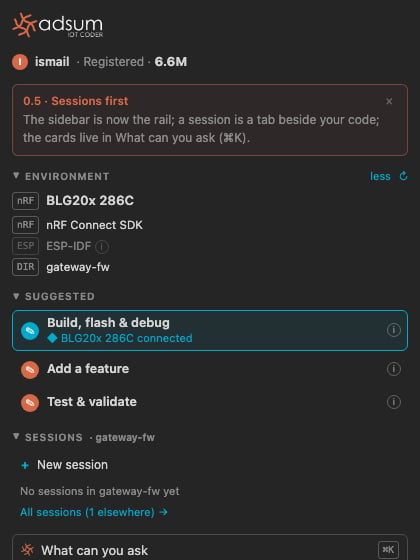
The rail with a BLG20x on the service port: the unit is named, the next action is first, the sessions in this folder sit below.
The rail, top to bottom
A suggestion names its reason, and only when the reason is real: a board that was detected, a project that was read. The highlighted control is the next action. Grey ones are for later, never wrong.
A session is a tab
A session opens beside your code, like a file. Its tab carries the ◆ mark and the session’s title. You can open several, split them, drag one to the other side, and close them; closing a tab keeps the session in the rail, and a tab closed while the agent was working or waiting on you offers to reopen. The composer is the same in every tab: type and press Enter, drop an image,/ for a slash command, @ to mention a file or the unit on the desk. The foot line names the folder and how much of the context is in use, and carries Something else · ⌘K so the palette is one key away from any session.