> ## Documentation Index
> Fetch the complete documentation index at: https://docs.adsumnetworks.com/llms.txt
> Use this file to discover all available pages before exploring further.

# Build firmware for a composable multi-radio gateway

> From one prompt to firmware building, flashing and running on a Fanstel LEW840X, with the configuration dashboard served from the board itself.

Start with a Fanstel LEW840X, describe the gateway you want, and end with firmware building,
flashing and running on it, with a configuration dashboard served from the board's own
flash.

<Tabs>
  <Tab title="Closed">
    <Frame caption="The LEW840X, closed">
      <img src="https://mintcdn.com/adsumnetworks/LDMmUpLUGNRElB7M/images/demos/lew840x-hero-a.jpg?fit=max&auto=format&n=LDMmUpLUGNRElB7M&q=85&s=7b1051035adcd2bf0f2112f6030f02e9" alt="A Fanstel LEW840X industrial IoT gateway, closed" width="1600" height="900" data-path="images/demos/lew840x-hero-a.jpg" />
    </Frame>
  </Tab>

  <Tab title="Ports">
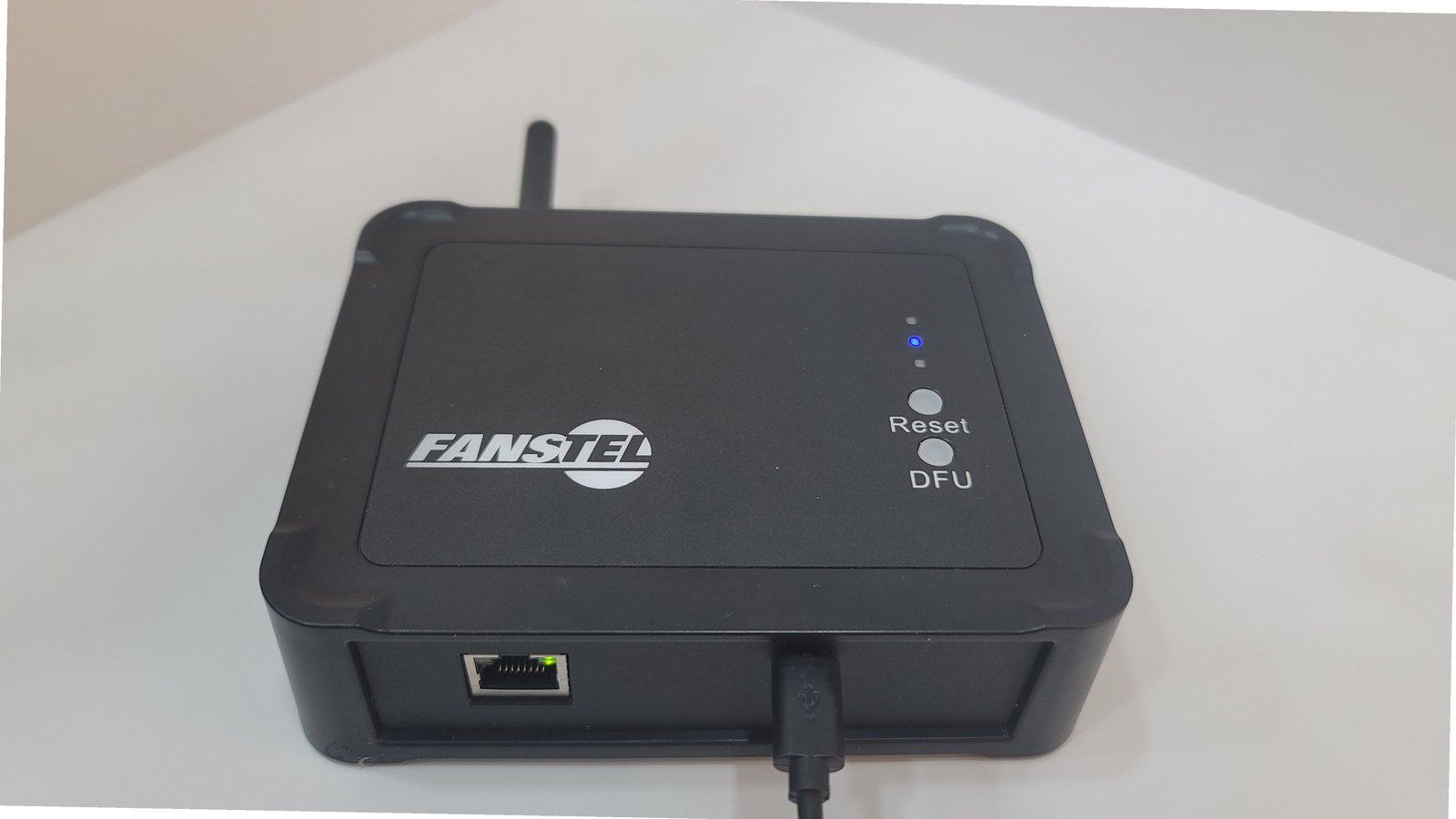
    <Frame caption="The same unit from the front, Ethernet in with the link LED up and micro-USB power">
      <img src="https://mintcdn.com/adsumnetworks/0J8aMB3uXN6264UW/images/demos/lew840x-hero-b.jpg?fit=max&auto=format&n=0J8aMB3uXN6264UW&q=85&s=38cb60e7157047f807b4b276efde91a1" alt="The Fanstel LEW840X from the front, showing the Ethernet port with its link LED lit and the micro-USB power connector" width="1600" height="900" data-path="images/demos/lew840x-hero-b.jpg" />
    </Frame>
  </Tab>

  <Tab title="Board in view">
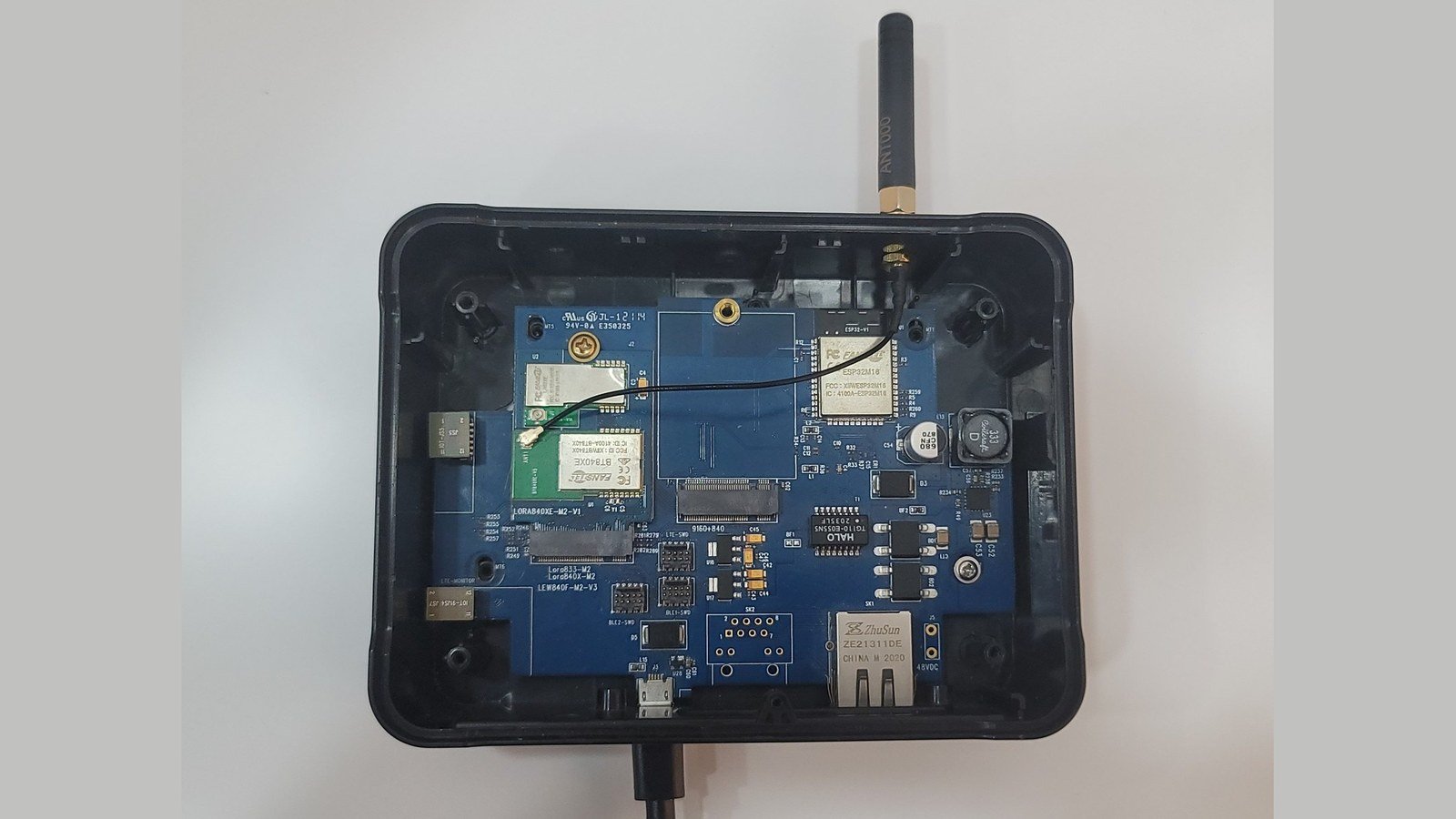
    <Frame caption="Opened, with the board in view, the M.2 card sits on the left">
      <img src="https://mintcdn.com/adsumnetworks/LDMmUpLUGNRElB7M/images/demos/lew840x-open-board.jpg?fit=max&auto=format&n=LDMmUpLUGNRElB7M&q=85&s=b49c096f1495e67102d498868af9e74a" alt="The opened gateway with the board visible inside" width="1600" height="900" data-path="images/demos/lew840x-open-board.jpg" />
    </Frame>
  </Tab>
</Tabs>

Real firmware, on real industrial hardware, in one session, without reading a schematic.

## The gateway

The LEW840X is a professional IP65 industrial gateway, and a flexible one: the radios sit on
**M.2 cards** rather than being soldered down. Two slots, one for cellular and BLE, one for
BLE and LoRa, so a single base covers a wide range of builds, and changing what the gateway
does can be a card swap.

<div className="my-6 grid gap-6 md:grid-cols-2">
  <div>
    <img className="m-0 w-full aspect-[16/9] object-cover rounded-xl border border-gray-200 dark:border-gray-800" src="https://mintcdn.com/adsumnetworks/0J8aMB3uXN6264UW/images/demos/lew840x-open.jpg?fit=max&auto=format&n=0J8aMB3uXN6264UW&q=85&s=42f939697e22f028b0965b2b63978e22" alt="The LEW840X opened, with the M.2 radio card lifted out of its slot and lying beside the board" width="1600" height="900" data-path="images/demos/lew840x-open.jpg" />

    <p className="m-0 mt-2 text-sm text-gray-500 dark:text-gray-400">Open, with the M.2 radio card lifted out. The slot beside it takes a second.</p>
  </div>

  <div>
    <img className="m-0 w-full aspect-[16/9] object-cover rounded-xl border border-gray-200 dark:border-gray-800" src="https://mintcdn.com/adsumnetworks/LDMmUpLUGNRElB7M/images/demos/lew840x-wired.jpg?fit=max&auto=format&n=LDMmUpLUGNRElB7M&q=85&s=af89f9d56c63f02aeb9f2245047286e9" alt="The gateway wired for programming, with the nRF52 DK and the UART bridge both connected" width="1600" height="900" data-path="images/demos/lew840x-wired.jpg" />

    <p className="m-0 mt-2 text-sm text-gray-500 dark:text-gray-400">Wired for programming: the nRF52 DK on the debug header and the UART bridge on the base.</p>
  </div>
</div>

### The hardware, briefly

|                        |                                                                                                                                                                                                            |
| :--------------------- | :--------------------------------------------------------------------------------------------------------------------------------------------------------------------------------------------------------- |
| **Base**               | ESP32M16 with 16 MB flash, LAN8720A Ethernet PHY, PoE                                                                                                                                                      |
| **Slots**              | Two B-key M.2, 30 × 42 mm. The **LN** slot for LTE + BLE, the **M2** slot for BLE + LoRa                                                                                                                   |
| **Card in this build** | `LORA840XE-M2-V1` in the **M2 slot**: **BT840XE** (nRF52840 + PA) and **LR62XE** LoRa, both soldered. External antenna on the BLE side.                                                                    |
| **Link to the base**   | nRF52840 `P0.26`/`P0.27` ↔ ESP32 `GPIO2`/`GPIO15`, UART2 at 115200                                                                                                                                         |
| **Enclosure**          | Photographed here on the **IP51 black base**. The IP65 yellow LEW6P-3 is the same board running the same firmware. The differences are the enclosure, PoE, the fitted antennas and the temperature rating. |

The ESP32 on the base owns the network and the application: WiFi, Ethernet and the
dashboard. The nRF52840 on the card owns the radio: it listens for **Bluetooth Low Energy
advertisements**, the short packets that beacons, asset tags and battery-powered sensors
broadcast to announce themselves.

**Programming and logs.** Two chips means two paths. The ESP32 is reached through Fanstel's
UART bridge board on the base, which is both flashing and its serial console. The nRF52840
on the card is reached over SWD, using an nRF52840 DK purely as a programming probe, with
its Debug Out wired across to the gateway's debug header. **RTT** rides that same SWD
connection, so the radio's log is there without a second cable.

<Note>
  **Which slot the radio sits in decides whether this build is possible at all.**

  The ESP32 has one UART per slot, and on the **LN** slot the far end is the **nRF9160**.
  A BLE module on an LN card therefore talks to the cellular modem, not to the base, so
  BLE advertisements cannot reach the ESP32 from that slot without modem firmware relaying
  them. **BLE to the base comes from the M2 slot**, which is wired straight through.
</Note>

## The prompt

```text theme={null}
# Composable gateway — BLE to Ethernet and WiFi

Build production gateway firmware for my **Fanstel LEW840X**.

## Hardware

- Base **LEW6P-3** — IP65, PoE.
- M2 slot: `LORA840XE-M2-V1` — BT840XE (nRF52840 + PA) and LR62XE LoRa, both soldered.
  This is the radio the ESP32 talks to. So BLE, Ethernet and WiFi; no cellular.
- LN slot: empty. (An LN card's BLE sits behind the nRF9160, so it cannot reach the ESP32.)
- A few BLE tags nearby to scan.

## Two modes

- **Configuration** — WiFi AP, and reachable over Ethernet straight to a PC. No DHCP there, so fall back to a fixed address and log it.
- **Running** — WiFi station, Ethernet to a router.

## Features

- Ethernet and WiFi both usable, priority I choose, automatic failover, no flapping.
- BLE scanning on the card, forwarded to the ESP32 over a framed link. ESP32 filters and publishes to MQTT, one topic per device.
- Dashboard served from the board, assets embedded, **modern dark theme**. Four tabs: **Overview** · **BLE Devices** (MAC, RSSI, last seen, raw data) · **Config** (WiFi, MQTT, BLE filter, Ethernet/WiFi priority) · **Logs** (from the ESP32).
- Reach the dashboard by name, not by IP — advertise **mDNS** so it answers on
  `http://<hostname>.local` on both uplinks. Hostname configurable.
- Reset button: 5 s reboots, over 10 s returns to configuration mode.
- LEDs should show state without opening the dashboard — powered, WiFi, MQTT, BLE scanner. Use the LEDs this board has; show me the scheme before building it.
- Watchdogs, reconnect with backoff, sane logging.
```

The hardware section names the base and the card, and stops there. No pin numbers and no
connectors. The agent already has this gateway's hardware knowledge, so the prompt is spent
on the product you are building rather than on re-typing a schematic.

## What the agent does

<Tabs>
  <Tab title="1 · Prompt">
    <Frame caption="The prompt pasted in. The whole prompt, before the first response.">
      <video src="https://mintcdn.com/adsumnetworks/Tt67fVB7rVkl049h/images/demos/lew840x-prompt.mp4?fit=max&auto=format&n=Tt67fVB7rVkl049h&q=85&s=b3ab98f76af8acdfd33c52643e7a8f2c" controls muted loop playsInline preload="metadata" data-path="images/demos/lew840x-prompt.mp4" />
    </Frame>
  </Tab>

  <Tab title="2 · Plan">
    <Frame caption="The plan, before any file exists. Which chip owns what, and how the two sides talk.">
      <img src="https://mintcdn.com/adsumnetworks/Tt67fVB7rVkl049h/images/demos/lew840x-plan.png?fit=max&auto=format&n=Tt67fVB7rVkl049h&q=85&s=2db55218eef85b51be74f0e920179df0" alt="The architecture the agent lays out before scaffolding" width="1366" height="768" data-path="images/demos/lew840x-plan.png" />
    </Frame>
  </Tab>

  <Tab title="3 · Scaffold">
    <Frame caption="Scaffolding, both projects. ESP-IDF on the base and nRF Connect SDK on the card, side by side.">
      <img src="https://mintcdn.com/adsumnetworks/Tt67fVB7rVkl049h/images/demos/lew840x-tree.png?fit=max&auto=format&n=Tt67fVB7rVkl049h&q=85&s=20e25e6e48e40a79ef226750ba41705f" alt="File tree after scaffolding, with both firmware projects" width="1366" height="768" data-path="images/demos/lew840x-tree.png" />
    </Frame>
  </Tab>

  <Tab title="4 · Build">
    <Frame caption="Building. Each side built as it goes, not saved for the end.">
      <img src="https://mintcdn.com/adsumnetworks/Tt67fVB7rVkl049h/images/demos/lew840x-build.png?fit=max&auto=format&n=Tt67fVB7rVkl049h&q=85&s=ddd394f24af0ecf5d9aff741341187ad" alt="A firmware build completing" width="1366" height="768" data-path="images/demos/lew840x-build.png" />
    </Frame>
  </Tab>

  <Tab title="5 · Flash">
    <Frame caption="Flashing the board. Onto the real hardware, not a simulator.">
      <img src="https://mintcdn.com/adsumnetworks/Tt67fVB7rVkl049h/images/demos/lew840x-flash.png?fit=max&auto=format&n=Tt67fVB7rVkl049h&q=85&s=24a7f59545686c2bb3a43895f4938f05" alt="Firmware being flashed to the gateway" width="1366" height="768" data-path="images/demos/lew840x-flash.png" />
    </Frame>
  </Tab>

  <Tab title="6 · Boot log">
    <Frame caption="Reading the board. The boot log straight off the hardware, where firmware work starts.">
      <img src="https://mintcdn.com/adsumnetworks/Tt67fVB7rVkl049h/images/demos/lew840x-monitor.png?fit=max&auto=format&n=Tt67fVB7rVkl049h&q=85&s=12fb63bb016b1541077e242fd521736a" alt="The ESP32 boot log in the serial monitor" width="1366" height="768" data-path="images/demos/lew840x-monitor.png" />
    </Frame>
  </Tab>
</Tabs>

<Steps>
  <Step title="Plans the system before writing anything">
    It works out the shape first: which chip owns what, how the two sides talk over the
    inter-chip link, what the uplink logic has to handle. It shows you that before creating a
    single file. Read it: this is the cheapest moment to change your mind.
  </Step>

  <Step title="Scaffolds both projects">
    A gateway here is **two firmware projects**: ESP-IDF on the base, nRF Connect SDK on the
    card. Both are created in one workspace, each with its own build configuration.
  </Step>

  <Step title="Writes the firmware">
    The dashboard, the network logic, the framed link between the chips, the BLE scanner. It
    works in passes rather than emitting everything at once, so each part can be checked
    while the reasoning behind it is still on screen.
  </Step>

  <Step title="Builds and flashes, on your board">
    It builds each side, works through the build errors it hits, finds which boards are
    actually connected, and knows which connector programs which chip, so flashing is not a
    step you have to wire up yourself.
  </Step>

  <Step title="Reads the board">
    This is where firmware work stops resembling ordinary coding. The agent captures the
    ESP32's serial output and the nRF's RTT log, and reads what the hardware actually did.
    Building is not the finish line; a board that behaves is.
  </Step>
</Steps>

## Bringing it up

Three states, in order: nothing configured, credentials entered, then running. The captions
say what changed between them.

<Tabs>
  <Tab title="Out of the box">
    <Frame caption="Out of the box. The gateway is its own access point and the dashboard is already served from its own flash, WiFi and MQTT down, because nothing has been told to it yet.">
      <img src="https://mintcdn.com/adsumnetworks/0J8aMB3uXN6264UW/images/demos/lew840x-ap-setup.png?fit=max&auto=format&n=0J8aMB3uXN6264UW&q=85&s=9f811ae13281986f48b82bccab41ed07" alt="The gateway in access-point mode with the dashboard open, WiFi and MQTT still down" width="1366" height="768" data-path="images/demos/lew840x-ap-setup.png" />
    </Frame>
  </Tab>

  <Tab title="Configured">
    <Frame caption="Configured. WiFi credentials, the MQTT broker and the BLE filter. Nothing has been saved yet.">
      <img src="https://mintcdn.com/adsumnetworks/0J8aMB3uXN6264UW/images/demos/lew840x-config-filled.png?fit=max&auto=format&n=0J8aMB3uXN6264UW&q=85&s=83d6a29162cca320457aaa5d9053be17" alt="The configuration page filled in before saving" width="1366" height="768" data-path="images/demos/lew840x-config-filled.png" />
    </Frame>
  </Tab>

  <Tab title="Running">
    <Frame caption="Running. After the reboot: WiFi up, MQTT connected, and the radio scanning.">
      <img src="https://mintcdn.com/adsumnetworks/0J8aMB3uXN6264UW/images/demos/lew840x-overview.png?fit=max&auto=format&n=0J8aMB3uXN6264UW&q=85&s=9e2b99ec6906ded5447fb40435a98e02" alt="The Overview tab after rebooting into running mode, with WiFi and MQTT up" width="1366" height="768" data-path="images/demos/lew840x-overview.png" />
    </Frame>
  </Tab>
</Tabs>

<Steps>
  <Step title="Configuration mode">
    On first power-up the gateway comes up as its own WiFi access point, serving the
    dashboard from its own flash. Join the access point and the setup page is there, no
    app, no cable, no internet.
  </Step>

  <Step title="Configure, then run">
    WiFi credentials, the MQTT broker and the BLE filter. Save, and it reboots into running
    mode: connected, scanning, publishing.
  </Step>

  <Step title="Reset, without a cable">
    Holding the reset button for 5 seconds reboots. Holding it for more than 10 returns the
    gateway to configuration mode, the recovery path for a unit that was moved to a
    different network.
  </Step>
</Steps>

## The dashboard

Served from the board itself, with every asset compiled into the firmware, in configuration
mode there is no internet, so the page has to stand on its own. Four tabs:

<Tabs>
  <Tab title="Overview">
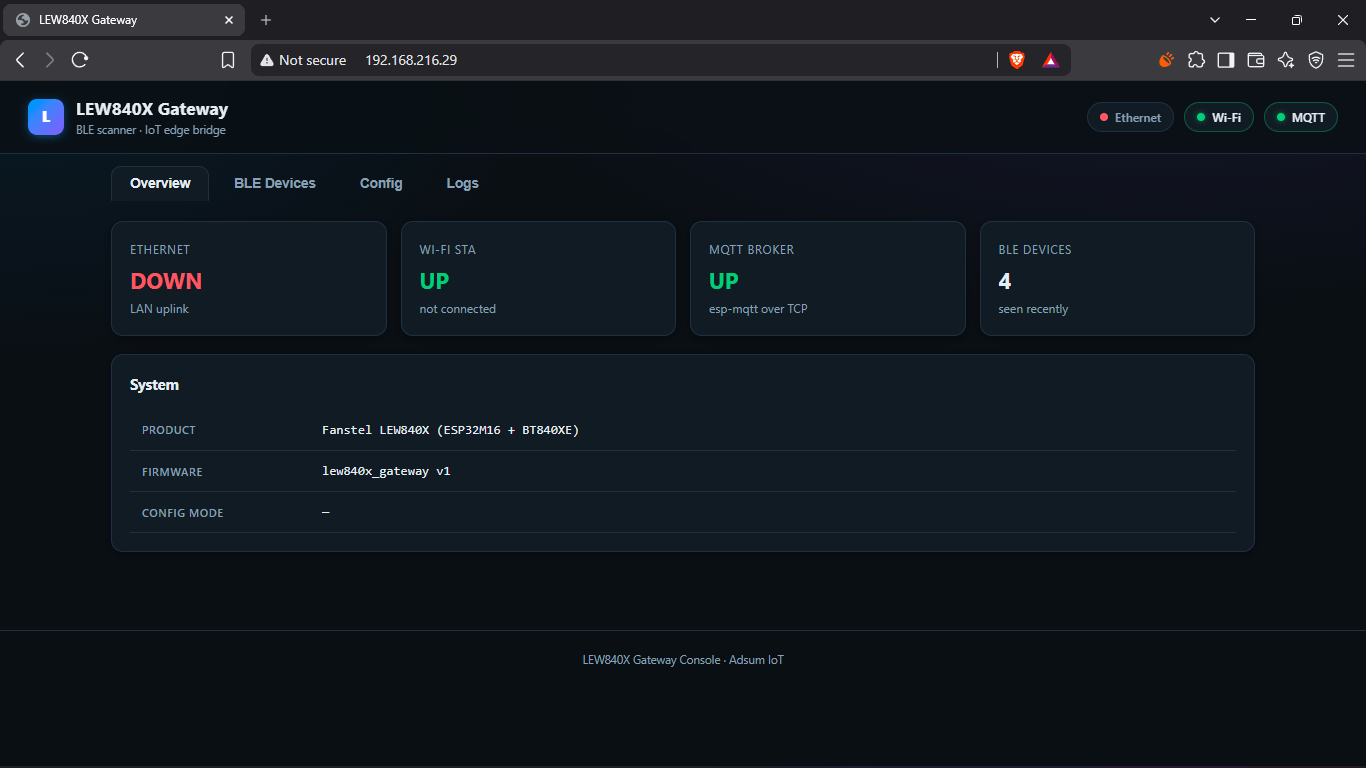
    <Frame caption="Overview. Uplink and MQTT status, IP address, uptime and how many devices are being seen.">
      <img src="https://mintcdn.com/adsumnetworks/0J8aMB3uXN6264UW/images/demos/lew840x-overview.png?fit=max&auto=format&n=0J8aMB3uXN6264UW&q=85&s=9e2b99ec6906ded5447fb40435a98e02" alt="The Overview tab" width="1366" height="768" data-path="images/demos/lew840x-overview.png" />
    </Frame>
  </Tab>

  <Tab title="BLE Devices">
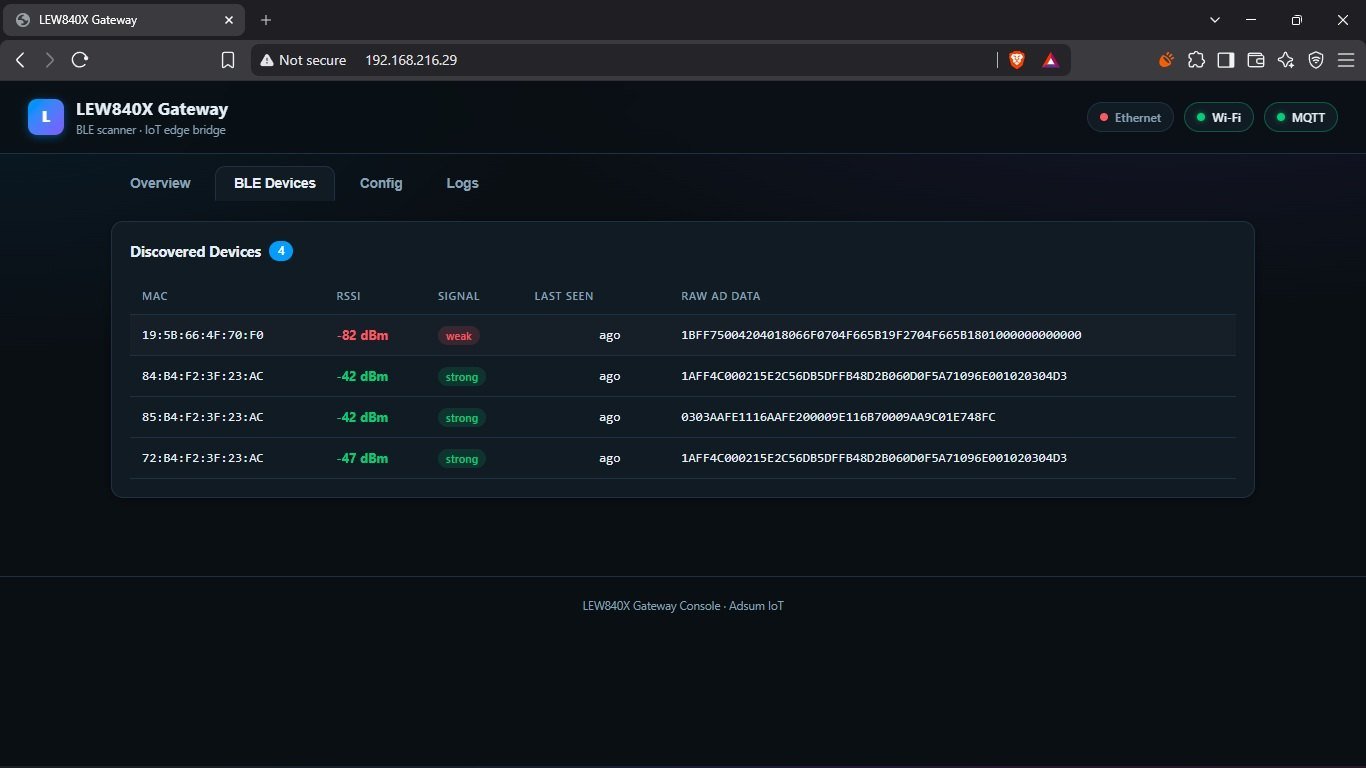
    <Frame caption="BLE Devices. Every device passing the filter: MAC, RSSI, last seen, and the raw advertisement bytes.">
      <img src="https://mintcdn.com/adsumnetworks/0J8aMB3uXN6264UW/images/demos/lew840x-ble-devices.jpg?fit=max&auto=format&n=0J8aMB3uXN6264UW&q=85&s=8b5b21992bc3246b11a3c496352dbdb8" alt="The BLE Devices tab" width="1366" height="768" data-path="images/demos/lew840x-ble-devices.jpg" />
    </Frame>
  </Tab>

  <Tab title="Config">
    <Frame caption="Config. WiFi, the MQTT broker and the BLE filter, the same page used to set the gateway up.">
      <img src="https://mintcdn.com/adsumnetworks/Tt67fVB7rVkl049h/images/demos/lew840x-dashboard.png?fit=max&auto=format&n=Tt67fVB7rVkl049h&q=85&s=4a9f69359a3d81975960086a65c209eb" alt="The Config tab" width="1366" height="768" data-path="images/demos/lew840x-dashboard.png" />
    </Frame>
  </Tab>

  <Tab title="Logs">
    <Frame caption="Logs. The ESP32's own log, streaming in the browser, with no cable attached.">
      <img src="https://mintcdn.com/adsumnetworks/0J8aMB3uXN6264UW/images/demos/lew840x-logs.png?fit=max&auto=format&n=0J8aMB3uXN6264UW&q=85&s=3d1e0fc7a6dd2f6591e8e99b416790a9" alt="The Logs tab" width="1366" height="768" data-path="images/demos/lew840x-logs.png" />
    </Frame>
  </Tab>
</Tabs>

## Live data

<img className="m-0 w-full rounded-xl border border-gray-200 dark:border-gray-800 my-6" src="https://mintcdn.com/adsumnetworks/0J8aMB3uXN6264UW/images/demos/lew840x-live-mqtt.png?fit=max&auto=format&n=0J8aMB3uXN6264UW&q=85&s=0d9753a332668201e7d181fda4cc6667" alt="The dashboard listing live BLE devices beside an MQTT client receiving the same data" width="1366" height="768" data-path="images/demos/lew840x-live-mqtt.png" />

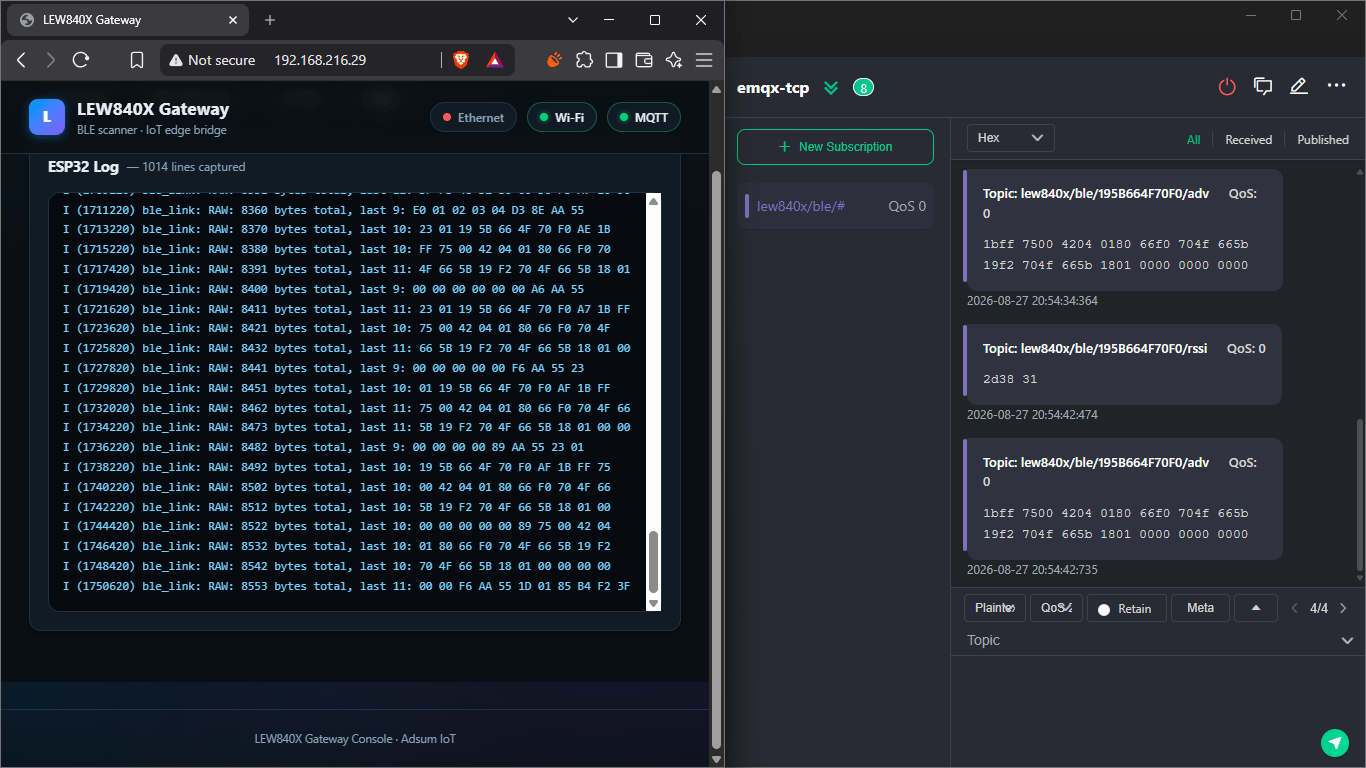
Tags in the air, rows updating on the dashboard, messages arriving at the broker.

## Where the board knowledge helps

Fanstel builds a lot of hardware, and the range runs wide: bases, enclosures, radio
cards, and combinations for most jobs. The cost of that range lands on the firmware
engineer: a long specification, a schematic, and part numbers to reconcile before any code
gets written.

**We do that reading once, per product.** Adsum's LEW840X knowledge is curated by engineers,
checked against the hardware and refined as we test: which connector reaches which chip,
what each M.2 part number actually contains, how the Ethernet interface has to be brought up
on this board, and where a printed part number can mislead.

It also carries something a parsed document cannot: **what has been confirmed on hardware
versus what is still only expected**, kept separate, so an assumption is named as one
rather than presented as fact.

## Try it first: the demo firmware

Have an LEW840x on the bench? Register (free) and flash three signed images the agent already knows: a **BLE scanner** on the nRF52840, a **Wi-Fi / Ethernet uplink** on the ESP32, and a **cellular bearer** on the nRF9160. Tags advertising nearby reach your MQTT broker within minutes, so you judge the hardware and the firmware on your own network before writing a line.

The limits, before the button: Wi-Fi and Ethernet run without limit; cellular runs in 60-minute sessions; flashing needs `nrfutil` and `esptool` on this machine.

The signed images are free to flash and evaluate. When the gateway does what you need, the same firmware is available as **licensed source, per module**, so your team can extend the scanner, the uplink or the bearer on its own: ask from *Settings › Account › Request template source*. The full picture, row by row, is on [gateway firmware](/gateway-firmware). For the cellular card, the flash-only path is its own page: [run the LEW840x on cellular from the signed images](/supported-hardware/fanstel/lew840x-cellular).

## Reproduce it yourself

### Prerequisites

* **VS Code** with **Adsum IoT Coder**, from the [Marketplace](https://marketplace.visualstudio.com/items?itemName=AdsumNetwork.nrf-ai-debugger) or [Open VSX](https://open-vsx.org/extension/AdsumNetwork/nrf-ai-debugger). The free tier needs no key and no account.
* **ESP-IDF** for the base, and the **nRF Connect SDK** with its toolchain for the card. See [platforms](/platforms-and-roadmap).
* A **Fanstel LEW840X** with a BLE card in the **M2 slot** (this build used the `LORA840XE-M2-V1`), Fanstel's UART bridge for the base, and an **nRF52840 DK** to use as the SWD probe for the card.
* A few BLE tags or sensors nearby, so there is something to scan.

<Info>
  No board? The agent works end to end on the bundled samples with the [free tier](/free-tier), no hardware and no key required. Bring the gateway when you are ready to flash and verify.
</Info>

### Steps

<Steps>
  <Step title="Open an empty workspace">
    Install the extension, open an empty folder for the project, and open the Adsum panel.
  </Step>

  <Step title="Paste the prompt">
    Paste [the prompt](#the-prompt) with your own hostname, uplink priority and LED wishes. Name the base and the card and stop there; the agent has the pins. Read the plan before it creates a file.
  </Step>

  <Step title="Approve the builds, then the flashes">
    Two projects, two toolchains. Let the agent build each side and work through its own build errors, then approve the flash for each chip: the ESP32 over the UART bridge, the nRF52840 over SWD.
  </Step>

  <Step title="Bring it up and watch it">
    Join the gateway's access point, configure it from the dashboard, and watch the ESP32 serial log and the nRF RTT log as it reboots into running mode and the first tags appear.
  </Step>
</Steps>

## Where this build can go next

The same session can carry on, as the [BWG840X build](/ble-wifi-gateway) did.

<CardGroup cols={2}>
  <Card title="3-layer debug" icon="wave-square" href="/ble-debug">
    When the log is clean and the air disagrees: application log, HCI and over-the-air capture, correlated.
  </Card>

  <Card title="CRA readiness" icon="shield-check" href="/cra-readiness">
    An SBOM from the real build, a ranked CVE scan and a posture check, on the firmware that is running on the gateway.
  </Card>
</CardGroup>

## Verified with

|               |                                                                          |
| :------------ | :----------------------------------------------------------------------- |
| Last verified | 2026-08-25                                                               |
| Extension     | 0.3.1                                                                    |
| Base          | Fanstel `LEW840F-M2-V3` PCBA                                             |
| Card          | `LORA840XE-M2-V1` in the M2 slot: BT840XE + LR62XE, external BLE antenna |
| BLE link      | nRF52840 `P0.26`/`P0.27` ↔ ESP32 `GPIO2`/`GPIO15`, UART2 @ 115200        |
| Toolchains    | ESP-IDF 5.5.4 · NCS 3.3.1                                                |