> ## Documentation Index
> Fetch the complete documentation index at: https://docs.adsumnetworks.com/llms.txt
> Use this file to discover all available pages before exploring further.
# Run the LEW840x on cellular from the signed images
> The cellular LEW840x (LTE-M and NB-IoT on the nRF9160 card) running from Adsum's signed images: what to fit, what to flash, what you will see, and how to get the source. No build, no source, no SDK needed.
The [base build](/supported-hardware/fanstel/lew840x) starts from a prompt and ends with firmware you built. This page is the other door: the same gateway with its cellular card fitted, running from **signed images you flash**, so you can judge LTE-M and NB-IoT on your own SIM in an afternoon. Nothing to build, nothing to read from source, no SDK on the machine.
Three signed images, free to flash with a [free account](/account): the **BLE scanner** for the nRF52840 on the M2 card, the **uplink** for the ESP32 base, and the **cellular bearer** for the nRF9160 on the LN card. Wi-Fi and Ethernet run without limit; **cellular runs in 60-minute sessions** in this build, for evaluation. Licensed source is on request. Row by row: [gateway firmware](/gateway-firmware).
## The gateway, with the cellular card
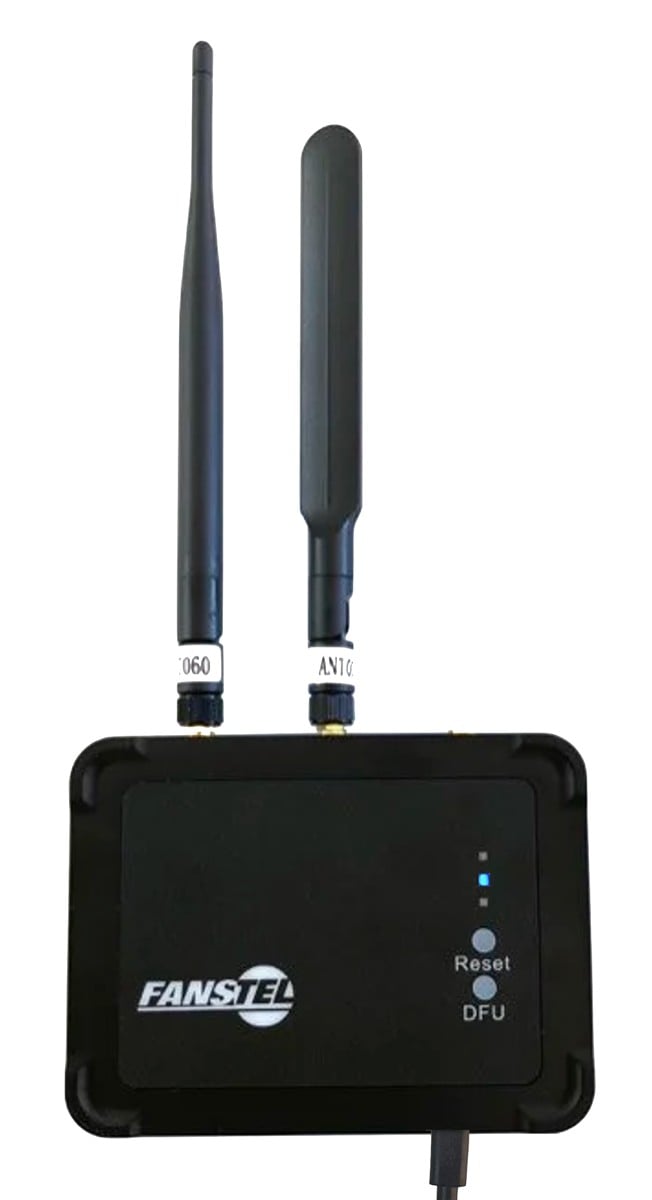
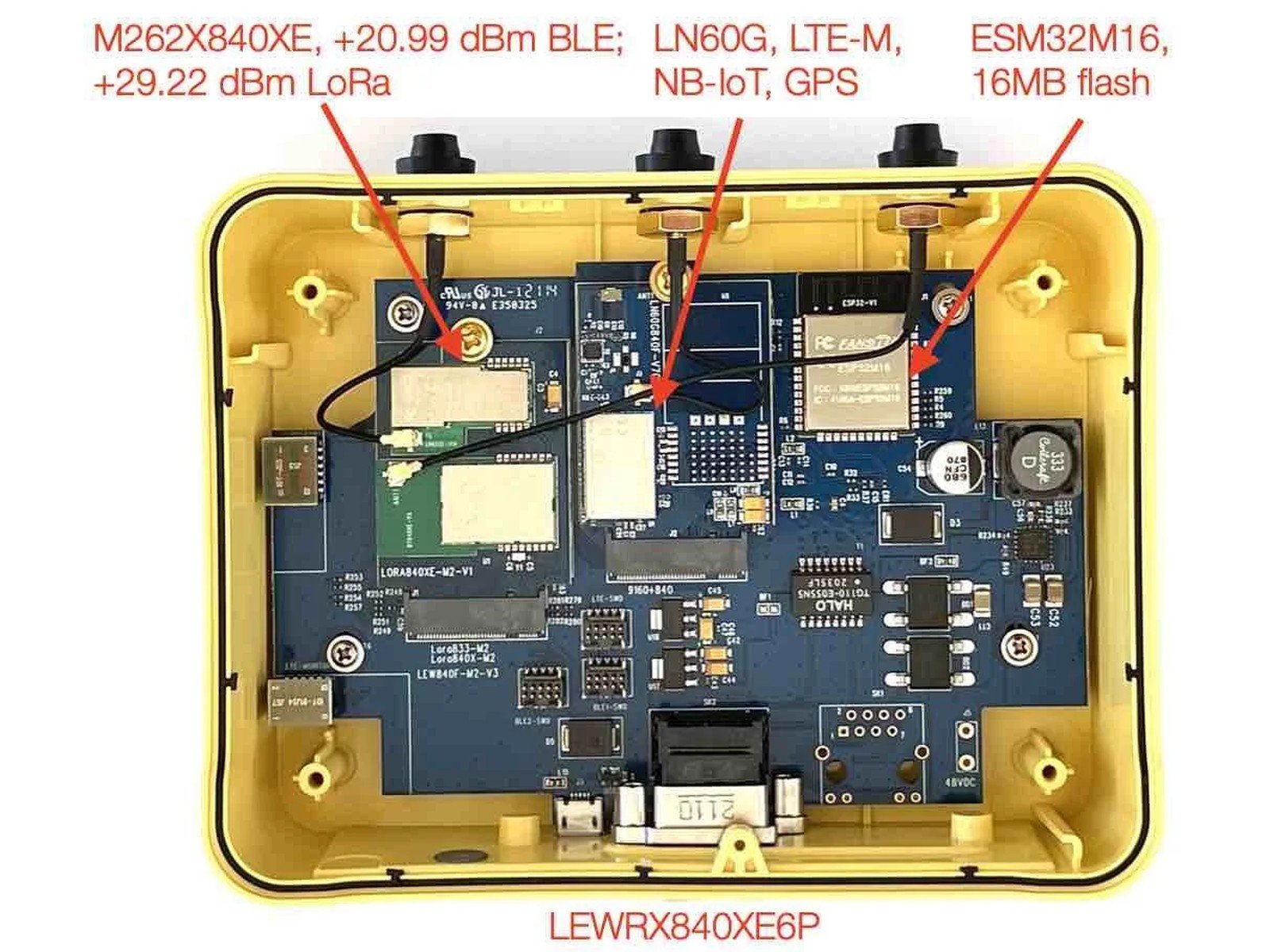
The LEW840x carries its radios on two M.2 slots. For cellular the **LN slot** takes an nRF9160-based card (Fanstel's LN-series, LTE-M, NB-IoT and GNSS) and the **M2 slot** keeps the BLE card. The ESP32 on the base owns the network and the dashboard; the nRF52840 scans; the nRF9160 is the cellular bearer.
| | |
| :----------- | :------------------------------------------------------------------------------------------------ |
| **Base** | ESP32M16 with 16 MB flash, LAN8720A Ethernet PHY, PoE |
| **LN slot** | An nRF9160 cellular card (LTE-M, NB-IoT, GNSS). The ESP32 reaches it over its own UART. |
| **M2 slot** | A BLE card (nRF52840), as in the base build |
| **SIM** | Any LTE-M or NB-IoT SIM with data. The bearer attaches on it; your APN if your operator needs one |
| **Antennas** | Cellular on the LN card's connector, BLE on the M2 card's |
 ## What you need
* A **Fanstel LEW840x** with a cellular card in the **LN slot** and a BLE card in the **M2 slot**, a SIM, and the antennas fitted.
* **Fanstel's UART bridge** for the base (flashing the ESP32) and an **nRF52840 DK** or another J-Link probe on the gateway's debug header (flashing the nRF chips over SWD). The agent tells you which header reaches which chip.
* **VS Code** with **Adsum IoT Coder**, `nrfutil` and `esptool` on this machine. No SDK, no toolchain: the images are prebuilt and signed.
* A **free account**: register from the card when it asks, GitHub or email, no card.
No SDK is needed for this page. If you later want to change the firmware, the [base build](/supported-hardware/fanstel/lew840x) shows the toolchains, and [licensed source](/gateway-firmware) gives you the modules to extend.
## Flash the signed images
## What you need
* A **Fanstel LEW840x** with a cellular card in the **LN slot** and a BLE card in the **M2 slot**, a SIM, and the antennas fitted.
* **Fanstel's UART bridge** for the base (flashing the ESP32) and an **nRF52840 DK** or another J-Link probe on the gateway's debug header (flashing the nRF chips over SWD). The agent tells you which header reaches which chip.
* **VS Code** with **Adsum IoT Coder**, `nrfutil` and `esptool` on this machine. No SDK, no toolchain: the images are prebuilt and signed.
* A **free account**: register from the card when it asks, GitHub or email, no card.
No SDK is needed for this page. If you later want to change the firmware, the [base build](/supported-hardware/fanstel/lew840x) shows the toolchains, and [licensed source](/gateway-firmware) gives you the modules to extend.
## Flash the signed images
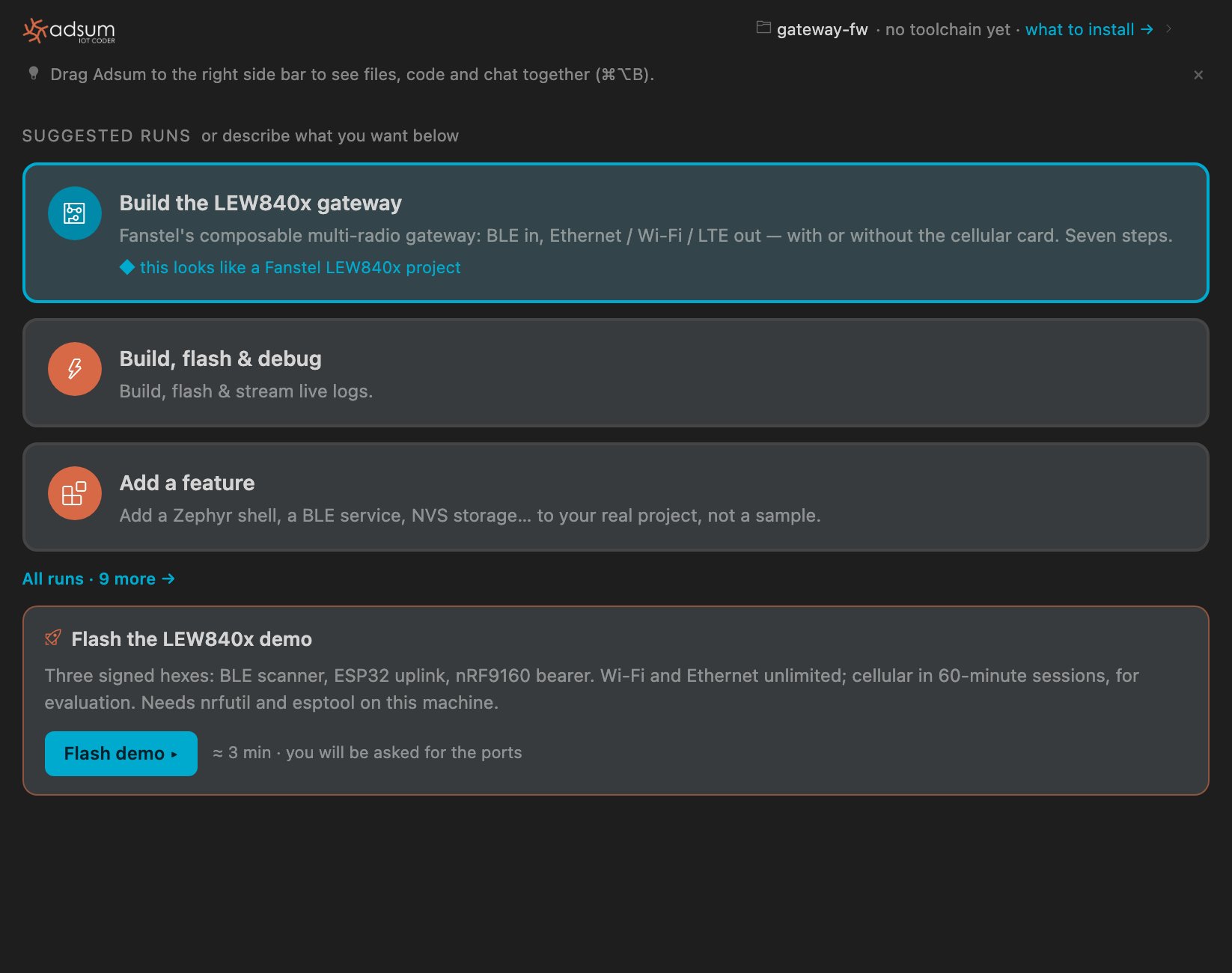 Open the Adsum panel with the gateway on the desk. The **Flash the LEW840x demo** card asks you to register the first time: your browser opens, GitHub or email, and you come straight back.
The agent loads the signed images and their hashes from the registry and verifies them before anything is written. It checks that `nrfutil` and `esptool` are on this machine and says plainly if they are not.
It asks which serial port is the UART bridge and which probe reaches the nRF chips, then flashes in order: the BLE scanner, the ESP32 uplink, the nRF9160 bearer. About three minutes.
On first power-up the gateway is its own Wi-Fi access point, serving its dashboard from its own flash. Join it, enter your broker and, if you use them, your Wi-Fi credentials, choose the uplink priority, save. It reboots into running mode. Holding reset for more than 10 seconds returns it to configuration mode.
## What you will see
Open the Adsum panel with the gateway on the desk. The **Flash the LEW840x demo** card asks you to register the first time: your browser opens, GitHub or email, and you come straight back.
The agent loads the signed images and their hashes from the registry and verifies them before anything is written. It checks that `nrfutil` and `esptool` are on this machine and says plainly if they are not.
It asks which serial port is the UART bridge and which probe reaches the nRF chips, then flashes in order: the BLE scanner, the ESP32 uplink, the nRF9160 bearer. About three minutes.
On first power-up the gateway is its own Wi-Fi access point, serving its dashboard from its own flash. Join it, enter your broker and, if you use them, your Wi-Fi credentials, choose the uplink priority, save. It reboots into running mode. Holding reset for more than 10 seconds returns it to configuration mode.
## What you will see
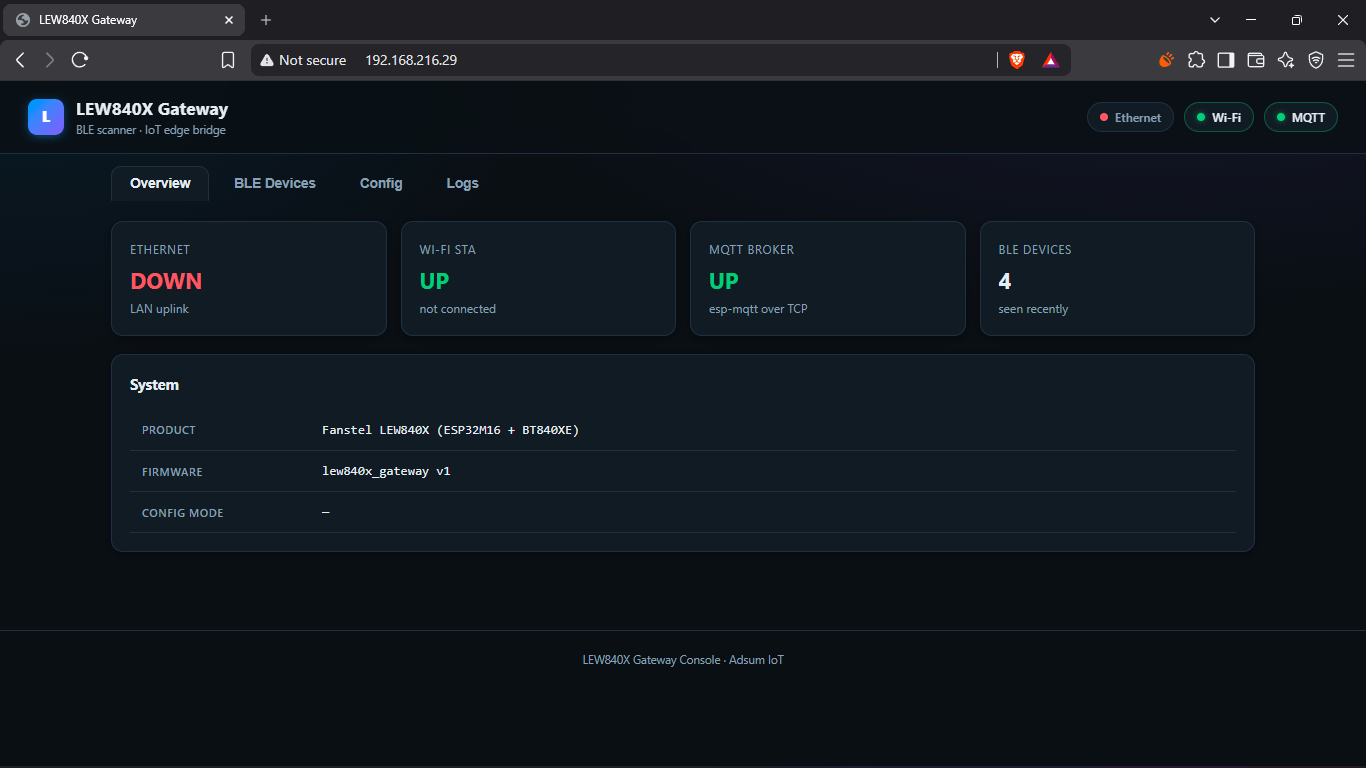
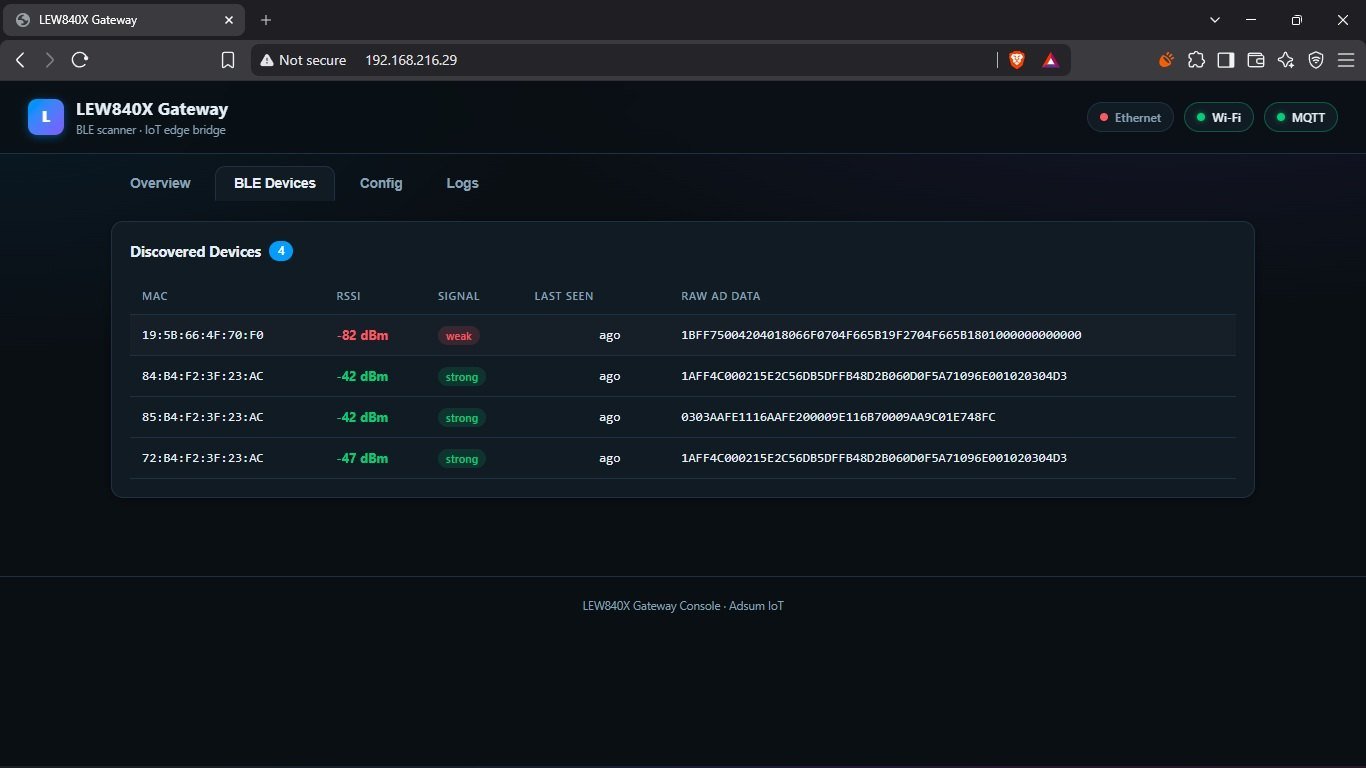
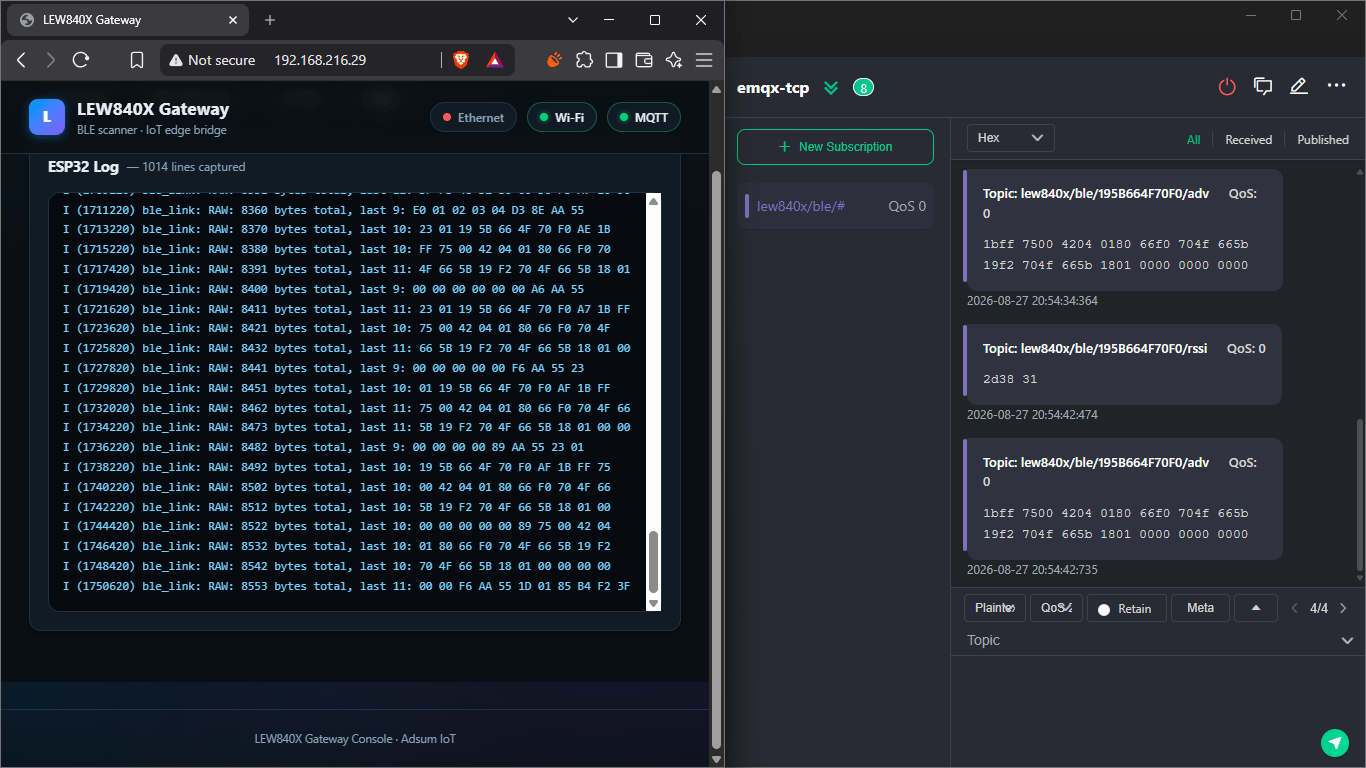 With the cellular card fitted and the bearer flashed, the gateway can uplink over LTE-M or NB-IoT as well as Ethernet and Wi-Fi, in the priority you set. The cellular session stops after 60 minutes in this build and starts again on the next attach; Ethernet and Wi-Fi keep flowing.
## From evaluation to your product
The images are for judging the hardware and the firmware on your own network. When it does what you need, the same firmware is available as **licensed source, per module** (the scanner, the uplink, the bearer), so your team can extend it with the agent: ask from *Settings › Account › Request template source*, or write to [support@adsumnetworks.com](mailto:support@adsumnetworks.com). The licence covers production use and your modifications stay yours; the details depend on what you are building.
What exists for the LEW gateway today, as signed images and as licensed source, and what is next.
NB-IoT, LTE-M and GNSS bring-up, the board shell and the modem trace, when you go past the images.
## Verified with
| | |
| :------------------- | :---------------------------------------------------------------------------------- |
| Extension | 0.4.0 |
| Images | The 0.4.0 signed builds, delivered from the registry, hash-verified before flashing |
| Base | Fanstel LEW840x |
| Cards | An nRF9160 cellular card in the LN slot, an nRF52840 BLE card in the M2 slot |
| Tools on the machine | `nrfutil`, `esptool` |
With the cellular card fitted and the bearer flashed, the gateway can uplink over LTE-M or NB-IoT as well as Ethernet and Wi-Fi, in the priority you set. The cellular session stops after 60 minutes in this build and starts again on the next attach; Ethernet and Wi-Fi keep flowing.
## From evaluation to your product
The images are for judging the hardware and the firmware on your own network. When it does what you need, the same firmware is available as **licensed source, per module** (the scanner, the uplink, the bearer), so your team can extend it with the agent: ask from *Settings › Account › Request template source*, or write to [support@adsumnetworks.com](mailto:support@adsumnetworks.com). The licence covers production use and your modifications stay yours; the details depend on what you are building.
What exists for the LEW gateway today, as signed images and as licensed source, and what is next.
NB-IoT, LTE-M and GNSS bring-up, the board shell and the modem trace, when you go past the images.
## Verified with
| | |
| :------------------- | :---------------------------------------------------------------------------------- |
| Extension | 0.4.0 |
| Images | The 0.4.0 signed builds, delivered from the registry, hash-verified before flashing |
| Base | Fanstel LEW840x |
| Cards | An nRF9160 cellular card in the LN slot, an nRF52840 BLE card in the M2 slot |
| Tools on the machine | `nrfutil`, `esptool` |