> ## Documentation Index
> Fetch the complete documentation index at: https://docs.adsumnetworks.com/llms.txt
> Use this file to discover all available pages before exploring further.

# BLG20x: the Adsum NTN Relay for an indoor site

> Firmware for the Fanstel BLG20x: your Bluetooth LE devices in; LTE-M, NB-IoT and satellite NB-NTN out; Edge AI on board; updated over the air. The demo is on every relay, and licences are per relay.

**Bluetooth in. Edge AI on board. Satellite out.** Firmware that listens to your Bluetooth devices, pre-processes with Edge AI, keeps what matters in flash, and delivers it over Wi-Fi, LTE-M, NB-IoT or satellite NB-NTN, the cheapest uplink that works. Its position is set once, at commissioning.

<div className="adsum-mast">
  <div><span className="adsum-mast-k">Ways out</span><span className="adsum-mast-v">4 uplinks</span><span className="adsum-mast-n">Wi-Fi where a network is set, then LTE-M, NB-IoT and satellite NB-NTN, cheapest first.</span></div>
  <div><span className="adsum-mast-k">Over satellite</span><span className="adsum-mast-v">128 bytes</span><span className="adsum-mast-n">One datagram carries a status and two alerts. Sent and acknowledged on a geostationary service.</span></div>
  <div><span className="adsum-mast-k">Over LTE-M</span><span className="adsum-mast-v">About 1 kB</span><span className="adsum-mast-n">Per cycle of up to eight records, measured on the hardware.</span></div>
  <div><span className="adsum-mast-k">Updated over Bluetooth</span><span className="adsum-mast-v">Under 6 minutes</span><span className="adsum-mast-n">Both processors in 337 s, every setting kept. Over LTE-M, 409 kB in 129 s.</span></div>
</div>

<CardGroup cols={2}>
  <Card title="Datasheet (PDF)" icon="file-pdf" href="https://www.adsumnetworks.com/datasheets/BLG20x-NTN-Relay-Firmware-Datasheet.pdf" horizontal>
    Three pages: what it does, how it works, how it is tested, and the specifications.
  </Card>

  <Card title="The first run, step by step" icon="route" href="/supported-hardware/fanstel/blg20x-first-run" horizontal>
    From an unflashed board to readings on your own platform, and a command sent back.
  </Card>
</CardGroup>

<div className="adsum-byline">
  <span>Gateway <b>Fanstel BLG20XE02C-V1</b></span>
  <span>Chips <b>nRF54LM20B and nRF9151</b></span>
  <span>Built and verified by <b>Adsum Networks, September 2026</b></span>
</div>

## Who does what

<div className="adsum-roles">
  <div className="adsum-role"><b>Our partner Fanstel · the hardware</b><span>Designs, makes and sells the BLG20x, and publishes its design: Bluetooth 6 with an NPU for edge AI, cellular and satellite, and Wi-Fi 6 on the BC02C model, in a compact IP51 enclosure for desk or wall, on USB-C power. FCC, ISED and CE are pending at Fanstel.</span></div>
  <div className="adsum-role"><b>Adsum Networks · the firmware</b><span>Industrial-grade IoT firmware, to use as it is or to customise in hours with Adsum IoT Coder. We then put it through our reliability and security tests, support it, and keep it safe with security updates.</span></div>
  <div className="adsum-role"><b>You · the product</b><span>Your devices, your network, your data platform. Nothing of ours in the path.</span></div>
</div>

## What it is

<div className="my-6 grid gap-6 md:grid-cols-2">
  <div>
    <img className="m-0 w-full rounded-md border border-gray-200 dark:border-gray-800" src="https://mintcdn.com/adsumnetworks/lnw-8Han7IgQYwBI/images/demos/blg20x-closed.jpg?fit=max&auto=format&n=lnw-8Han7IgQYwBI&q=85&s=403004258f10e3a6bd4aa6f64212ddff" alt="The Fanstel BLG20x gateway, closed" width="920" height="690" data-path="images/demos/blg20x-closed.jpg" />

    <p className="m-0 mt-2 text-sm text-gray-500 dark:text-gray-400">The BLG20x as it ships.</p>
  </div>

  <div>
    <img className="m-0 w-full rounded-md border border-gray-200 dark:border-gray-800" src="https://mintcdn.com/adsumnetworks/lnw-8Han7IgQYwBI/images/demos/blg20x-board.jpg?fit=max&auto=format&n=lnw-8Han7IgQYwBI&q=85&s=53d24559bdc2758fb089742a96d64621" alt="The BLG20x board, with the radio modules and the SIM holder" width="920" height="690" data-path="images/demos/blg20x-board.jpg" />

    <p className="m-0 mt-2 text-sm text-gray-500 dark:text-gray-400">The board inside: the radio modules and the SIM holder.</p>
  </div>
</div>

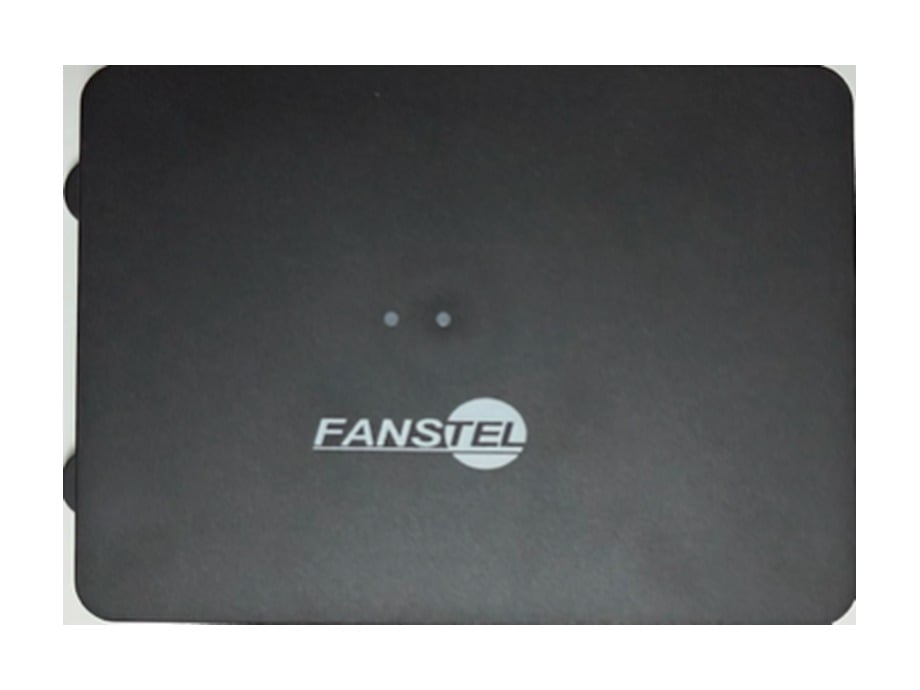
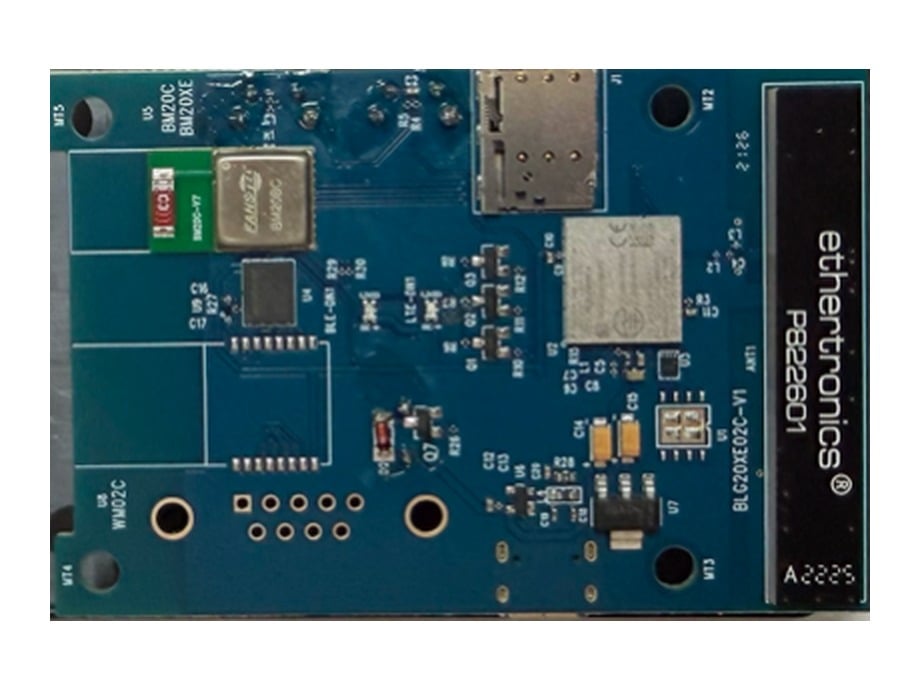
A desk- or wall-mount gateway from [Fanstel](https://www.fanstel.com/blg20cbwg20c), with the radios, antennas and a USB-C power supply in the box. It is **two computers on one board**, and knowing that saves most of the confusion in a first run:

* **The Bluetooth half**, a Fanstel BM20 module on Nordic's nRF54LM20B, hears the sensors, decides what is worth keeping, sends over Wi-Fi where the WM02C module is fitted and a network is set, and is what you commission over Bluetooth, from Adsum IoT Coder or the commissioning page.
* **The wide-area half**, a Nordic nRF9151, owns the modem: LTE-M, NB-IoT and NB-NTN satellite. It schedules the sends and keeps the unit inside its data budget.

The two halves run their own firmware, flash separately, and each reports only what it knows itself.

## What the firmware does

<div className="adsum-fig">
  <div className="adsum-pipe">
    <div className="adsum-step"><b>Your sensors</b><span>Anything that advertises over Bluetooth LE.</span></div>
    <div className="adsum-step is-key"><b>The gateway</b><span>Admits the devices you name. Counts or quarantines the rest, never silently.</span></div>
    <div className="adsum-step"><b>Wi-Fi, LTE-M, NB-IoT or satellite</b><span>Cheapest first, in the order the deployment allows.</span></div>
    <div className="adsum-step"><b>Your platform</b><span>Your tenant, your devices. Nothing of ours in the path.</span></div>
  </div>

  <p className="adsum-cap">A reading and a command take the same path, in opposite directions.</p>
</div>

* **Commissioned from Adsum IoT Coder or from a browser.** Over Bluetooth either way: the Hardware page in Adsum IoT Coder and its agent at your desk, or Chrome over Web Bluetooth on an installer's phone. Both write the unit's position, with how uncertain it is, its label and its credential, then read every value back from the unit rather than trusting the button.
* **A deployment class, set once.** Terrestrial only, satellite only, or both as a ladder. The class fixes the transport and the encoding, and the unit refuses a setting its class cannot carry, at the desk, before it is installed.
* **Only the devices you name.** An expected-devices list admits your sensors. Everything else heard is counted or held in a quarantine you can inspect, so a device that should be there and is not is visible.
* **Readings to your own platform.** Confirmable CoAP, or MQTT with or without TLS on Wi-Fi and cellular; protobuf or CBOR; each reading carrying the device's own timestamp. Verified end to end with ThingsBoard Cloud; any platform that accepts them will do.
* **A command back.** A value set on the platform reaches the Bluetooth half on the unit's next exchange.
* **Metered by design.** Wi-Fi first, then the cheapest cell; every send is checked against a monthly allowance, with a separate one for satellite, which is used only for what cannot wait.

## Industrial grade, by design

<div className="adsum-fig">
  <div className="adsum-lanes">
    <div className="adsum-lane"><b>Runs unattended</b><span>Hardware watchdogs, and self-recovery from a hang, a dropped link, a bad configuration or a power cut.</span></div>
    <div className="adsum-lane"><b>Never loses data</b><span>Records wait in flash until your platform acknowledges them. Alarms are never overwritten, and every dropped record is counted.</span></div>
    <div className="adsum-lane"><b>Updated over the air</b><span>Signed updates for both processors, over Bluetooth at the desk or LTE-M and NB-IoT in the field, so a security fix needs no site visit.</span></div>
    <div className="adsum-lane"><b>Edge AI on board</b><span>Data is pre-processed on the relay, beside the radio, so a decision leaves the site and not raw data.</span></div>
    <div className="adsum-lane"><b>Secure by design</b><span>Signed boot, secure key storage, authenticated Bluetooth, and only the devices you name admitted. Once claimed, it takes images only with your key.</span></div>
    <div className="adsum-lane"><b>Managed from afar</b><span>Set up over Bluetooth, from Adsum IoT Coder or a browser. Health and reset causes reported. Commands sent back from your platform.</span></div>
    <div className="adsum-lane"><b>Costs under control</b><span>Wi-Fi first, then the cheapest cell, a data budget counted before every send, and the modem off in between.</span></div>
    <div className="adsum-lane"><b>Tested to prove it</b><span>Reliability and security tests on the real board, not in a simulator. <a href="/supported-hardware/fanstel/blg20x-specification#tested-to-prove-it">The tests</a>.</span></div>
  </div>
</div>

## Edge AI, and why satellite needs it

**Send the decision, not the data.** A satellite link carries a few kilobytes a month, not a stream. So the work happens on the gateway, on the nRF54LM20B beside the radio, before anything is sent: each device's readings are filtered with their own state, thresholds and hold times; a change, an anomaly or a missing device becomes one alert instead of a thousand readings; alerts go first, and the rest is summarised and waits for a cheaper uplink.

| Uplink | What leaves the gateway | Size |
| :- | :- | :- |
| **Wi-Fi, LTE-M, NB-IoT** | Digests per device, alerts, status and a daily health record | About 1 kB per cycle |
| **Satellite NB-NTN** | Alerts and status only. Everything else waits in flash for a cheaper uplink | One 128 B datagram |

More on the link itself in [satellite IoT: NB-NTN](/satellite-ntn).

## Updated over the air, signed

Updates are how a fleet stays secure and how a product keeps improving, so they are part of the firmware and not an afterthought.

* **Over Bluetooth, at the desk.** Both processors in under six minutes, from Adsum IoT Coder or the commissioning page, and the unit keeps its settings.
* **Over the mobile network, in the field.** LTE-M or NB-IoT, while the relay keeps working: no site visit.
* **Never over satellite.** An update waits for a cellular uplink, so the satellite allowance is never spent on firmware.
* **Safe by default.** Signed images only, for both processors. A new image is tested on the unit, and rolls back by itself if it does not prove healthy.
* **Yours once claimed.** A relay claimed with your computer's key takes images from no one else.

Measured on the hardware: both processors over Bluetooth in 337 seconds; the cellular one over LTE-M, 409 kB in 129 seconds, swapped, tested and confirmed.

## From our firmware to your product

<div className="adsum-fig">
  <div className="adsum-ladder">
    <div className="adsum-tier"><div className="adsum-when">Minutes</div><div className="adsum-what"><b>Try it</b><span>The demo comes on every relay from Fanstel: ten devices, no time limit. Judge it on your own desk.</span></div></div>
    <div className="adsum-tier"><div className="adsum-when">Under 30 min</div><div className="adsum-what"><b>First gateway live</b><span>Commissioned from Adsum IoT Coder or a browser, and sending readings to your own platform.</span></div></div>
    <div className="adsum-tier"><div className="adsum-when">Hours</div><div className="adsum-what"><b>Make it yours</b><span>A new sensor, a rule or a payload, with Adsum IoT Coder, which already knows the board and the firmware.</span></div></div>
    <div className="adsum-tier"><div className="adsum-when">Then</div><div className="adsum-what"><b>Certify your version</b><span>Your build goes through the same reliability and security tests, on the board, and earns its own certificate.</span></div></div>
    <div className="adsum-tier"><div className="adsum-when">Five years</div><div className="adsum-what"><b>Stay secure</b><span>Watched, advised and fixed: security fixes for five years, delivered over the air.</span></div></div>
  </div>
</div>

## BLG20x or LBG20x?

The same firmware, the same uplinks and the same licences. What differs is where the relay goes.

| | BLG20x | LBG20x |
| :- | :- | :- |
| **Where** | Indoors, at a fixed site | Outdoors, fixed or on the move |
| **Position** | Set once at commissioning, from a phone or typed in | Its own GNSS fix: at commissioning, on request, and when it moves |
| **Enclosure** | IP51, 90 × 65 × 28 mm, desk or wall | IP67, 107 × 141 × 40 mm, wall-mount bracket |
| **Operating temperature** | −40 to +80 °C | −40 to +85 °C |
| **Power** | USB-C, with an AC adapter | USB-C or M12; battery and solar next |
| **Records in flash** | 2 MB | 1.4 MB |
| **Cues** | A buzzer | A cue light |
| **Proven over satellite** | A status and two alerts, 13 September 2026 | An alert, on its own GNSS position, 9 October 2026 |
| **Updated over Bluetooth** | Both processors in under six minutes | Both processors in about four minutes |

Both take Wi-Fi on their BC02C models. Fanstel's pages have the models on sale.

## Ways to have it

| | What you get | How |
| :- | :- | :- |
| **Demo firmware** | Both halves, on every relay from Fanstel: ten devices, 10 MB a month over mobile and 10 KB over satellite, no time limit | Free |
| **Production licence** | Our production firmware on one relay: security fixes for five years, a year of new versions (renewed a year at a time), and the evidence pack (certificate, test report, SBOM, advisories and VEX) | [Per relay, see prices](https://www.adsumnetworks.com/licensing/) |
| **Guided first run** | The step-by-step run in Adsum IoT Coder, with the board knowledge behind it | [Free account](/account) |
| **Your own build, certified** | Your device side, built by you in Adsum IoT Coder, certified on the real board | Quoted |
| **Full source** | Change anything, connectivity side included | Ask us |
| **Your device in the catalogue** | Its profile in the next production release, when it serves every buyer | Free, [ask for it](https://www.adsumnetworks.com/request/) |

Buy licences at [www.adsumnetworks.com](https://www.adsumnetworks.com/licensing/). For a quote, the source or your own build, [write to us](https://www.adsumnetworks.com/contact/). We reply within one business day.

## What you need

| | |
| :- | :- |
| **Gateway** | A Fanstel BLG20x, and a SIM on a plan that allows LTE-M or NB-IoT |
| **Probes, rarely** | Only for an unflashed board or a unit on an older release: a debug probe for each half, or one moved between them. Any Nordic DK works as the probe |
| **Tools** | Nordic's `nrfutil`, and VS Code with Adsum IoT Coder |
| **Bluetooth** | From Adsum IoT Coder 0.5.1 or later: the computer's own Bluetooth, tested on macOS and Linux. From a browser: Chrome or Edge on a desktop, or Chrome on Android. No browser on iOS supports Web Bluetooth |
| **Platform** | An account on the platform the readings go to. The guide uses [ThingsBoard Cloud](https://thingsboard.cloud/signup), whose free plan is enough to evaluate one gateway |
| **Satellite, optional** | A satellite NB-NTN subscription from a provider that covers your region. See [satellite IoT](/satellite-ntn) |

## What the demo firmware does not do

* **No device management.** A demo unit does not appear in a device console and is not updated over the air. Over-the-air updates are part of the production firmware, fitted per build.
* **No GNSS.** The board has no satellite positioning receiver, so the unit's position is stated at commissioning, and commissioning will not finish without one.
* **Limited use.** The demo is for evaluation. The limits are stated in the extension before you install, and the commissioner reads them off the unit.

## Where to buy

Fanstel designs, makes and sells the BLG20 family, including models with a power amplifier, Wi-Fi 6 or a CAN port; FCC, ISED and CE are pending at Fanstel: [fanstel.com](https://www.fanstel.com/blg20cbwg20c). Adsum writes, verifies and licenses the firmware and the knowledge.

<CardGroup cols={2}>
  <Card title="Firmware specification" icon="list-check" href="/supported-hardware/fanstel/blg20x-specification">
    What each processor does, the uplink order, record sizes, updates, recovery and the tests. With the datasheet.
  </Card>

  <Card title="The first run, step by step" icon="route" href="/supported-hardware/fanstel/blg20x-first-run">
    Install, flash, commission, admit a sensor, send readings, send a command back.
  </Card>

  <Card title="Satellite IoT: NB-NTN" icon="satellite" href="/satellite-ntn">
    What NB-NTN is, what it costs, and how the BLG20x uses it.
  </Card>

  <Card title="The NTN-GW Commissioner" icon="bluetooth" href="https://commission.adsumnetworks.com/ntn-gw/">
    The page that commissions a BLG20x from Chrome, over Web Bluetooth.
  </Card>

  <Card title="Gateway firmware, row by row" icon="microchip" href="/gateway-firmware">
    Every gateway, and every way to have its firmware.
  </Card>
</CardGroup>


This documentation is built and hosted on [Mintlify](https://mintlify.com), a developer documentation platform.