> ## Documentation Index
> Fetch the complete documentation index at: https://docs.adsumnetworks.com/llms.txt
> Use this file to discover all available pages before exploring further.
# Sessions: the rail and the tabs
> From 0.5 the sidebar is a rail (you, what to do next, the hardware, your sessions, the palette) and every session is an editor tab beside your code. Several can be open.
From 0.5 the extension has two surfaces, and they do different jobs.
* **The rail**, in the sidebar: who you are, what to do next, the hardware on the desk, your sessions, and the palette. Nothing runs here.
* **A session**, as an editor tab: the conversation with the agent, and only that. Open as many as you need; each keeps its own folder, its own transcript and its own place in the work.
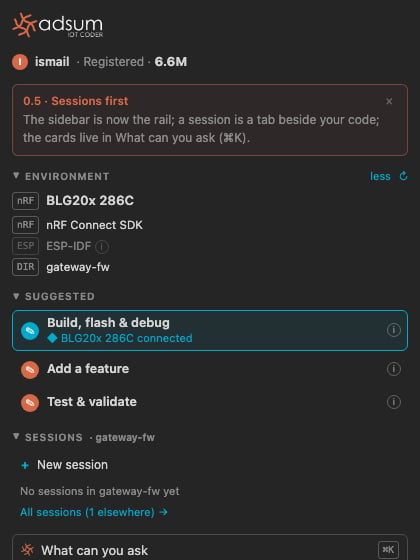 ## The rail, top to bottom
| Block | What it shows | What it does |
| :- | :- | :- |
| **You** | Your account word (Free, Registered or Licensed), the model in use, tokens left on the free tier | Sign in, open Settings, change the provider |
| **What's new** | One line on what changed in this version | Dismiss it once, here or in a tab |
| **Environment** | The units and boards by name, the toolchains with their versions, the folder | Re-probe, open the Hardware page with the firmware versions |
| **Suggested** | Up to three next actions, only when something on the desk or in the folder calls for them | A click opens a session tab with the prompt already written |
| **Sessions** | The recent sessions in this folder, then the count elsewhere, then **All sessions** | A row opens its tab; **+** opens a new one |
| **What can you ask** | The palette: every run, journey, check and sample, the relevant ones first | ⌘K or Ctrl+K from anywhere in the rail |
A suggestion names its reason, and only when the reason is real: a board that was detected, a project that was read. The highlighted control is the next action. Grey ones are for later, never wrong.
## A session is a tab
A session opens beside your code, like a file. Its tab carries the ◆ mark and the session's title. You can open several, split them, drag one to the other side, and close them; closing a tab keeps the session in the rail, and a tab closed while the agent was working or waiting on you offers to reopen.
The composer is the same in every tab: type and press Enter, drop an image, `/` for a slash command, `@` to mention a file or the unit on the desk. The foot line names the folder and how much of the context is in use, and carries **Something else · ⌘K** so the palette is one key away from any session.
## Where the cards went
Everything the cards did is in the palette, grouped by what it is: **Runs** (prefill a prompt), **Journeys** (the multi-step walks, with their step count), **Checks** (CRA readiness, posture) and **Samples** (pre-canned, about a minute, fire on one click). The rail's Suggested block lifts the relevant ones to the top; the palette holds all of them. The first time you open 0.5 a one-line notice says so; dismiss it and it stays dismissed.
With no session yet in a folder, a new tab shows the three most useful rows inside the empty session, so the first minute still starts with one click.
## The status bar
The ◆ Adsum item on the status bar names the one thing to look at: a session waiting on your answer first, otherwise the unit on the desk, then the tokens left. Its tooltip lists both platforms, every unit and who holds its port, and the open sessions. Click it to focus the rail or the active session.
## One bench, several sessions
Two sessions never fight over a port or a probe. A session that uses a serial port or a programmer claims it for as long as its task runs; another session that reaches for the same one is told which session holds it, and the Environment block shows the holder.
This documentation is built and hosted on [Mintlify](https://mintlify.com), a developer documentation platform.
## The rail, top to bottom
| Block | What it shows | What it does |
| :- | :- | :- |
| **You** | Your account word (Free, Registered or Licensed), the model in use, tokens left on the free tier | Sign in, open Settings, change the provider |
| **What's new** | One line on what changed in this version | Dismiss it once, here or in a tab |
| **Environment** | The units and boards by name, the toolchains with their versions, the folder | Re-probe, open the Hardware page with the firmware versions |
| **Suggested** | Up to three next actions, only when something on the desk or in the folder calls for them | A click opens a session tab with the prompt already written |
| **Sessions** | The recent sessions in this folder, then the count elsewhere, then **All sessions** | A row opens its tab; **+** opens a new one |
| **What can you ask** | The palette: every run, journey, check and sample, the relevant ones first | ⌘K or Ctrl+K from anywhere in the rail |
A suggestion names its reason, and only when the reason is real: a board that was detected, a project that was read. The highlighted control is the next action. Grey ones are for later, never wrong.
## A session is a tab
A session opens beside your code, like a file. Its tab carries the ◆ mark and the session's title. You can open several, split them, drag one to the other side, and close them; closing a tab keeps the session in the rail, and a tab closed while the agent was working or waiting on you offers to reopen.
The composer is the same in every tab: type and press Enter, drop an image, `/` for a slash command, `@` to mention a file or the unit on the desk. The foot line names the folder and how much of the context is in use, and carries **Something else · ⌘K** so the palette is one key away from any session.
## Where the cards went
Everything the cards did is in the palette, grouped by what it is: **Runs** (prefill a prompt), **Journeys** (the multi-step walks, with their step count), **Checks** (CRA readiness, posture) and **Samples** (pre-canned, about a minute, fire on one click). The rail's Suggested block lifts the relevant ones to the top; the palette holds all of them. The first time you open 0.5 a one-line notice says so; dismiss it and it stays dismissed.
With no session yet in a folder, a new tab shows the three most useful rows inside the empty session, so the first minute still starts with one click.
## The status bar
The ◆ Adsum item on the status bar names the one thing to look at: a session waiting on your answer first, otherwise the unit on the desk, then the tokens left. Its tooltip lists both platforms, every unit and who holds its port, and the open sessions. Click it to focus the rail or the active session.
## One bench, several sessions
Two sessions never fight over a port or a probe. A session that uses a serial port or a programmer claims it for as long as its task runs; another session that reaches for the same one is told which session holds it, and the Environment block shows the holder.
This documentation is built and hosted on [Mintlify](https://mintlify.com), a developer documentation platform.