> ## Documentation Index
> Fetch the complete documentation index at: https://docs.adsumnetworks.com/llms.txt
> Use this file to discover all available pages before exploring further.
# Models
> Use the free tier, or bring any OpenAI-compatible model. Recommended models and exact settings.
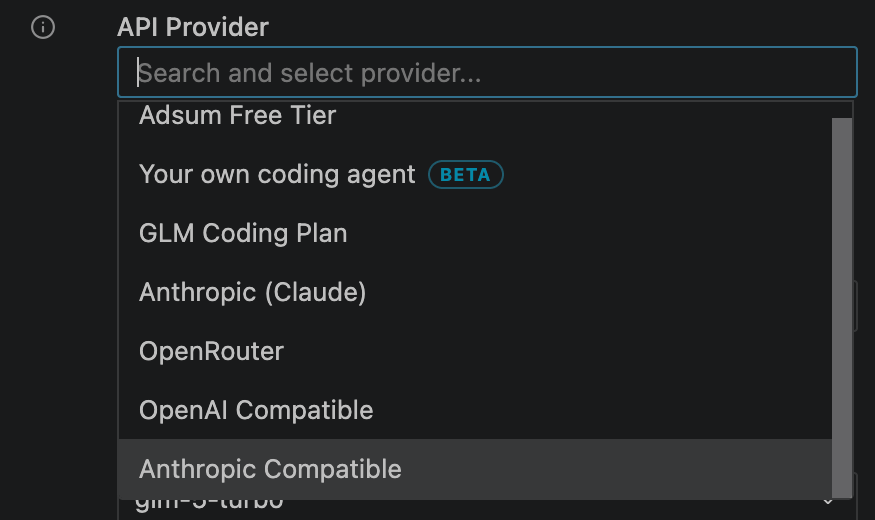
The [free tier](/free-tier) runs on a managed model and is on by default. When you want a specific model or heavier usage, bring your own: Adsum ships a curated provider picker, the free tier, the GLM Coding Plan, Claude, DeepSeek V4, and any OpenAI or Anthropic-compatible endpoint, cloud or local.
 The model must have strong native **tool-calling** (function-calling). Models without it cannot execute hardware actions or debug workflows.
## Recommended models
| Model | Best for | Notes |
| :----------------------------- | :--------------------------- | :---------------------------------------------------------------------------------------------------------------------------------------------------------- |
| **Claude Sonnet 5** | The strongest results | The default in the picker. Best reasoning and tool use for hard, multi-step firmware work. |
| **Claude Haiku 4.5** | Speed and cost | The model our [benchmark](/benchmark) ran on. Fast and inexpensive for everyday loops. |
| **GLM Coding Plan** | Cost-effective, long context | A flat z.ai subscription: `glm-5.2` (1M context), plus `glm-5-turbo` and `glm-4.7`. Tool-calling optimized. |
| **DeepSeek V4** (flash / pro) | Cost-sensitive long sessions | Large context for long debug loops at a low price per token. Via [OpenRouter](https://openrouter.ai) or the [DeepSeek API](https://api-docs.deepseek.com/). |
| **Local** (Ollama / LM Studio) | Everything on your machine | Keeps code and logs on your machine. Needs strong native tool-calling. |
The model must have strong native **tool-calling** (function-calling). Models without it cannot execute hardware actions or debug workflows.
## Recommended models
| Model | Best for | Notes |
| :----------------------------- | :--------------------------- | :---------------------------------------------------------------------------------------------------------------------------------------------------------- |
| **Claude Sonnet 5** | The strongest results | The default in the picker. Best reasoning and tool use for hard, multi-step firmware work. |
| **Claude Haiku 4.5** | Speed and cost | The model our [benchmark](/benchmark) ran on. Fast and inexpensive for everyday loops. |
| **GLM Coding Plan** | Cost-effective, long context | A flat z.ai subscription: `glm-5.2` (1M context), plus `glm-5-turbo` and `glm-4.7`. Tool-calling optimized. |
| **DeepSeek V4** (flash / pro) | Cost-sensitive long sessions | Large context for long debug loops at a low price per token. Via [OpenRouter](https://openrouter.ai) or the [DeepSeek API](https://api-docs.deepseek.com/). |
| **Local** (Ollama / LM Studio) | Everything on your machine | Keeps code and logs on your machine. Needs strong native tool-calling. |
 ## Configure a provider
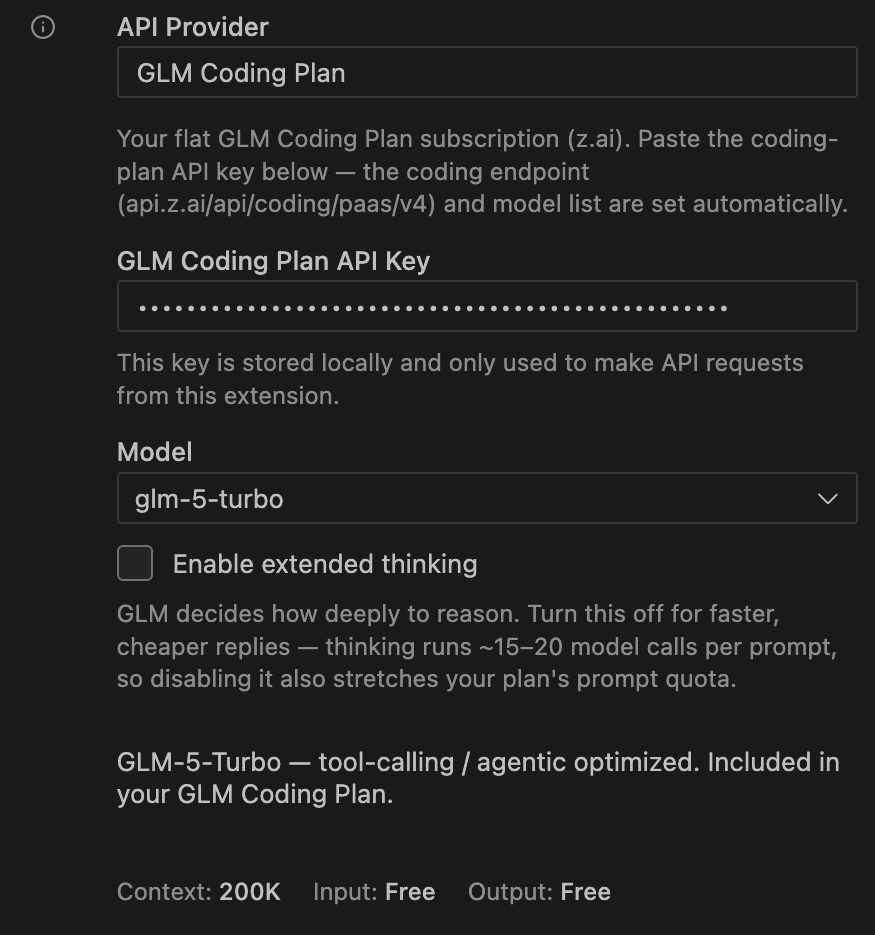
Open the Adsum settings, choose a provider, and add your key. Providers include the GLM Coding Plan, Anthropic (Claude), OpenRouter, OpenAI-Compatible, Anthropic-Compatible, and a local Ollama or LM Studio server.
**Recommended setup for Claude Haiku 4.5**, matching the [benchmark](/benchmark) configuration:
| Setting | Value |
| :------------------------ | :--------------------------------------------- |
| API provider | OpenRouter (or any OpenAI-compatible endpoint) |
| Model | `anthropic/claude-haiku-4.5` |
| Enable thinking | Off |
| Prompt caching (Advanced) | On |
## Provider quick setup
The endpoint URL is the only provider-specific part. Use these as the API endpoint in the extension settings, then add your key.
Pick **GLM Coding Plan** as the provider and paste your z.ai coding-plan key. The coding endpoint and the model list (`glm-5.2`, `glm-5-turbo`, `glm-4.7`) are set for you.
Endpoint: `https://openrouter.ai/api/v1`. One key reaches Claude, DeepSeek, GLM, and more. Set the model to the provider-prefixed id, for example `anthropic/claude-haiku-4.5`.
Endpoint: `https://api.deepseek.com`. Use a DeepSeek key directly for cost-sensitive long sessions.
Run a model on your own machine and point Adsum at it: Ollama is `http://localhost:11434/v1`, LM Studio is `http://localhost:1234/v1`. The model still needs strong tool-calling to drive hardware workflows.
Point Adsum at any endpoint that speaks the Anthropic wire format: pick **Anthropic-Compatible**, set the base URL and model id, and add your key.
## Configure a provider
Open the Adsum settings, choose a provider, and add your key. Providers include the GLM Coding Plan, Anthropic (Claude), OpenRouter, OpenAI-Compatible, Anthropic-Compatible, and a local Ollama or LM Studio server.
**Recommended setup for Claude Haiku 4.5**, matching the [benchmark](/benchmark) configuration:
| Setting | Value |
| :------------------------ | :--------------------------------------------- |
| API provider | OpenRouter (or any OpenAI-compatible endpoint) |
| Model | `anthropic/claude-haiku-4.5` |
| Enable thinking | Off |
| Prompt caching (Advanced) | On |
## Provider quick setup
The endpoint URL is the only provider-specific part. Use these as the API endpoint in the extension settings, then add your key.
Pick **GLM Coding Plan** as the provider and paste your z.ai coding-plan key. The coding endpoint and the model list (`glm-5.2`, `glm-5-turbo`, `glm-4.7`) are set for you.
Endpoint: `https://openrouter.ai/api/v1`. One key reaches Claude, DeepSeek, GLM, and more. Set the model to the provider-prefixed id, for example `anthropic/claude-haiku-4.5`.
Endpoint: `https://api.deepseek.com`. Use a DeepSeek key directly for cost-sensitive long sessions.
Run a model on your own machine and point Adsum at it: Ollama is `http://localhost:11434/v1`, LM Studio is `http://localhost:1234/v1`. The model still needs strong tool-calling to drive hardware workflows.
Point Adsum at any endpoint that speaks the Anthropic wire format: pick **Anthropic-Compatible**, set the base URL and model id, and add your key.